
TradeCraft - Player Market & Server Economy
Simple player economy with Micro currency and markets
Screenshots
About this Mod
TradeCraft - Player Market & Server Economy 💰
If you're looking for a simple, lightweight, and practical economy system for your Minecraft server, TradeCraft is built exactly for that.
TradeCraft introduces a small but powerful currency called Micro, designed to make trading between players smooth and natural without relying on complicated commands or oversized economy plugins.
When a player joins the server for the first time, they automatically receive 500 Micro as a starting balance. This currency becomes the core of the server’s economy and can be used for trading, payments, and player-run markets.
One of the best parts is that your money never disappears when you die. No matter what happens in the world, your Micro balance stays safe. The goal of this mod is to encourage trading and player interaction, not punish mistakes.
💳 Simple Currency System
Your Micro balance is always visible on the HUD, displayed clearly near the hotbar so you can easily keep track of your money while playing.
No constant commands.
No menus to dig through.
Just a clean and simple display that keeps the economy part of the game without getting in the way.
🤝 Player-to-Player Trading
Trading with other players is quick and straightforward.
Simply look at another player and press the "I" key, and they will receive a trade request directly in chat.
They can choose:
✔ Accept
✖ Decline
If they accept, a small trading interface opens where players can transfer Micro between each other.
There are no item trades in this system — it's purely a currency transfer to keep everything clear and prevent trade scams.
Fast, simple, and perfect for quick payments.
📦 Market Chest – Player Shops
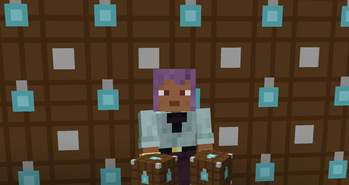
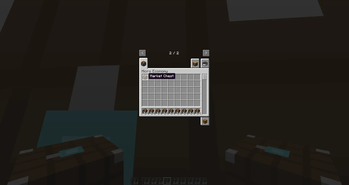
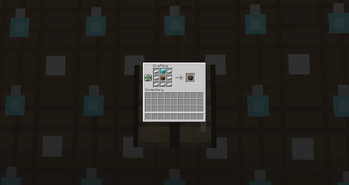
The biggest feature of TradeCraft is the Market Chest.
This special chest-like block allows players to create their own automatic shops directly in the world.
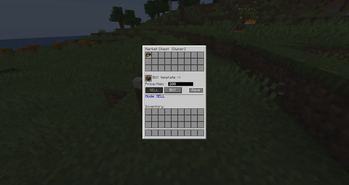
Players can configure the chest to sell items to others or buy items from other players.
🛒 Sell Mode
In Sell Mode, you place items in the Market Chest and set a price.
Example:
5 Diamonds
Price: 100 Micro
When another player purchases the item:
• The item is removed from the chest
• The buyer receives the item
• The seller receives the Micro payment
Even if the seller is offline, the money will still be delivered automatically.
This allows players to run shops that work 24/7.
📥 Buy Orders
Players can also create buy requests.
Example:
Buying: 10 Iron
Reward: 50 Micro
If another player sells the requested item:
• The item is removed from the seller's inventory
• The seller receives the Micro payment
• The shop owner receives the item
For safety and inventory handling, the shop owner must be online to receive items from buy orders.
🔒 Shop Protection
Every Market Chest belongs to its owner.
Other players cannot:
- Change its settings
- Steal items from it
- Break it
Your shop stays completely secure.
⚡ Lightweight & Server Friendly
TradeCraft was designed with performance in mind.
It avoids complex systems and focuses only on the features that matter most for multiplayer servers:
• Player currency
• Safe trading
• Player-run shops
No unnecessary mechanics.
No heavy systems.
Just a clean and efficient economy system that fits naturally into Minecraft gameplay.
🌍 Perfect For Multiplayer Servers
TradeCraft is ideal for servers that want:
• A simple economy
• Player markets
• Easy money transfers
• A natural trading experience
Whether you're running a small survival server with friends or building a larger community, TradeCraft gives players the tools they need to create their own economy.
And the best part?
It all stays simple, lightweight, and fun.
Available Versions
How to Install TradeCraft - Player Market & Server Economy on Your Server
Order Server
Order a Minecraft Java server with at least 3 GB RAM (4 GB recommended).
Set neoforge Loader
In the panel under "Egg", select the neoforge loader and matching Minecraft version (1.21.11).
Install Mod
Open the mod browser in the dashboard and search for "TradeCraft - Player Market & Server Economy". Click "Install" – done! Alternatively, upload the .jar via SFTP to the /mods folder.
Compatibility
Mod Loaders
Minecraft Versions
1.21.11, 1.21.10, 1.21.9 (+4 more)
Server-side
✓ RequiredRecommended RAM
4 GB(min. 3 GB)Frequently Asked Questions
TradeCraft - Player Market & Server Economy server crashes on startup – what to do?
Most common cause: wrong neoforge version or insufficient RAM. Check the server log (latest.log) for "OutOfMemoryError" or "Mixin" errors. With Mado Hosting: ensure at least 3 GB RAM is allocated and the loader matches the mod version (1.21.11). You can switch loaders with one click in the panel.
Is TradeCraft - Player Market & Server Economy compatible with neoforge?
TradeCraft - Player Market & Server Economy officially supports neoforge for Minecraft 1.21.11, 1.21.10, 1.21.9. The Mado dashboard automatically detects incompatible loader combinations.
Server lagging with TradeCraft - Player Market & Server Economy – how to optimize performance?
Recommended RAM: 4 GB (per 8 players). Use /spark profiler to check if TradeCraft - Player Market & Server Economy consumes the most tick time. Common fixes: reduce server view-distance to 8-10, install "performant" or "starlight" as supplementary mods on Forge. With Mado Hosting, your server runs on NVMe SSDs with dedicated CPU cores for minimal latency.
Similar Mods




![CobbleDollars [Cobblemon Addon]](https://cdn.modrinth.com/data/s7N7AsqL/684040a264fc1d7f9b856ec5d2da39767398c7ad.png)
Rent Modded Server
Install TradeCraft - Player Market & Server Economy with just one click on your server.