
TradeTracker
That automatically tracks and analyzes all Villager and Wandering Trader trades, calculating emerald profit/loss in real-time with a detailed trade history and HUD overlay.
Screenshots
About this Mod
TradeTracker
Track every trade. Know every profit. Master the emerald economy!
This client-side Fabric mod automatically tracks and analyzes all your Villager and Wandering Trader trades, calculating emerald profit and loss in real-time with a detailed history and HUD overlay.
Features
Trade Tracking
- Automatic detection - Every trade with Villagers and Wandering Traders is recorded instantly
- Emerald calculation - Real-time profit/loss per trade using 100+ item value mappings
- Session management - Start, pause, and resume tracking sessions with a single keybind
- Session persistence - Optionally save sessions across world closes
HUD Overlay
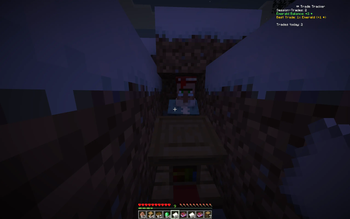
- Full mode - Detailed stats: total trades, balance, best/worst trades, daily count
- Compact mode - Clean one-line summary with balance and trade count
- Flash effects - Gold flash for big profits, red flash for losses
- Customizable - Position, opacity, scale, and visibility all adjustable
Trade History
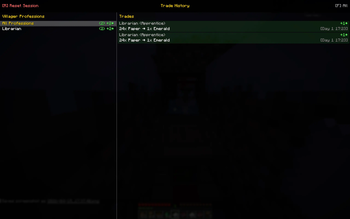
- History screen - Browse all recorded trades with a dedicated GUI
- Profession filter - Filter trades by villager profession with trade counts
- Smart filters - View all, profit only, loss only, or last 10 trades
- Color-coded - Green for profit, red for loss, gray for neutral trades
Player-Friendly
- In-game config - Full YACL config screen via ModMenu
- Keybinds - Dedicated "TradeTracker" category in controls
- Localization - English and German language support
- Client-side only - No server installation required
Customization
Configure everything in-game via ModMenu:
General
- Toggle mod on/off
- Enable/disable Wandering Trader tracking
- Session persistence on/off
HUD
- Position: top-left, top-right, bottom-left, bottom-right
- Opacity: 0-100%
- Scale: 50-150%
- Visibility: always visible or only during trading
Keybinds (Controls > TradeTracker)
T- Toggle compact HUD modeG- Open trade history screenJ- Start/pause/resume sessionR- Reset session (in history screen)F- Cycle filters (in history screen)
Requirements
- Minecraft: 26.1+
- Fabric Loader: 0.18.4 or higher
- Fabric API: Required
- Java: 25 or higher
- ModMenu + YACL: Required (for in-game config screen)
Perfect For
- Traders - Maximize your emerald profits with data-driven insights
- Builders - Track how much you spend on building materials from villagers
- Survival Players - Keep an eye on your trading economy across sessions
- Everyone - Anyone who trades with villagers in Minecraft!
Links
- Issues & Bugs: GitHub Issues
- Source Code: GitHub Repository
License
This mod is open-source and licensed under the MIT License.
Made with love by DennisTheGamer
Available Versions
How to Install TradeTracker on Your Server
Order Server
Order a Minecraft Java server with at least 3 GB RAM (4 GB recommended).
Set fabric Loader
In the panel under "Egg", select the fabric loader and matching Minecraft version (26.2).
Install Mod
Open the mod browser in the dashboard and search for "TradeTracker". Click "Install" – done! Alternatively, upload the .jar via SFTP to the /mods folder.
Compatibility
Mod Loaders
Minecraft Versions
26.2, 26.1.2, 26.1.1 (+1 more)
Server-side
✗ UnsupportedRecommended RAM
4 GB(min. 3 GB)Frequently Asked Questions
TradeTracker server crashes on startup – what to do?
Most common cause: wrong fabric version or insufficient RAM. Check the server log (latest.log) for "OutOfMemoryError" or "Mixin" errors. With Mado Hosting: ensure at least 3 GB RAM is allocated and the loader matches the mod version (26.2). You can switch loaders with one click in the panel.
Is TradeTracker compatible with fabric?
TradeTracker officially supports fabric for Minecraft 26.2, 26.1.2, 26.1.1. The Mado dashboard automatically detects incompatible loader combinations.
Server lagging with TradeTracker – how to optimize performance?
Recommended RAM: 4 GB (per 8 players). Use /spark profiler to check if TradeTracker consumes the most tick time. Common fixes: reduce server view-distance to 8-10, install "performant" or "starlight" as supplementary mods on Forge. With Mado Hosting, your server runs on NVMe SSDs with dedicated CPU cores for minimal latency.
Similar Mods






Rent Modded Server
Install TradeTracker with just one click on your server.