
Translate_AllinOne(fork)
A powerful Minecraft server content AI translation mod, allowing you to easily enjoy international servers!一个强大的 Minecraft 服务器内容AI翻译模组,让您轻松畅玩国际服务器!
Screenshots


About this Mod
Translate All in One
Preview Notice
- Current target version: Minecraft 1.21.11
- Platform: Fabric (Client-side)
- Java: 21+
- This project is actively evolving. Feedback and bug reports are welcome in Issues.
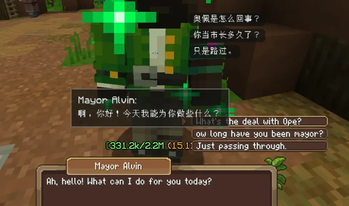
An in-game AI translation mod for Minecraft that supports chat, chat input, item tooltip, scoreboard, WynnCraft NPC dialogue, and a dedicated WynnCraft category for related integrations with multi-provider routing, editable local dictionaries, an AI chat-input assistant panel, automatic cache backup, and a fully in-game configuration workflow.
What It Can Do Right Now
Translation modules
| Module | What it does | Highlights |
|---|---|---|
| Chat Output | Translates incoming chat lines | Auto mode or manual [T] click mode, optional streaming display |
| Chat Input | Translates your text before send | Hotkey-driven translation plus AI rewrite actions (Translate/Professional/Friendly/Expand/Concise/Restore), optional streaming update |
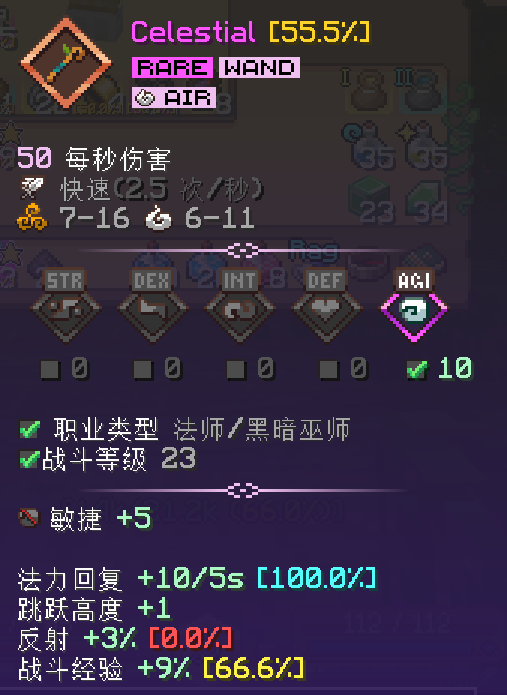
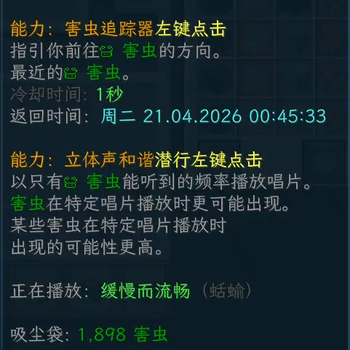
| Item Tooltip | Translates item custom name and lore | Template/style-preserving pipeline, async cache queue, refresh-cache |
| Scoreboard Sidebar | Translates prefix/suffix and player name display | Real-time replacement with style-preserving reconstruction |
| Dictionary config | Exposes a dedicated in-game dictionary section, per-slot toggles, and file selectors | Supports a master switch, independent toggles for item/skill, dialogue, and quest dictionaries, mixed multi/single file selection, and direct open-directory access |
WynnCraft
| Feature | What it does | Highlights |
|---|---|---|
| Wynn item compatibility | Handles Wynn-specific tooltip compatibility flows | Reuses the mod's style-preserving tooltip pipeline, local wynncraft_skills.json dictionary support for fixed-format lines |
| Wynn NPC Dialogue | Translates WynnCraft NPC dialogue and clickable options from chat and overlay into a dedicated HUD | Local dictionary priority, cache + AI fallback, per-row options rendering with animation, in-game HUD editor |
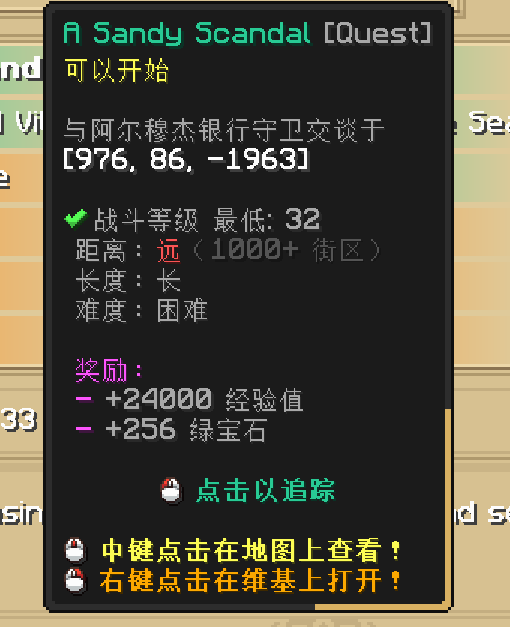
| Tracked quest support | Translates tracked quest title/type/description from WynnCraft-related UI integrations such as Wynntils ContentTracker |
Shared WynnCraft target language, refresh-cache, cache + AI fallback |
AI provider and routing system
- Multiple provider profiles in one config.
- Provider types:
OPENAI_COMPAT(/chat/completions)OPENAI_RESPONSE(/responses)OLLAMA(/api/chat)
- Per-route model selection for:
- Chat Output
- Chat Input
- Item Translation
- Scoreboard Translation
- Wynn NPC Dialogue
- WynnCraft tracked quest translation
- Chat Output/Input, Item, Scoreboard, and the WynnCraft have an independent Target Language field.
Model-level controls
- Model ID
- Temperature
- Ollama keep_alive (for Ollama profiles)
- Supports system message toggle
- Inject system prompt into user message toggle (used when system-message mode is disabled)
- Structured output toggle with compatibility fallback
- Prompt suffix
- Custom parameters (JSON tree editor)
- Set as default model
Runtime behavior and reliability
- Translation pipeline preserves style markers/placeholders/tokens as much as possible.
- Item, scoreboard, Wynn NPC dialogue, and WynnCraft tracked-quest template caches persisted on disk with configurable automatic backups.
- Bundled WynnCraft dictionaries are installed to
config/translate_allinone/dictionary/at startup without overwriting existing edited files. - Supported WynnCraft flows prefer local dictionary hits first, then cache, then remote AI fallback.
Dictionary Configincludes a master switch and per-slot enable toggles; when enabled with a dictionary file selected, supported flows usedictionary -> cache -> remote AI. When no file is selected for a slot, that slot's dictionary lookup is skipped.Item / Skillsupports multi-select dictionary files that are loaded together on the shared item/skill local-dictionary path;DialogueandQuestkeep independent single-file selection.- Dedicated item-tooltip refresh hotkey can invalidate and rebuild the current tooltip cache immediately.
- WynnCraft tracked quest translation has its own refresh-cache hotkey that only invalidates the currently tracked quest keys.
- Retry queue prioritizes requeued failed items (front-of-queue retry).
- Batch translation with configurable batch size/thread count (item/scoreboard, plus a dedicated WynnCraft tracked-quest runtime route).
- Session-epoch guard prevents stale async callbacks from writing outdated results after world/session switches.
- Missing-key and key-mismatch detection triggers prioritized retries with clear in-game fallback/status behavior.
- Version-change safety backup stores existing config/cache files before upgrade-sensitive startup flows.
Command and update helpers
- Startup update check against the current GitHub repository releases (latest tag detection).
- In-game update notice in chat and config modal, with one-click open release page.
- Client command:
translate_allinone translatechatline <messageId>for manual chat-line retranslation (used by manual[T]workflows).
In-game config UI features
- Full ModMenu-based custom config screen.
- Structured sections with group boxes.
- Scroll + clipping + scrollbar drag support for long content.
- Provider/model operations inside game: add/remove providers, test connection, manage route models, set default model, edit custom JSON parameters.
- Closing the config screen with unsaved changes now opens a save/discard/cancel confirmation modal.
- Unified action flow:
- Done = save and close
- Cancel = leave the screen; if there are unsaved changes, you can save, discard, or return
- Reset (red button) = reset to defaults after confirmation
- Built-in hotkey capture in config UI (no legacy requirement to bind in Minecraft Controls for these module bindings), including separate refresh bindings for item-tooltip translation and WynnCraft tracked-quest translation.
- WynnCraft config includes NPC dialogue options, local-hit logging toggles, and an in-game HUD editor for dialogue scale/offset preview.
- Cache Backup section exposes backup interval/count, current cache stats for item / scoreboard / Wynn NPC dialogue / WynnCraft tracked quest, and one-click open cache directory.
- Config-side update notice modal supports opening the latest release page directly.
Installation
- Install Fabric Loader for Minecraft
1.21.11. - Put these jars into your
modsfolder:translate-all-in-one-*.jar- Fabric API
- ModMenu
- Launch the game and open ModMenu.
- Open Translate All in One config and set provider/model routes.
- If you use WynnCraft-related mods such as Wynntils, configure the
WynnCraftsection to enable NPC dialogue translation, tracked-quest translation, and HUD-related options. - In
Dictionary Config, leave the master switch enabled if you want supported flows to check local dictionary matches before cache/AI fallback. - After the first launch, optionally edit the local JSON files inside
config/translate_allinone/dictionary/to extend dictionary matches.
Quick Start
- Add at least one provider profile in
Providers. - Add models under the provider and set route models for each module you want to use.
- Set module target language.
- If needed, enable Wynn NPC dialogue and/or tracked-quest translation and adjust the dialogue HUD position/scale.
- In
Dictionary Config, keep the master switch on if you want supported flows to try local dictionary matches first. - Configure hotkeys/modes where needed, including refresh-cache hotkeys for item tooltip and WynnCraft tracked quests if you want manual cache invalidation.
- Click Done to save and close.
Config and Runtime Files
- Main config:
config/translate_allinone/translate_allinone.json- includes
dictionary.enabled, per-slot enable fields, and selected dictionary file fields for item/skill, dialogue, and quest routing
- Caches:
config/translate_allinone/item_translate_cache.jsonconfig/translate_allinone/scoreboard_translate_cache.jsonconfig/translate_allinone/wynncraft_dialogue_translate_cache.jsonconfig/translate_allinone/wynncraft_quest_translate_cache.json
- WynnCraft local dictionaries:
config/translate_allinone/dictionary/- typically includes files such as
items.jsonandREADME.txt
- Automatic cache backups (timestamped snapshot directories):
config/translate_allinone/translate_cache_backup/
- Version-change safety backups:
config/translate_allinone/translate_update_backup/
Available Versions
How to Install Translate_AllinOne(fork) on Your Server
Order Server
Order a Minecraft Java server with at least 3 GB RAM (4 GB recommended).
Set fabric Loader
In the panel under "Egg", select the fabric loader and matching Minecraft version (26.2).
Install Mod
Open the mod browser in the dashboard and search for "Translate_AllinOne(fork)". Click "Install" – done! Alternatively, upload the .jar via SFTP to the /mods folder.
Compatibility
Mod Loaders
Minecraft Versions
26.2, 26.1.2, 26.1.1 (+3 more)
Server-side
✗ UnsupportedRecommended RAM
4 GB(min. 3 GB)Frequently Asked Questions
Translate_AllinOne(fork) server crashes on startup – what to do?
Most common cause: wrong fabric version or insufficient RAM. Check the server log (latest.log) for "OutOfMemoryError" or "Mixin" errors. With Mado Hosting: ensure at least 3 GB RAM is allocated and the loader matches the mod version (26.2). You can switch loaders with one click in the panel.
Is Translate_AllinOne(fork) compatible with fabric?
Translate_AllinOne(fork) officially supports fabric for Minecraft 26.2, 26.1.2, 26.1.1. The Mado dashboard automatically detects incompatible loader combinations.
Server lagging with Translate_AllinOne(fork) – how to optimize performance?
Recommended RAM: 4 GB (per 8 players). Use /spark profiler to check if Translate_AllinOne(fork) consumes the most tick time. Common fixes: reduce server view-distance to 8-10, install "performant" or "starlight" as supplementary mods on Forge. With Mado Hosting, your server runs on NVMe SSDs with dedicated CPU cores for minimal latency.
Similar Mods






Rent Modded Server
Install Translate_AllinOne(fork) with just one click on your server.