
Trashventory
A server-side /trash bin: dumped items delete after a configurable delay (with a grab-back window). Works for vanilla clients. The optional client mod adds an inventory icon, a smooth settings GUI, a personal timer, and an auto-delete blacklist.
Screenshots
About this Mod
Trashventory
A personal /trash bin for your Fabric server. Drop items you do not want, close it, and after a short delay they are deleted forever - with a grab-back window if you change your mind.
The whole /trash feature is server-side, so it works for players on vanilla (unmodded) clients. Installing the mod on the client adds extras.
Features
/trash(alias/tr) opens your private bin - a normal chest GUI.- Items left inside are deleted after a configurable delay; reopen before it ends to take them back (the countdown pauses while open).
- Survives relogs and restarts: the countdown freezes while you are offline.
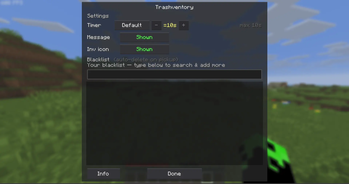
- Client extras (optional): a one-click inventory trash icon, a settings gear on the bin, a smooth flat settings GUI (also via ModMenu), a personal shorter-only timer, and an auto-delete blacklist (items vanish the instant they enter your inventory).
Player commands
/trash(or/tr) - open the bin/trash timer default|off|<seconds>/trash message on|off/trash blacklist add|remove|list|clear/trash settings
Admin commands (OP only)
/trash admin size single|double/trash admin timer <seconds>|off/trash admin message on|off/trash admin clientoverride on|off/trash admin clear <player>/trash admin reload
Requirements
Minecraft 26.1.2, Fabric Loader 0.19.2+, Fabric API. ModMenu optional.
Source: https://github.com/dev-limucc/trashventory - MIT - by dev-limucc
Available Versions
How to Install Trashventory on Your Server
Order Server
Order a Minecraft Java server with at least 3 GB RAM (4 GB recommended).
Set fabric Loader
In the panel under "Egg", select the fabric loader and matching Minecraft version (26.1.2).
Install Mod
Open the mod browser in the dashboard and search for "Trashventory". Click "Install" – done! Alternatively, upload the .jar via SFTP to the /mods folder.
Compatibility
Mod Loaders
Minecraft Versions
26.1.2
Server-side
✓ RequiredRecommended RAM
4 GB(min. 3 GB)Frequently Asked Questions
Trashventory server crashes on startup – what to do?
Most common cause: wrong fabric version or insufficient RAM. Check the server log (latest.log) for "OutOfMemoryError" or "Mixin" errors. With Mado Hosting: ensure at least 3 GB RAM is allocated and the loader matches the mod version (26.1.2). You can switch loaders with one click in the panel.
Is Trashventory compatible with fabric?
Trashventory officially supports fabric for Minecraft 26.1.2. The Mado dashboard automatically detects incompatible loader combinations.
Server lagging with Trashventory – how to optimize performance?
Recommended RAM: 4 GB (per 8 players). Use /spark profiler to check if Trashventory consumes the most tick time. Common fixes: reduce server view-distance to 8-10, install "performant" or "starlight" as supplementary mods on Forge. With Mado Hosting, your server runs on NVMe SSDs with dedicated CPU cores for minimal latency.
Similar Mods






Rent Modded Server
Install Trashventory with just one click on your server.