
Traveler's Chest
Part of the Traveler's Series; This mod helps server administrators create chests that refresh after a cooldown period has completed. This mod was designed for the GBTI Network SMP to help regulate adventure based POIs.
Screenshots
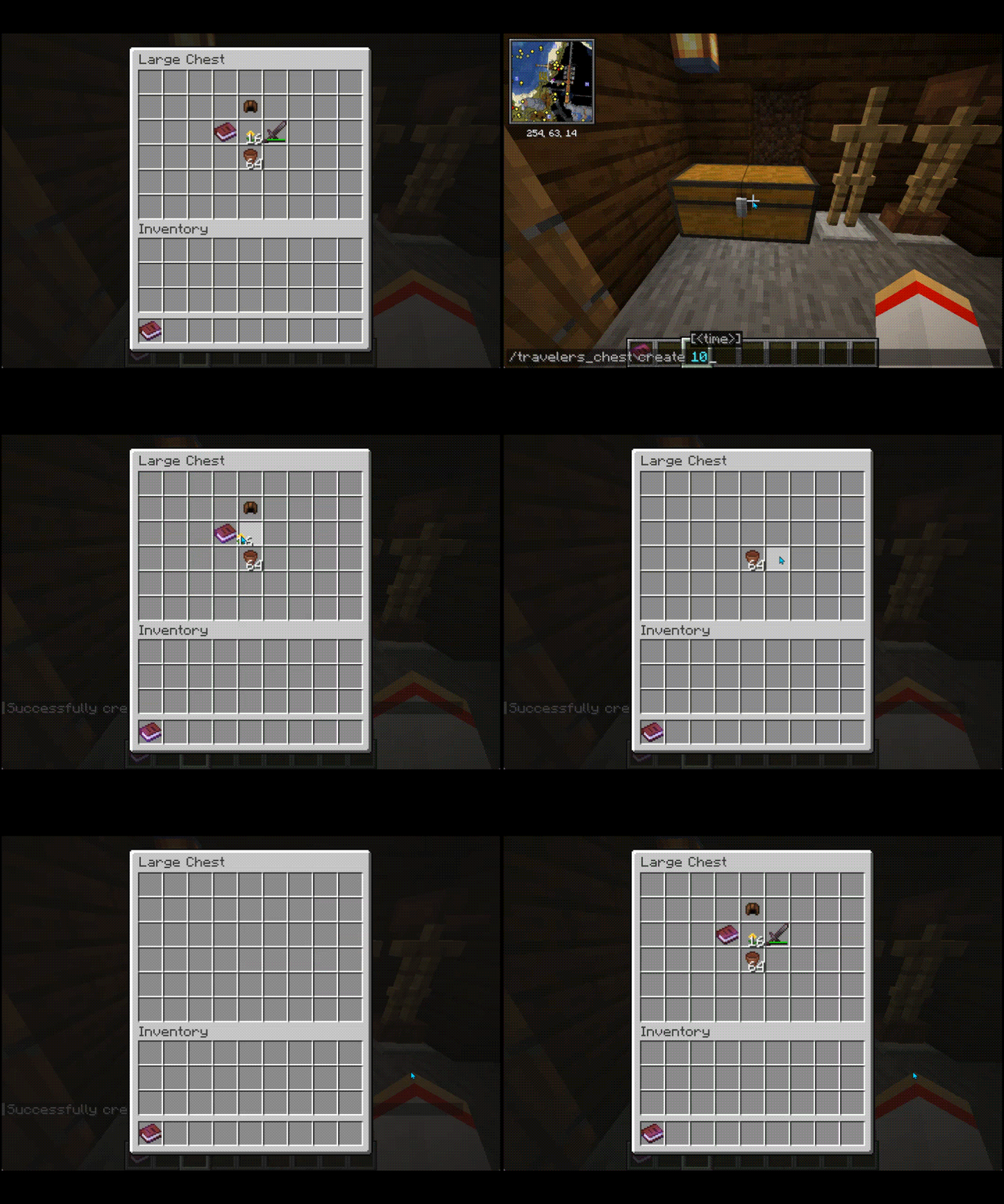
About this Mod
Traveler's Chest
A Minecraft mod that enables administrators to manage refillable chests dynamically. Designed for multiplayer servers using Fabric for Minecraft 1.21.1, the mod provides control over chest content, cooldowns, and interactions.
Features
- Refillable chests with customizable cooldowns
- Administrator tools for creating, editing, and destroying refillable chests
- Protected chests to prevent unauthorized modifications or destruction
Installation
- Install Fabric Loader and Fabric API.
- Download the latest version of Traveler's Chest from the releases page.
- Place the
.jarfile in your server'smodsfolder. - Start your server to generate configuration files.
Configuration
Config Files
config/travelers-chest/travelers_chest_config.txt- Example Contents:
debug_logging=false - Enables or disables debug logging for detailed troubleshooting.
- Example Contents:
config/travelers-chest/travelers_chests.json- Stores data about all managed chests, including their cooldowns, items, and positions.
Usage
Commands
Administrators can manage chests using commands:
Create a Traveler's Chest:
- Command:
/travelers_chest create [cooldown_in_seconds] - Default cooldown: 30 minutes (1800 seconds)
- Example:
/travelers_chest create 600creates a chest with a 10-minute cooldown.
- Command:
Edit a Traveler's Chest:
- Command:
/travelers_chest edit [new_cooldown_in_seconds] - Updates the cooldown of an existing chest.
- Example:
/travelers_chest edit 1200sets the cooldown to 20 minutes.
- Command:
Destroy a Traveler's Chest:
- Command:
/travelers_chest destroy - Removes a Traveler's Chest and its data.
- Command:
Chest Functionality
- Protected Chests: Players without sufficient permissions cannot break or modify these chests.
- Refill Mechanism: Automatically replenishes chest contents based on saved configurations after the cooldown period expires.
- Double Chest Support: Handles single and double chests seamlessly.
Debug Logging
Enable debug logging in travelers_chest_config.txt for detailed logs of mod operations, such as chest refills and command execution:
debug_logging=true
Logs are output to the server console.
JSON Structure
Chests are stored in travelers_chests.json with the following schema:
- lastRefreshed: Timestamp of the last refill
- chestCooldown: Cooldown in seconds
- worldKey: World identifier
- items: List of stored items
- itemPositions: Item slot positions
Example:
{
  "123456789": {
    "lastRefreshed": 12345678,
    "chestCooldown": 1800,
    "worldKey": "minecraft:overworld",
    "items": [{"nbt": "{id:\"minecraft:diamond\",Count:1b}"}],
    "itemPositions": [0]
  }
}
Support
To support the development of Traveler's Chest, please join the GBTI Network for access to:
- Exclusive tools and resources
- Development support
- Private Minecraft Server
Other Ways to Contribute
- Star the project on GitHub
- Report issues via the Issue Tracker
- Submit improvements via Pull Requests
License
This project is licensed under the GNU General Public License v3.0. See the LICENSE file for details.
Available Versions
How to Install Traveler's Chest on Your Server
Order Server
Order a Minecraft Java server with at least 3 GB RAM (4 GB recommended).
Set fabric Loader
In the panel under "Egg", select the fabric loader and matching Minecraft version (1.21.4).
Install Mod
Open the mod browser in the dashboard and search for "Traveler's Chest". Click "Install" – done! Alternatively, upload the .jar via SFTP to the /mods folder.
Compatibility
Mod Loaders
Minecraft Versions
1.21.4, 1.21.3, 1.21.2 (+1 more)
Server-side
✓ RequiredRecommended RAM
4 GB(min. 3 GB)Frequently Asked Questions
Traveler's Chest server crashes on startup – what to do?
Most common cause: wrong fabric version or insufficient RAM. Check the server log (latest.log) for "OutOfMemoryError" or "Mixin" errors. With Mado Hosting: ensure at least 3 GB RAM is allocated and the loader matches the mod version (1.21.4). You can switch loaders with one click in the panel.
Is Traveler's Chest compatible with fabric?
Traveler's Chest officially supports fabric for Minecraft 1.21.4, 1.21.3, 1.21.2. The Mado dashboard automatically detects incompatible loader combinations.
Server lagging with Traveler's Chest – how to optimize performance?
Recommended RAM: 4 GB (per 8 players). Use /spark profiler to check if Traveler's Chest consumes the most tick time. Common fixes: reduce server view-distance to 8-10, install "performant" or "starlight" as supplementary mods on Forge. With Mado Hosting, your server runs on NVMe SSDs with dedicated CPU cores for minimal latency.
Similar Mods




Rent Modded Server
Install Traveler's Chest with just one click on your server.