
Travis's Mod
A mod that adds more armor sets and biomes!
Screenshots
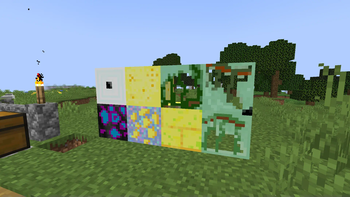
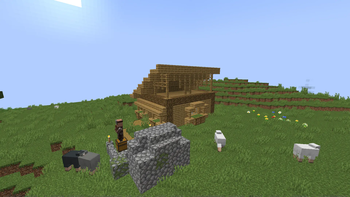
About this Mod
Travis's Mod is an ambitious expansion mod that significantly enhances the world of Minecraft. It introduces a plethora of new content, dramatically increasing the game's depth and replayability. The mod's key features include:
Expanded Ore Generation:
Expect to discover many new ores, each with its unique properties and uses, leading to new crafting possibilities and challenges.
Diverse Item Additions:
A wide range of new items are added, providing players with more tools, weapons, armor, and decorative blocks to customize their worlds.
New Biomes:
Explore a variety of unique biomes, each with its own distinct terrain, flora, and fauna. These biomes will offer exciting new environments to traverse and resources to gather.
Additional Dimensions:
Venture into new dimensions, offering entirely new landscapes, creatures, and challenges.These dimensions will add hours of exploration and adventure to your gameplay.
Additional Structures:
Find some brand new structures within Travis's Mod that endures more exploration!
Overall
Travis's Mod offers a substantial and engaging experience for players seeking to expand their Minecraft adventures with new content and challenges. The sheer volume of additions ensures countless hours of exploration and gameplay. The mod's focus on expanding existing mechanics rather than replacing them makes it a seamless addition to the base game.
Available Versions
How to Install Travis's Mod on Your Server
Order Server
Order a Minecraft Java server with at least 3 GB RAM (4 GB recommended).
Set forge Loader
In the panel under "Egg", select the forge loader and matching Minecraft version (1.20.1).
Install Mod
Open the mod browser in the dashboard and search for "Travis's Mod". Click "Install" – done! Alternatively, upload the .jar via SFTP to the /mods folder.
Compatibility
Mod Loaders
Minecraft Versions
1.20.1
Server-side
✓ RequiredRecommended RAM
4 GB(min. 3 GB)Frequently Asked Questions
Travis's Mod server crashes on startup – what to do?
Most common cause: wrong forge version or insufficient RAM. Check the server log (latest.log) for "OutOfMemoryError" or "Mixin" errors. With Mado Hosting: ensure at least 3 GB RAM is allocated and the loader matches the mod version (1.20.1). You can switch loaders with one click in the panel.
Is Travis's Mod compatible with forge?
Travis's Mod officially supports forge for Minecraft 1.20.1. The Mado dashboard automatically detects incompatible loader combinations.
Server lagging with Travis's Mod – how to optimize performance?
Recommended RAM: 4 GB (per 8 players). Use /spark profiler to check if Travis's Mod consumes the most tick time. Common fixes: reduce server view-distance to 8-10, install "performant" or "starlight" as supplementary mods on Forge. With Mado Hosting, your server runs on NVMe SSDs with dedicated CPU cores for minimal latency.
Similar Mods




Rent Modded Server
Install Travis's Mod with just one click on your server.