Triple Inventory
Gives you a bigger inventory, access shulker boxes and ender chests from the inventory, and more
Screenshots
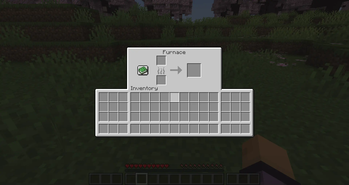
About this Mod
Triple Inventory
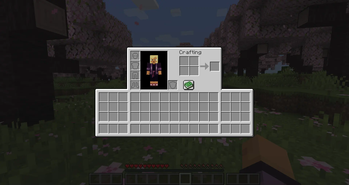
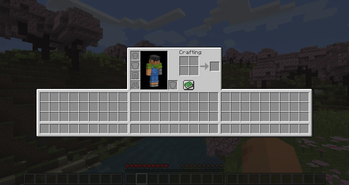
Triple Inventory aims to solve the serious inventory space issues in Minecraft by simply giving you a bigger inventory, along with some quality of life changes.
This mod can add up to 72 new inventory slots, including 18 new hotbar slots - these slots are also accessible in containers.
You can access shulker boxes and ender chests from your inventory by right clicking them - including adding and taking items.
There are also options to automatically switch to the best tool in your hotbar when using an item.
Change the number of available slots with the extendedInventorySize gamerule. This determines how many new inventory columns to add either side of the main inventory. (default 3, max 9, set to 0 to disable extended inventory).
Configuration
Config can be edited using Mod Menu or in tripleinventory.json
showExtendedHotbar: Show the extended hotbar on the HUD (default true)
scrollToExtendedHotbar: Access the extended hotbar using the scroll wheel (default true)
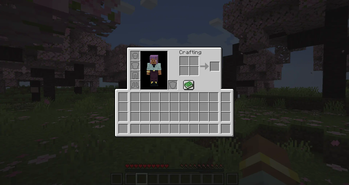
showExtendedInventoryWithRecipeBook: Show the extended inventory when the recipe book is open (default true)
autoSelectTools: Automatically select the best tool in the hotbar when mining (default false)
showPreviousSelectedSlotIndicator: Show an indicator on your previously selected slot after automatically selecting a tool (default true)
autoReturnOnUse: Automatically return to the last manually selected slot when using an item (default false)
autoReturnAfterCooldown: Automatically return to the last manually selected slot after a cooldown (default false)
autoReturnCooldown: The number of ticks after which to return to the last selected slot (default 40)
colorShulkerBackground: Change the background colour of the shulker preview to match the shulker box colour (default true)
shulkerPosition: The position of the shulker preview (default BOTTOM, allowed values BOTTOM, TOP, LEFT_TOP, LEFT_BOTTOM, RIGHT_TOP, RIGHT_BOTTOM)
Hotkeys to switch to extended hotbar slots are available in the vanilla controls settings
Important Information
This mod requires Yet Another Config Lib (YACL). It is also recommended to use Mod Menu on the clientside to change settings.
Due to the nature of this mod, there is a small risk of duplication glitches or item loss. Report any issues on the issue tracker. You can post suggestions there too!
This mod is likely to be incompatible with other mods which modify the player's inventory or other vanilla inventories. The extended inventory will not appear in modded inventories. Feel free to report incompatibilities on the issue tracker, but they may not be possible to resolve.
Available Versions
How to Install Triple Inventory on Your Server
Order Server
Order a Minecraft Java server with at least 3 GB RAM (4 GB recommended).
Set fabric Loader
In the panel under "Egg", select the fabric loader and matching Minecraft version (1.21.8).
Install Mod
Open the mod browser in the dashboard and search for "Triple Inventory". Click "Install" – done! Alternatively, upload the .jar via SFTP to the /mods folder.
Compatibility
Mod Loaders
Minecraft Versions
1.21.8, 1.21.7, 1.21.6 (+3 more)
Server-side
✓ RequiredRecommended RAM
4 GB(min. 3 GB)Frequently Asked Questions
Triple Inventory server crashes on startup – what to do?
Most common cause: wrong fabric version or insufficient RAM. Check the server log (latest.log) for "OutOfMemoryError" or "Mixin" errors. With Mado Hosting: ensure at least 3 GB RAM is allocated and the loader matches the mod version (1.21.8). You can switch loaders with one click in the panel.
Is Triple Inventory compatible with fabric?
Triple Inventory officially supports fabric for Minecraft 1.21.8, 1.21.7, 1.21.6. The Mado dashboard automatically detects incompatible loader combinations.
Server lagging with Triple Inventory – how to optimize performance?
Recommended RAM: 4 GB (per 8 players). Use /spark profiler to check if Triple Inventory consumes the most tick time. Common fixes: reduce server view-distance to 8-10, install "performant" or "starlight" as supplementary mods on Forge. With Mado Hosting, your server runs on NVMe SSDs with dedicated CPU cores for minimal latency.
Similar Mods




![[TaCZ] Timeless and Classics Zero](https://cdn.modrinth.com/data/SzzJttH8/fd27766d2bb8390d284696b1dbd358f87e081439_96.webp)

Rent Modded Server
Install Triple Inventory with just one click on your server.