
Multi Tools
Adds a multitool that combines tools, swords, and bows.
About this Mod
Multi Tools

日本語の説明は下にあります。
This mod adds multiple multi-tools.
This Mod is an addon for TokorotenSlime, so you'll also need to download that as well.
Wooden, Stone, Copper, Iron, Golden, Diamond, and Netherite Multitools
Crafting
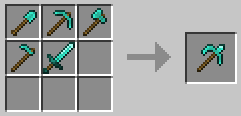
- Each type of shovel, pickaxe, axe, hoe, and sword is used to crafting.
Specifications
- When attacking an entity, it functions as a sword.
- When breaking blocks, the tool is treated as a shovel, pickaxe, axe, hoe, or sword depending on the block type.
- Right-click to use the shovel, axe, and hoe.
- Right-clicking while holding down the Shift key activates the hoe function.
- Enchantments can be applied to shovels, pickaxes, axes, hoes, and swords.
Notes
- Enchantments cannot be transferred when crafting.
- You cannot craft a Netherite Multitool from a Diamond Multitool.
Actually, everything up to this point is just a bonus feature.
Slime Tool
Crafting
- You can create it using any of the following recipes:
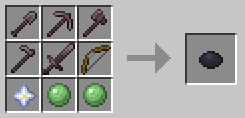
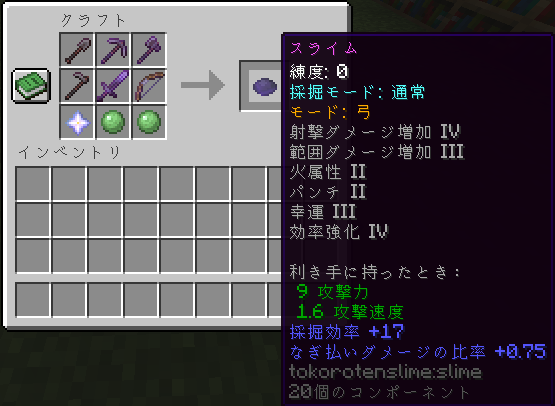
- Netherite Shovel, Pickaxe, Axe, Hoe, Sword, Bow, Nether Star, and 2 Slimeballs
- Netherite Multitool, Bow, Nether Star, and 2 Slimeballs

Specifications
- This item has no durability and consumes experience points when used.
- Using it increases "Proficiency":
- As proficiency increases, the probability of consuming experience points decreases.
- Maximum proficiency level 50,000, with experience point consumption reduced to 1/5 when used.
- Using
/slimecount, you can set the count to any value.
- This item cannot be used if your experience points are 0.
- Left-click functions the same as the multi-tools, but glass and wool are also recognized as suitable tools.
- The appearance of items changes depending on the blocks destroyed and the amount of experience points gained.
- This item has modes that can be switched using specific keys:
- Bow Mode: Right-click to perform the bow action (Arrows are not needed).
- Tool Mode: Right-clicking performs the same action as the multi-tools.
- If the item has the Luck or Silk Touch enchantment, you can swap them using the mode change key.
(Default: Luck Lv3, Silk Touch Lv1)
- Enchantments can be transferred during crafting.
- Enchantments compatible with multi-tools and bows can be applied.
- However, Durability, Repair, and Infinity enchantments cannot be applied.
- However, Durability, Repair, and Infinity enchantments cannot be applied.
- X key (default): Change Mining Mode (Luck or Silk Touch)
- X key (default) + Ctrl: Change Mode (Bow or Tool)
Notes
- The X key conflicts with the load hotbar activator, so one of them must be changed.

The English explanation is above.
このModは複数のマルチツールを追加します。
このModはTokorotenSlimeのアドオンであるため、そちらもダウンロードが必要です。
木、石、銅、鉄、金、ダイヤ、ネザライトのマルチツール
クラフト
- それぞれの種類のシャベル、ツルハシ、斧、クワ、剣をクラフトに使用します。
仕様
- エンティティを攻撃する際は剣として動作します。
- ブロックを破壊する際は、対応するブロックに応じてシャベル、ツルハシ、斧、クワ、剣として扱われます。
- 右クリックでシャベル、斧、クワの動作を行えます。
- Shiftキーを押しながら右クリックをすると、クワの動作になります。
- シャベル、ツルハシ、斧、クワ、剣に対応するエンチャントを付与可能です。
注意事項
- クラフトする際、エンチャントは引き継げません。
- ダイヤマルチツールから、ネザライトマルチツールをクラフトすることはできません。
実は、ここまではおまけ要素です。
スライムツール
クラフト
- 次のいずれかのレシピで作成できます。
- ネザライトのシャベル、ツルハシ、斧、クワ、剣、弓、ネザースター、スライムボール×2
- ネザライトのマルチツール、弓、ネザースター、スライムボール×2
仕様
- このアイテムには耐久値がなく、使用時に経験値を消費します。
- 使用することで「練度」が増加します。
- 練度が上がると、経験値の消費確率が減少します。
- 最大練度50,000で、使用時の経験値消費は1/5になります。
/slimecountでカウントを任意の値にできます。
- 経験値が0の場合、このアイテムは使用できません。
- 左クリックの動作はマルチツールと同じですが、ガラスや羊毛も適性ツールと判定されます。
- 壊すブロックや経験値量に応じて、アイテムの見た目が変化します。
- このアイテムにはモードがあり、特定のキーで切り替え可能です。
- 弓モード: 右クリックで弓の動作をします。矢は不要です。
- ツールモード: 右クリックでマルチツールと同じ動作をします。
- 幸運またはシルクタッチのエンチャントが付与されている場合、モード変更キーでスワップ可能です。
(デフォルトは幸運Lv3、シルクタッチLv1)
- クラフト時にエンチャントを引き継ぐことが可能です。
- マルチツールや弓に対応するエンチャントを付与可能です。
- ただし、耐久力、修繕、無限のエンチャントは付与できません。
- ただし、耐久力、修繕、無限のエンチャントは付与できません。
- Xキー(デフォルト): 採掘モード変更 (幸運 ↔ シルクタッチ)
- Xキー(デフォルト) + Ctrlキー: モード変更(弓 ↔ ツール)
注意事項
- Xキーはホットバーの読み込みと被っているため、どちらかの変更が必要です。
Available Versions
How to Install Multi Tools on Your Server
Order Server
Order a Minecraft Java server with at least 3 GB RAM (4 GB recommended).
Set fabric Loader
In the panel under "Egg", select the fabric loader and matching Minecraft version (26.2).
Install Mod
Open the mod browser in the dashboard and search for "Multi Tools". Click "Install" – done! Alternatively, upload the .jar via SFTP to the /mods folder.
Compatibility
Mod Loaders
Minecraft Versions
26.2, 26.1.2, 26.1.1 (+5 more)
Server-side
✓ RequiredRecommended RAM
4 GB(min. 3 GB)Frequently Asked Questions
Multi Tools server crashes on startup – what to do?
Most common cause: wrong fabric version or insufficient RAM. Check the server log (latest.log) for "OutOfMemoryError" or "Mixin" errors. With Mado Hosting: ensure at least 3 GB RAM is allocated and the loader matches the mod version (26.2). You can switch loaders with one click in the panel.
Is Multi Tools compatible with fabric and neoforge?
Multi Tools officially supports fabric, neoforge for Minecraft 26.2, 26.1.2, 26.1.1. The Mado dashboard automatically detects incompatible loader combinations.
Server lagging with Multi Tools – how to optimize performance?
Recommended RAM: 4 GB (per 8 players). Use /spark profiler to check if Multi Tools consumes the most tick time. Common fixes: reduce server view-distance to 8-10, install "performant" or "starlight" as supplementary mods on Forge. With Mado Hosting, your server runs on NVMe SSDs with dedicated CPU cores for minimal latency.
Similar Mods




![[TaCZ] Timeless and Classics Zero](https://cdn.modrinth.com/data/SzzJttH8/fd27766d2bb8390d284696b1dbd358f87e081439_96.webp)

Rent Modded Server
Install Multi Tools with just one click on your server.