
Tungsten
A precise, lightweight HUD overlay for tracking Minecraft stability.
Screenshots
About this Mod
Tungsten Benchmark
Tungsten is a comprehensive, precise, and passive observability and benchmarking tool for Minecraft (Fabric).
Unlike optimization mods that attempt to alter game logic, Tungsten focuses entirely on giving you accurate, real-time analytics to help you diagnose exactly why your game feels laggy. We strictly observe game state without modifying server packets, ticking, or engine loops, ensuring full compliance with both Modrinth guidelines and strict server rules.
What Does Tungsten Track?
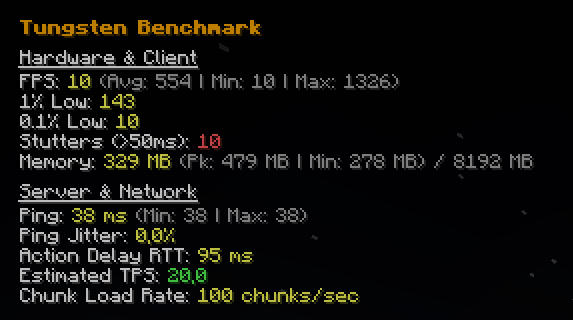
Tungsten provides a clean, smooth in-game HUD overlay (/tungsten toggle) alongside an active file-logging suite (/tungsten log start) that measures performance across three critical pillars: Hardware, Memory, and Network.
🎮 Frametime & Hardware Analytics
Relying on standard FPS numbers hides micro-stutters. Tungsten intercepts the core render loop to track precise microsecond delays between frames:
- Current, Average, Peak, and Minimum FPS
- 1% and 0.1% Lows: Identifies if your framerate is consistently dropping during intense moments.
- Stutter Detection: Accurately counts how many times your game drops below a playable 20fps equivalent (>50ms frame time).
🧠 JVM Memory Monitoring
Minecraft lag is frequently caused by Java Garbage Collection sweeps.
- Live Memory Footprint: Watch your real-time Used Memory vs Max Allocated Memory to instantly identify if GC spikes are the exact cause of your recorded frame drops.
🌐 Advanced Network & Server Metrics
Stop wondering if the lag is your PC, your internet, or the server hardware.
- Estimated Server TPS: By tracking the delta time between the server's dispatched
WorldTimeUpdatepackets, Tungsten accurately estimates if the host server itself is lagging behind 20.0 TPS. - Chunk Load Bandwidth: Tracks exactly how many chunks your client is downloading per second to help identify choked internet bandwidth.
- Ping & Ping Jitter: Passively evaluates your connection stability, tracking extreme ping variance and highest jitter percentages.
- Action Routing Delay (RTT): Hooks into packet confirmations to determine your physical input latency when breaking blocks or hitting entities.
Active Logging
Need to benchmark a new optimization mod or compare two shaderpacks?
Run /tungsten log start. Tungsten will silently begin graphing every extreme high, explicit low, standard deviation, and stutter that occurs while you play.
Run /tungsten log stop to automatically crunch the data and generate an exhaustive .txt report inside your tungsten-benchmarks/ directory, giving you permanent mathematical proof of how smooth your game truly was during that window.
Technical Transparency
Per Modrinth's Content Rules regarding performance data-blocked:
- No Optimization Claims: Tungsten is exclusively a read-only analytics dashboard. It does not contain game-altering engine tweaks to improve your gameplay.
- Data Gathering Mechanics: FPS and lows are calculated via a
MinecraftClient.rendermixin capturing trueSystem.nanoTime()deltas. Server TPS is mathematically derived client-side viaWorldTimeUpdateS2CPacketintervals. All data gathered is directly represented without arbitrary modifiers algorithms.
Available Versions
How to Install Tungsten on Your Server
Order Server
Order a Minecraft Java server with at least 3 GB RAM (4 GB recommended).
Set fabric Loader
In the panel under "Egg", select the fabric loader and matching Minecraft version (1.21.11).
Install Mod
Open the mod browser in the dashboard and search for "Tungsten". Click "Install" – done! Alternatively, upload the .jar via SFTP to the /mods folder.
Compatibility
Mod Loaders
Minecraft Versions
1.21.11
Server-side
✗ UnsupportedRecommended RAM
4 GB(min. 3 GB)Frequently Asked Questions
Tungsten server crashes on startup – what to do?
Most common cause: wrong fabric version or insufficient RAM. Check the server log (latest.log) for "OutOfMemoryError" or "Mixin" errors. With Mado Hosting: ensure at least 3 GB RAM is allocated and the loader matches the mod version (1.21.11). You can switch loaders with one click in the panel.
Is Tungsten compatible with fabric?
Tungsten officially supports fabric for Minecraft 1.21.11. The Mado dashboard automatically detects incompatible loader combinations.
Server lagging with Tungsten – how to optimize performance?
Recommended RAM: 4 GB (per 8 players). Use /spark profiler to check if Tungsten consumes the most tick time. Common fixes: reduce server view-distance to 8-10, install "performant" or "starlight" as supplementary mods on Forge. With Mado Hosting, your server runs on NVMe SSDs with dedicated CPU cores for minimal latency.
Similar Mods






Rent Modded Server
Install Tungsten with just one click on your server.