Turtle Client
A lightweight and customizable Minecraft Java client focused on utility, visuals, clean UI, and performance improvements. Turtle Client includes various built-in features and HUD modules designed to improve gameplay and customization.
Screenshots
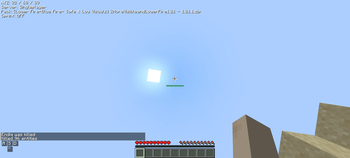
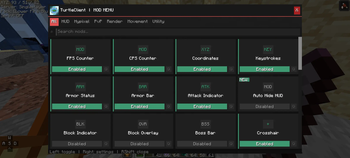
About this Mod
🐢 Turtle Client - A Minecraft Java Client
A lightweight and customizable Minecraft Java client focused on utility, visuals, clean UI, and performance improvements.
«Note: The name of this project was inspired by a Minecraft Bedrock client.»
Their licence: https://github.com/TurtleUtilityPack/turtle-client
✨ Features
Turtle Client includes various built-in features and HUD modules designed to improve gameplay and customization.
Included Features
- FPS Counter
- CPS Counter
- Coordinates HUD
- FullBright
- Freelook
- Combo Counter
- Clock
- Direction HUD
- Armor Status
- Attack Indicator
- Block Overlay
- Chat Improvements
- Discord RPC
- Custom Crosshair
- HUD Customization
- Perspective Toggle
- UI Customization
- Animation Tweaks
🤔 Why Turtle Client?
Turtle Client is designed for players who want:
- A clean and modern interface
- Useful built-in modules
- Lightweight gameplay enhancements
- Easy customization
- Better visual experience
The client focuses on simplicity while still providing useful features for everyday gameplay.
📥 Installation
💻 PC
- Download the TurtleClient-x.x.x.jar file
- Place the file inside your Minecraft mods folder
- Launch the game using Fabric Loader
📲 Android / Mobile Java Launchers
- Download the TurtleClient-x.x.x.jar file
- Place the file inside your mods folder
- Launch Minecraft using your preferred Java launcher
💥 Compatibility
✔️ Supported
- Fabric
❌ Not Supported
- Forge
- NeoForge
- Feather Client
- Lunar Client
- Some custom Minecraft clients may be incompatible
📋 Credits
- Endiq — Developer
Available Versions
How to Install Turtle Client on Your Server
Order Server
Order a Minecraft Java server with at least 3 GB RAM (4 GB recommended).
Set fabric Loader
In the panel under "Egg", select the fabric loader and matching Minecraft version (1.21.5).
Install Mod
Open the mod browser in the dashboard and search for "Turtle Client". Click "Install" – done! Alternatively, upload the .jar via SFTP to the /mods folder.
Compatibility
Mod Loaders
Minecraft Versions
1.21.5, 1.21.4, 1.21.3 (+3 more)
Server-side
✗ UnsupportedRecommended RAM
4 GB(min. 3 GB)Frequently Asked Questions
Turtle Client server crashes on startup – what to do?
Most common cause: wrong fabric version or insufficient RAM. Check the server log (latest.log) for "OutOfMemoryError" or "Mixin" errors. With Mado Hosting: ensure at least 3 GB RAM is allocated and the loader matches the mod version (1.21.5). You can switch loaders with one click in the panel.
Is Turtle Client compatible with fabric?
Turtle Client officially supports fabric for Minecraft 1.21.5, 1.21.4, 1.21.3. The Mado dashboard automatically detects incompatible loader combinations.
Server lagging with Turtle Client – how to optimize performance?
Recommended RAM: 4 GB (per 8 players). Use /spark profiler to check if Turtle Client consumes the most tick time. Common fixes: reduce server view-distance to 8-10, install "performant" or "starlight" as supplementary mods on Forge. With Mado Hosting, your server runs on NVMe SSDs with dedicated CPU cores for minimal latency.
Similar Mods






Rent Modded Server
Install Turtle Client with just one click on your server.