
TWISB-Enchanting
Enchanting, The Way It Should Be! Improves enchanting, adding a way to pick enchantments and rebalancing anvils.
Screenshots
About this Mod
Summary
Have you ever rage-quit the game after wasting all your hard-earned levels on "Bane of Arthropods" when trying to get "Sharpness"? Tired of endlessly exploting villagers to get "Mending" just so you can keep your tools? Well, this mod is for you!
I created this mod to make Minecraft enchanting less tedious while keeping it as close to Vanilla as possible. Incidentally, it also made exploration quite a bit more rewarding. (Mojang, if you read this, I would love if you added these changes to the game).
Picking enchantments
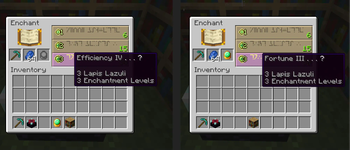
TWISB Enchanting improves the vanilla enchanting experience by introducing a method to pick enhantments: Catalysts. These rare items are found by exploring the world and can be used in the enchanting table to ensure you will get the enchantment you need. For example, using the "Smoldering Catalysts" with a sword guarantees "Fire Aspect". Using a catalyst does not destroy the item, so once you find one you'll always have it!
Notes: you can select one of the enchantments but others will be random as usual. If the selected enchantment type cannot be obtained with the current number of bookshelves you will get a random one as normal. The tooltip in the enchanting table is still random, so you might not see the enchantment you were expecting, but don't worry: it will still work!
Anvil rebalance
Repairing tools at anvils using materials (a diamond for a diamond pickaxe) no longer increases the prior work penalty. You'll be able to keep repairing your tools at a reasonable price!
Enchanting rework (Optional, experimental)
Version 0.3.0 for minecraft 1.21.9-10 introduces 2 new experimental gamerules that enable bigger reworks of vanilla enchanting. These are disabled by default. Please, feel free to provide feedback or report bugs if you try them out.
/gamerule linearExpGain true
This changes the exp per level to require a fixed amount of exp rather than exponentially more for higher levels. The point is to fix quirky things from vanilla, like item repair or renaming costing more if you're high level than if you're low level. (Renaming an item at level 30 in vanilla costs ~15x what it would cost at level 1, this fixes that). With this system, the amount of exp required to reach level 30 from 0 is the same as vanilla. Going from level 27 to 30 is however ~0.5x the cost of vanilla.
/gamerule enchantingLevelRework true
This completely reworks enchanting level and bookshelf requirements. The level required for enchating is now also the number of levels that will be used for that enchant (The exp requirements have been lowered to compensate, everything is the same or cheaper than vanilla). The amount of exp per level is fixed like with gamerule linearExpGain true. Lower tier tools, weapons and armor can receive max level enchants at much lower level. For example, a max level enchant for leather armor only requires being level 3 and no bookshelves. For copper, you need level 6 and 3 bookshelves. The max enchant level is indicated in the enchanting table after a slash (level 3/6 means you would enchant the item at half of max level, equivalent to vanilla level 15)
| Tier | Booshelves for max enchant | Levels for max enchant | Cost relative to vanilla | Extra items in tier |
| Leather | 0 | 3 | 0.16x | Wood and stone tools |
| Copper | 3 | 6 | 0.33x | |
| Gold | 5 | 8 | 0.44x | |
| Chainmail | 7 | 10 | 0.55x | |
| Iron | 9 | 12 | 0.66x | Trident, fishing rod, turtle helmet |
| Diamond | 15 | 18 | 1x | Mace, bow, crossbow, book |
| Netherite | 15 | 18 | 1x |
Check out my other mod
TWISB-Combat Tweaks health regeneration, potions and tridents to make combat more interesting.
TWISB-Exploration Adds an Atlas item to store and show your maps while you explore. Also makes the compass useful.
How to obtain catalysts (Spoiler):
- Plentiful catalyst: jungle temple chests
- Fortune
- Looting
- Multishot
- Luck of the Sea
- Smoldering catalyst: nether fortress chests
- Fire Aspect
- Flame
- Fire Protection
- Abyssal catalyst: cold/warm ocean ruin suspiscious sand
- Aqua Affinity
- Depth Strider
- Respiration
- Impaling
- Riptide
- Lure
- Explosive catalyst: desert pyramid chest
- Blast Protection
- Knockback
- Punch
- Divine catalyst: cleric hero-of-the-village reward
- Smite
- Channeling
- Preserving catalyst: end city chests
- Infinity
- Loyalty
- Silk Touch
- Enhancing catalyst: ancient city chests
- Efficiency
- Sharpness
- Power
- Protection
Adding custom enchantments as catalyst targets:
Starting in version 0.2.0, the enchantments selected by each catalysts are defined through tags. This means that any custom enchantments can be added to existing catalysts by editing it's tag with a datapack. For example, the enchantment tag "twisb-enchanting:catalyst_plentiful", found at path "data/twisb-enchanting/tags/enchantment/catalyst_plentiful.json" contains the following:
{
  "values": [
    "minecraft:fortune",
    "minecraft:looting",
    "minecraft:multishot",
    "minecraft:luck_of_the_sea"
  ]
}
If you wanted to add a custom enchantment named "luck" to be a target of the plentiful catalyst, you could create a datapack with the following file:
"data/twisb-enchanting/tags/enchantment/catalyst_plentiful.json", containing:
{
  "replace": false,
  "values": [
    "yourmod:luck"
  ]
}
Version 0.3.0 added 5 placeholder catalysts that are not obtainable in the game, but which can be customized if anyone wants to add their custom catalyst for a modpack. To fully implement do this:
- Give them a proper name with a language pack. Example: add a line "item.twisb-enchanting.placeholder_catalyst1": "Cool Catalyst" in en_us.json
- Give them a proper texture with a resource pack. Example: you make your own textures/item/placeholder_catalyst1.png
- Add enchantments to the catalyst tags. Example: add enchants as explained above to data/twisb-enchanting/tags/enchantment/catalyst_placeholder1.json
- Make the catalyst obtainable with a loot table.
Available Versions
How to Install TWISB-Enchanting on Your Server
Order Server
Order a Minecraft Java server with at least 3 GB RAM (4 GB recommended).
Set fabric Loader
In the panel under "Egg", select the fabric loader and matching Minecraft version (1.21.10).
Install Mod
Open the mod browser in the dashboard and search for "TWISB-Enchanting". Click "Install" – done! Alternatively, upload the .jar via SFTP to the /mods folder.
Compatibility
Mod Loaders
Minecraft Versions
1.21.10, 1.21.9, 1.21.5 (+8 more)
Server-side
✓ RequiredRecommended RAM
4 GB(min. 3 GB)Frequently Asked Questions
TWISB-Enchanting server crashes on startup – what to do?
Most common cause: wrong fabric version or insufficient RAM. Check the server log (latest.log) for "OutOfMemoryError" or "Mixin" errors. With Mado Hosting: ensure at least 3 GB RAM is allocated and the loader matches the mod version (1.21.10). You can switch loaders with one click in the panel.
Is TWISB-Enchanting compatible with fabric?
TWISB-Enchanting officially supports fabric for Minecraft 1.21.10, 1.21.9, 1.21.5. The Mado dashboard automatically detects incompatible loader combinations.
Server lagging with TWISB-Enchanting – how to optimize performance?
Recommended RAM: 4 GB (per 8 players). Use /spark profiler to check if TWISB-Enchanting consumes the most tick time. Common fixes: reduce server view-distance to 8-10, install "performant" or "starlight" as supplementary mods on Forge. With Mado Hosting, your server runs on NVMe SSDs with dedicated CPU cores for minimal latency.
Similar Mods




Rent Modded Server
Install TWISB-Enchanting with just one click on your server.