
TWISB-Exploration
Exploration, the way it should be! This mod adds an Atlas item to contain all your maps, and makes compasses more useful.
About this Mod
Summary
Noticed how many people play with minimap mods, or often use the F3 screen for coordinates even though the vanilla game has maps and compasses? Thats because those items are not that usefull in vanilla. This mod adds an Atlas item to keep your maps tidy and buffs compasses.
I created this mod to improve Minecraft exploration while keeping it as close to Vanilla as possible. The goal is to take what is already in the game and make it actually useful (Mojang, if you read this, I would love if you added these changes to the game).
The Atlas
The Atlas is a new item which can contain filled maps and shows the closest one to your current position. Here is the recipe:
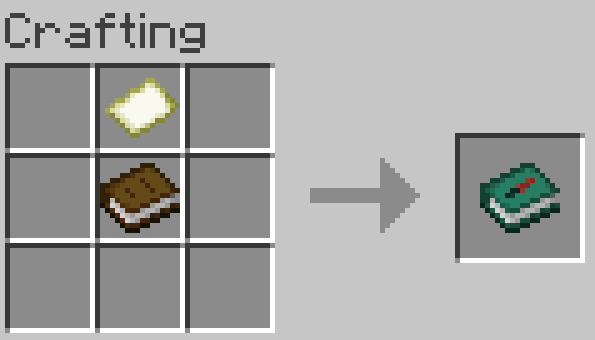
It works like a bundle: select it and click on map items to place them in the Atlas. You can alternatively select the map and click it into the Atlas instead. To extract maps right click the Atlas onto an empty slot or right click the Atlas without any item selected.
Only maps of the same scale and dimension can be placed in an Atlas. For example, if the Atlas contain maps from the overworld it will not take maps from the nether.
If the Atlas contains a map, when you hold it, it will show the one closest to your location.
If you right click while having empty maps in your inventory and the current location does not have a map in the Atlas, a new map will be made and added to the Atlas. If a new map made this way needs to be scaled (because other maps in the Atlas are scaled) paper will be required: one paper is used for each scale-up required.
Compass buff
Having an compass in your inventory will show coordinates and faced direction (N/E/S/W).
The F3 screen does not show coordinates unless you're in creative mode (from mod version 0.1.4) or cheats are enabled (before mod version 0.1.3) giving you an actual reason to have a compass.
Known bugs
For mod versions before 0.1.4 due to a vanilla Minecraft bug (afaik) you are able to place a map from the wrong dimension into an Atlas after reloading the game. Avoid doing that or it gets confusing.
Check out my other mods
TWISB-Enchanting Allows selecting enchantments in a vanilla-friendly way that promotes exploration. It also buffs anvils.
TWISB-Combat Tweaks health regeneration, potions and tridents to make combat more interesting.
Available Versions
How to Install TWISB-Exploration on Your Server
Order Server
Order a Minecraft Java server with at least 3 GB RAM (4 GB recommended).
Set fabric Loader
In the panel under "Egg", select the fabric loader and matching Minecraft version (1.21.10).
Install Mod
Open the mod browser in the dashboard and search for "TWISB-Exploration". Click "Install" – done! Alternatively, upload the .jar via SFTP to the /mods folder.
Compatibility
Mod Loaders
Minecraft Versions
1.21.10, 1.21.9, 1.21.1 (+1 more)
Server-side
✓ RequiredRecommended RAM
4 GB(min. 3 GB)Frequently Asked Questions
TWISB-Exploration server crashes on startup – what to do?
Most common cause: wrong fabric version or insufficient RAM. Check the server log (latest.log) for "OutOfMemoryError" or "Mixin" errors. With Mado Hosting: ensure at least 3 GB RAM is allocated and the loader matches the mod version (1.21.10). You can switch loaders with one click in the panel.
Is TWISB-Exploration compatible with fabric?
TWISB-Exploration officially supports fabric for Minecraft 1.21.10, 1.21.9, 1.21.1. The Mado dashboard automatically detects incompatible loader combinations.
Server lagging with TWISB-Exploration – how to optimize performance?
Recommended RAM: 4 GB (per 8 players). Use /spark profiler to check if TWISB-Exploration consumes the most tick time. Common fixes: reduce server view-distance to 8-10, install "performant" or "starlight" as supplementary mods on Forge. With Mado Hosting, your server runs on NVMe SSDs with dedicated CPU cores for minimal latency.
Similar Mods




Rent Modded Server
Install TWISB-Exploration with just one click on your server.