
Tycoon Shop
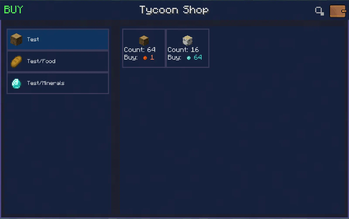
Tycoon Shop — a mod that lets you create custom shops and sell items using its own in-game currency.
Screenshots

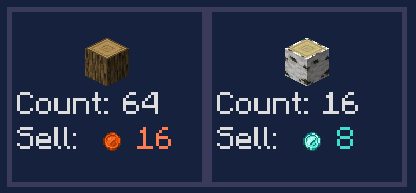
About this Mod
Overview
Tycoon Shop is a server-side economy mod for NeoForge 1.21.1. It adds a currency system, an admin-managed shop, a player-to-player marketplace, and wallet management tools.
Currency
Five coin tiers exist, each worth a configurable multiple of the one below it (default 100:1):
Copper Coin → Iron Coin → Gold Coin → Diamond Coin → Netherite Coin
Coins are physical items that can exist in your inventory. When you deposit them into your wallet, they auto-convert upward — 100 copper automatically becomes 1 iron, and so on. When spending, higher-tier coins are broken down automatically to cover the cost.
Wallet
Every player has a personal wallet stored on the server. It persists through deaths and restarts.
Interacting with the wallet:
Left-click the wallet HUD button — opens the withdraw screen to take coins out as items
Shift + Left-click the HUD button — deposits all coin items from your inventory into the wallet
Right-clicking a coin item — deposits that stack directly into the wallet
If FTB Teams is installed, teammates share a single wallet.
Tycoon Shop
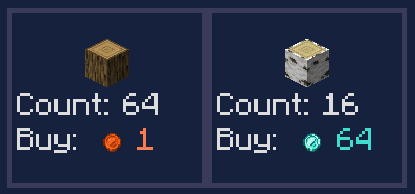
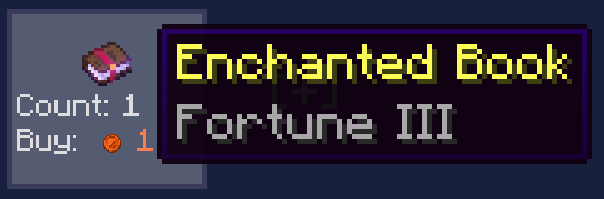
An admin-managed store where players can buy items for coins. The shop is organized into categories and entries.
Admins open the shop with /tshop, then enable Edit Mode to:
Create, rename, reorder, and delete categories
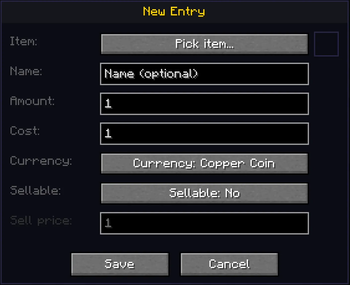
Add, edit, reorder, and delete item entries with custom prices and currencies
Save the current shop layout as the server default
Changes are applied live — no restart needed.
Player Market
A player-to-player marketplace where anyone can list items for sale.
Create a listing — select an item from your inventory, set a price and currency
Buy a listing — coins are deducted from your wallet, item goes to your inventory
Cancel a listing — the item is returned to your inbox
Inbox — if you're offline when your item sells or you cancel a listing, coins and items wait in your inbox until you claim them
Listings expire automatically after a set period
Tax: every sale deducts a 5% tax from what the seller receives (minimum 1 coin for prices of 2+). Taxed coins are destroyed, reducing the money supply over time.
Commands
Available to all players
Command Description
/tshop	Opens the shop
/tshop pay <player> <currency> <amount>	Transfers coins from your wallet to another player
Operators only (permission level 2)
Command	Description
/tshop editmode	Toggles shop edit mode for the calling admin
/tshop wallet <player> <currency> add <amount>	Adds coins to a player's wallet
/tshop wallet <player> <currency> set <amount>	Sets a player's coin balance
/tshop wallet <player> <currency> get	Checks a player's balance for a specific currency
/tshop savedefault	Saves the current shop layout to config/tycoonshop/default_shop.json
/tcoins give <player> <currency> <amount>	Gives coins to a player
/tcoins set <player> <currency> <amount>	Sets a player's balance
/tcoins show <player>	Displays a player's full wallet
Currency IDs for commands: copper_coin, iron_coin, gold_coin, diamond_coin, netherite_coin
Configuration
Two config files are generated on first launch:
tshop_coin.toml — exchange rates between coin tiers (default 100, range 2–10000)
tshop_name.toml — display names for the Shop and Market screens
Optional Integration
FTB Teams — if installed, players in the same team share one wallet automatically. No extra setup needed.
Available Versions
How to Install Tycoon Shop on Your Server
Order Server
Order a Minecraft Java server with at least 3 GB RAM (4 GB recommended).
Set neoforge Loader
In the panel under "Egg", select the neoforge loader and matching Minecraft version (26.1.2).
Install Mod
Open the mod browser in the dashboard and search for "Tycoon Shop". Click "Install" – done! Alternatively, upload the .jar via SFTP to the /mods folder.
Compatibility
Mod Loaders
Minecraft Versions
26.1.2, 26.1.1, 26.1 (+11 more)
Server-side
✓ RequiredRecommended RAM
4 GB(min. 3 GB)Frequently Asked Questions
Tycoon Shop server crashes on startup – what to do?
Most common cause: wrong neoforge version or insufficient RAM. Check the server log (latest.log) for "OutOfMemoryError" or "Mixin" errors. With Mado Hosting: ensure at least 3 GB RAM is allocated and the loader matches the mod version (26.1.2). You can switch loaders with one click in the panel.
Is Tycoon Shop compatible with neoforge?
Tycoon Shop officially supports neoforge for Minecraft 26.1.2, 26.1.1, 26.1. The Mado dashboard automatically detects incompatible loader combinations.
Server lagging with Tycoon Shop – how to optimize performance?
Recommended RAM: 4 GB (per 8 players). Use /spark profiler to check if Tycoon Shop consumes the most tick time. Common fixes: reduce server view-distance to 8-10, install "performant" or "starlight" as supplementary mods on Forge. With Mado Hosting, your server runs on NVMe SSDs with dedicated CPU cores for minimal latency.
Similar Mods




![CobbleDollars [Cobblemon Addon]](https://cdn.modrinth.com/data/s7N7AsqL/684040a264fc1d7f9b856ec5d2da39767398c7ad.png)
Rent Modded Server
Install Tycoon Shop with just one click on your server.