
TymusClient
Lightweight Fabric utility mod for 1.20.1 — Equipment saver
Screenshots
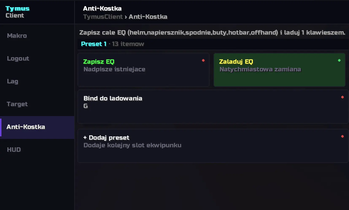
About this Mod
TymusClient is a client-side utility mod for Minecraft 1.20.1 on Fabric, built for players who want real control over their gameplay — gear saving and more — all in one place, with no server install required.
Whether you're grinding repetitive tasks, competing in PvP, or just want quality-of-life tools that don't slow down your game, TymusClient has you covered.
🛡️ Equipment Saver
Save your full gear loadout and restore it instantly with a keybind. No more manually re-equipping after death or switching between builds by hand.
📊 HUD Overlay
A minimal, always-visible overlay keeps you informed without cluttering your screen:
- Live FPS counter
📥 Installation
TymusClient requires Fabric Loader and Fabric API. Once you have those installed, drop the TymusClient .jar into your mods folder and launch the game as normal.
Press F9 in-game to open the GUI. Use , and . to switch between tabs.
Client-side only — works on any server without any server-side setup.
⚙️ Configuration
TymusClient saves your settings automatically to .minecraft/config/tymus_client.json. You can edit it directly, or change keybinds under Options → Controls → TymusClient.
---

---

**Requires:** Fabric Loader ≥ 0.14.22 · Fabric API · Minecraft 1.20.1 · Java 17+
Available Versions
How to Install TymusClient on Your Server
Order Server
Order a Minecraft Java server with at least 3 GB RAM (4 GB recommended).
Set fabric Loader
In the panel under "Egg", select the fabric loader and matching Minecraft version (1.20.6).
Install Mod
Open the mod browser in the dashboard and search for "TymusClient". Click "Install" – done! Alternatively, upload the .jar via SFTP to the /mods folder.
Compatibility
Mod Loaders
Minecraft Versions
1.20.6, 1.20.5, 1.20.4 (+3 more)
Server-side
✗ UnsupportedRecommended RAM
4 GB(min. 3 GB)Frequently Asked Questions
TymusClient server crashes on startup – what to do?
Most common cause: wrong fabric version or insufficient RAM. Check the server log (latest.log) for "OutOfMemoryError" or "Mixin" errors. With Mado Hosting: ensure at least 3 GB RAM is allocated and the loader matches the mod version (1.20.6). You can switch loaders with one click in the panel.
Is TymusClient compatible with fabric?
TymusClient officially supports fabric for Minecraft 1.20.6, 1.20.5, 1.20.4. The Mado dashboard automatically detects incompatible loader combinations.
Server lagging with TymusClient – how to optimize performance?
Recommended RAM: 4 GB (per 8 players). Use /spark profiler to check if TymusClient consumes the most tick time. Common fixes: reduce server view-distance to 8-10, install "performant" or "starlight" as supplementary mods on Forge. With Mado Hosting, your server runs on NVMe SSDs with dedicated CPU cores for minimal latency.
Similar Mods



![[TaCZ] Timeless and Classics Zero](https://cdn.modrinth.com/data/SzzJttH8/fd27766d2bb8390d284696b1dbd358f87e081439_96.webp)


Rent Modded Server
Install TymusClient with just one click on your server.