
Ultimate Backport Mod
Play these cool things of new Minecraft updates in old versions!
Screenshots
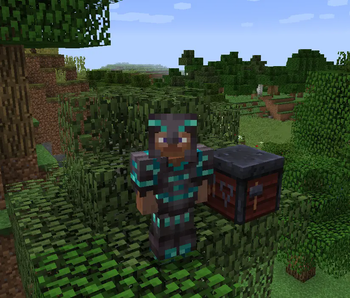
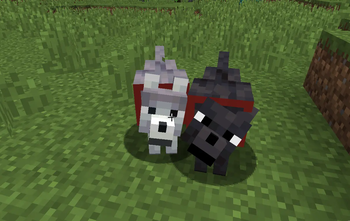

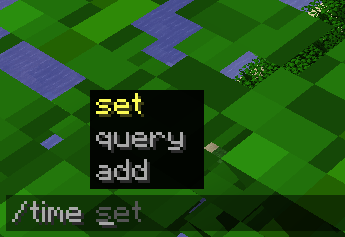
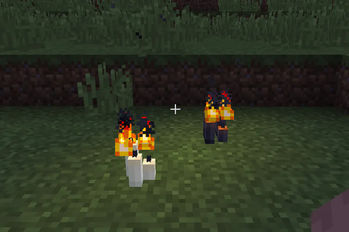
About this Mod
🌟 Ultimate Backport Mod – Bringing the Future to the Past!
Welcome to the official page of the Ultimate Backport Mod (UBM) – a project that breathes new life into old Minecraft versions by bringing modern mechanics, features, and mobs back to where it all began.
🔥 Highlights
✨ Command Suggestion UI Tired of blindly typing commands in older versions? UBM brings the modern command autocomplete system into legacy Minecraft – making commands easier, faster, and more intuitive.
🗳️ Mob Vote Candidates – The Forgotten Return Remember the mobs from the community votes that never made it into the game? They’re finally here – reimagined and added into your worlds! (More will be added step by step!)
⚙️ Full Mob Customization. Every mob is fully configurable (Coming Soon):
- Enable/disable them
- Adjust health, damage, and more
- Tailor the gameplay exactly to your taste
⏳ Modern Mechanics in Old Versions From combat tweaks to quality-of-life improvements – UBM carefully backports features from newer updates into 1.12.2 while keeping the nostalgic charm intact.
🛠️ Supported Versions
Currently, UBM is being developed for Minecraft 1.12.2. Other versions (like 1.7.10, 1.14.4, and 1.16.5) may follow after the core development is complete.
📢 Development Status
This mod was once discontinued – but now it’s being revived, rebuilt, and expanded with fresh ideas and a long-term vision. Stay tuned, join the community, and help shape the future of UBM!
🎯 Download Goals (CurseForge + Modrinth)
- 10.000 Downloads ✅
- 20.000 Downloads ✅
- 30.000 Downloads ✅
- 40.000 Downloads ✅
- 50.000 Downloads ✅
- 100.000 Downloads ❌
- 500.000 Downloads ❌
- 1.000.000 Downloads ❌
✨ Thank you so much for supporting the Ultimate Backport Mod! Every download brings us closer to reviving Minecraft’s history with the magic of its future.
Available Versions
How to Install Ultimate Backport Mod on Your Server
Order Server
Order a Minecraft Java server with at least 4 GB RAM (6 GB recommended).
Set forge Loader
In the panel under "Egg", select the forge loader and matching Minecraft version (1.12.2).
Install Mod
Open the mod browser in the dashboard and search for "Ultimate Backport Mod". Click "Install" – done! Alternatively, upload the .jar via SFTP to the /mods folder.
Compatibility
Mod Loaders
Minecraft Versions
1.12.2
Server-side
✓ RequiredRecommended RAM
6 GB(min. 4 GB)Frequently Asked Questions
Ultimate Backport Mod server crashes on startup – what to do?
Most common cause: wrong forge version or insufficient RAM. Check the server log (latest.log) for "OutOfMemoryError" or "Mixin" errors. With Mado Hosting: ensure at least 4 GB RAM is allocated and the loader matches the mod version (1.12.2). You can switch loaders with one click in the panel.
Is Ultimate Backport Mod compatible with forge?
Ultimate Backport Mod officially supports forge for Minecraft 1.12.2. The Mado dashboard automatically detects incompatible loader combinations.
Server lagging with Ultimate Backport Mod – how to optimize performance?
Recommended RAM: 6 GB (per 5 players). Use /spark profiler to check if Ultimate Backport Mod consumes the most tick time. Common fixes: reduce server view-distance to 8-10, install "performant" or "starlight" as supplementary mods on Forge. With Mado Hosting, your server runs on NVMe SSDs with dedicated CPU cores for minimal latency.
Similar Mods




Rent Modded Server
Install Ultimate Backport Mod with just one click on your server.