
Uncapped Anvil
Removes anvil limits, allows enchanting up to level 255, and caps the maximum repair/fusion cost at 10 experience levels.
Screenshots
About this Mod
Uncapped Anvil 🛠️✨
Tired of the "Too Expensive!" limit in Minecraft? Want to create the ultimate god-tier gear without building massive experience farms? mod completely overhauls the vanilla anvil mechanics!
🌟 Features:
- No More "Too Expensive!": The 40-level vanilla cap is completely removed. You can repair and enchant your items forever.
- Fixed Cost (Max 10 Levels): No matter how many times you combine books or repair gear, the maximum cost will never exceed 10 experience levels.
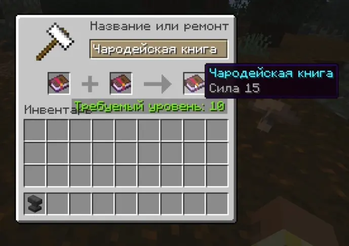
- Level 255 Enchantments: Combine enchanted books of the same level to reach unprecedented heights! (e.g., Sharpness V + Sharpness V = Sharpness 6... all the way up to the technical game limit of 255).
- Proper Level Rendering: Vanilla Minecraft struggles to display Roman numerals past level 10. This mod fixes that! Enchantments from level 11 to 255 will be displayed beautifully with Arabic numerals (e.g., "Sharpness 15" instead of broken text).
⚙️ Installation
- Requires Fabric Loader.
- Client & Server: This mod must be installed on BOTH the client and the server to work properly.
🇷🇺 Описание на русском:
Надоела надпись «Слишком дорого!»? Этот мод полностью меняет механику наковальни!
- Нет лимитов: Надпись «Слишком дорого!» удалена навсегда.
- Дешево: Максимальная стоимость любого скрещивания или ремонта зафиксирована на 10 уровнях опыта.
- Чары 255 уровня: Скрещивайте книги до технического предела игры (255 уровень).
- Красивые цифры: Мод исправляет ванильный баг и корректно отображает уровни чар больше 10-го арабскими цифрами (например, «Острота 25»).
Требует установки на клиент и на сервер!
Available Versions
How to Install Uncapped Anvil on Your Server
Order Server
Order a Minecraft Java server with at least 3 GB RAM (4 GB recommended).
Set fabric Loader
In the panel under "Egg", select the fabric loader and matching Minecraft version (1.21.11).
Install Mod
Open the mod browser in the dashboard and search for "Uncapped Anvil". Click "Install" – done! Alternatively, upload the .jar via SFTP to the /mods folder.
Compatibility
Mod Loaders
Minecraft Versions
1.21.11, 1.21.10, 1.21.9 (+16 more)
Server-side
✓ RequiredRecommended RAM
4 GB(min. 3 GB)Frequently Asked Questions
Uncapped Anvil server crashes on startup – what to do?
Most common cause: wrong fabric version or insufficient RAM. Check the server log (latest.log) for "OutOfMemoryError" or "Mixin" errors. With Mado Hosting: ensure at least 3 GB RAM is allocated and the loader matches the mod version (1.21.11). You can switch loaders with one click in the panel.
Is Uncapped Anvil compatible with fabric?
Uncapped Anvil officially supports fabric for Minecraft 1.21.11, 1.21.10, 1.21.9. The Mado dashboard automatically detects incompatible loader combinations.
Server lagging with Uncapped Anvil – how to optimize performance?
Recommended RAM: 4 GB (per 8 players). Use /spark profiler to check if Uncapped Anvil consumes the most tick time. Common fixes: reduce server view-distance to 8-10, install "performant" or "starlight" as supplementary mods on Forge. With Mado Hosting, your server runs on NVMe SSDs with dedicated CPU cores for minimal latency.
Similar Mods




![[TaCZ] Timeless and Classics Zero](https://cdn.modrinth.com/data/SzzJttH8/fd27766d2bb8390d284696b1dbd358f87e081439_96.webp)

Rent Modded Server
Install Uncapped Anvil with just one click on your server.