
UnifiedMetrics
Fully-featured metrics collection agent for Minecraft servers. Supports Prometheus and InfluxDB.
Screenshots
About this Mod





UnifiedMetrics is a fully-featured free and open-source metrics collection plugin for Minecraft servers. This project is
licensed under GNU LGPLv3.
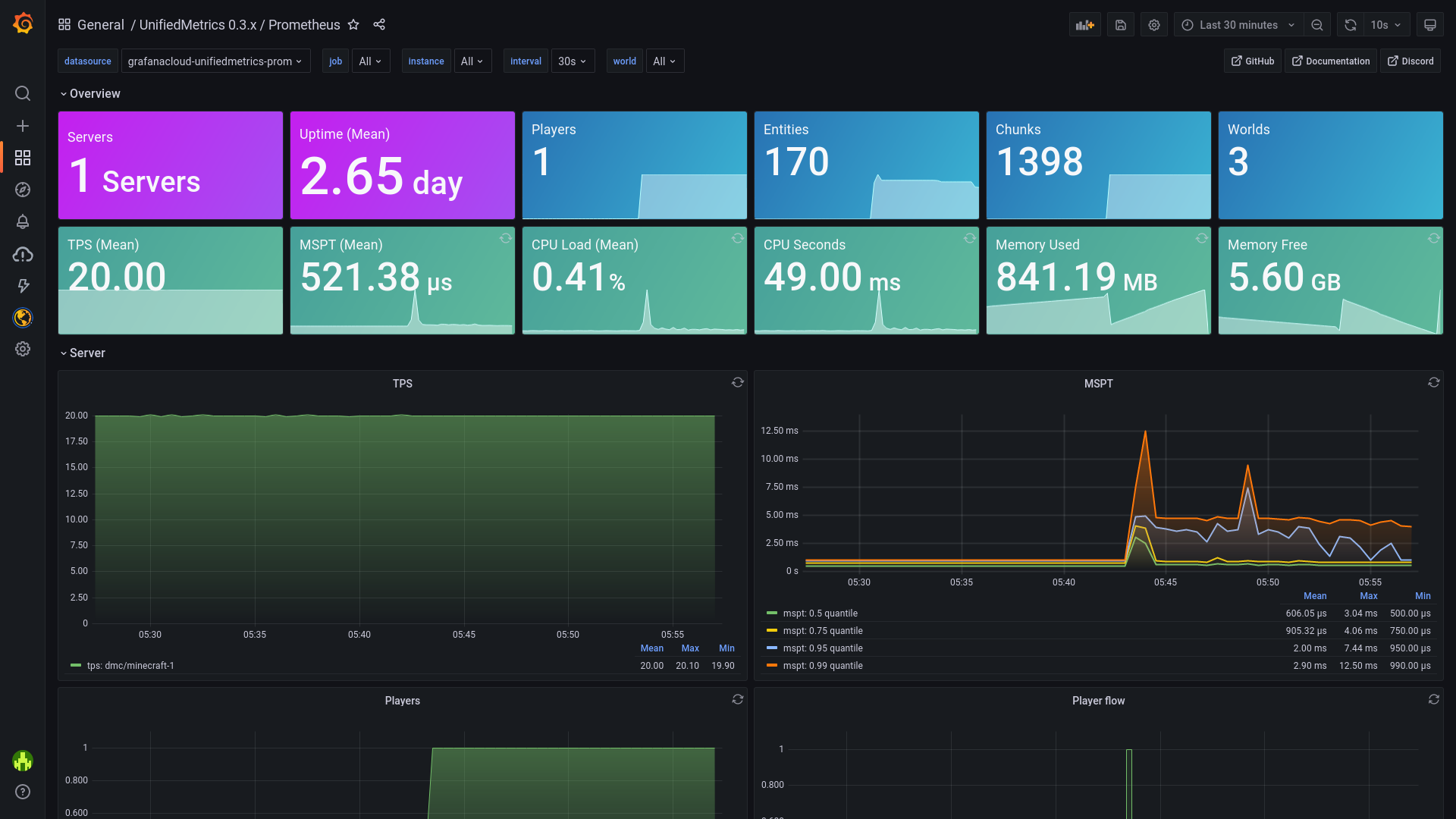
Dashboard included out-of-box!
Click here for live preview!
Features
- Platform-agnostic & compatible with popular platforms. Get the same metrics and features on any supported
platform. - Monitor your server in real-time with Prometheus/InfluxDB and provided Grafana dashboards.
- High performance metric collection. Low to none performance impact on the server's performance.
- Free and open-source. The code is free and open for anyone to audit and contribute to.
Compatibility
Server:
- 1.8+ Spigot servers (includes Spigot-based forks)
- 1.16+ Fabric servers
- Minestom
- Velocity
- BungeeCord
Metrics:
- Prometheus
- InfluxDB
Getting started
Read the wiki for instructions on how to get started.
Metrics
Table of metrics (click to show)
| Collector | Description | Platform | Default |
|---|---|---|---|
| systemGc | Garbage collection duration and freed bytes | All | true |
| systemMemory | Memory used, committed, max and init | All | true |
| systemProcess | CPU load, seconds, and process start time | All | true |
| systemThread | Current, daemon, started, and peak thread count | All | true |
| events | Login, join, quit, chat, and ping event counter | All | true |
| server | Plugins count and player counts | All | true |
| tick | Tick duration histogram | Bukkit, Minestom | true |
| world | World entities, players, and chunks count | Bukkit, Minestom | true |
Special Thanks
has kindly provided UnifiedMetrics with development servers.
Bloom has server splitting built-in, which makes it extremely easy to build your monitoring stack. Get high performance
servers at Bloom by using .
YourKit supports open source projects with innovative and intelligent tools for monitoring and profiling Java and .NET
applications. YourKit is the creator of YourKit Java Profiler,
YourKit .NET Profiler,
and YourKit YouMonitor.

Building from source
Instructions (click to show)
Requirements:
- JDK 8+ (16+ for Fabric, 17+ for Minestom)
- Git (Optional)
To build UnifiedMetrics, you need to obtain the source code first. You can download the source from GitHub or use the
Git CLI.
$ git clone https://github.com/Cubxity/UnifiedMetrics && cd UnifiedMetrics
Open a terminal in the cloned directory and run the following command. The following command will build all subprojects.
$ ./gradlew assemble -x signArchives
-x signArchivesis required to skip signing, unless you have signing set up
To build a specific subproject, you can prefix it with the subproject path. For example:
$ ./gradlew :unifiedmetrics-platform-bukkit:assemble -x signArchives
The output artifacts can be found in subproject/build/libs.
API
Instructions (click to show)
Examples
Example plugins can be found under examples directory.
Gradle (Kotlin)
repositories {
    mavenCentral()
    maven("https://s01.oss.sonatype.org/content/repositories/snapshots/")
}
dependencies {
    // ...
    compileOnly("dev.cubxity.plugins", "unifiedmetrics-api", "0.3.3-SNAPSHOT")
}
Usage
Add :unifiedmetrics-api as a dependency (compileOnly/provided). Prefer using platform's service manager if possible.
import dev.cubxity.plugins.metrics.api.UnifiedMetricsProvider

/* ... */

val api = UnifiedMetricsProvider.get()
Available Versions
How to Install UnifiedMetrics on Your Server
Order Server
Order a Minecraft Java server with at least 3 GB RAM (4 GB recommended).
Set bukkit Loader
In the panel under "Egg", select the bukkit loader and matching Minecraft version (1.19.4).
Install Mod
Open the mod browser in the dashboard and search for "UnifiedMetrics". Click "Install" – done! Alternatively, upload the .jar via SFTP to the /mods folder.
Compatibility
Mod Loaders
Minecraft Versions
1.19.4, 1.19.3, 1.19.2 (+48 more)
Server-side
✓ RequiredRecommended RAM
4 GB(min. 3 GB)Frequently Asked Questions
UnifiedMetrics server crashes on startup – what to do?
Most common cause: wrong bukkit version or insufficient RAM. Check the server log (latest.log) for "OutOfMemoryError" or "Mixin" errors. With Mado Hosting: ensure at least 3 GB RAM is allocated and the loader matches the mod version (1.19.4). You can switch loaders with one click in the panel.
Is UnifiedMetrics compatible with bukkit and bungeecord and fabric and paper and purpur and spigot and velocity and waterfall?
UnifiedMetrics officially supports bukkit, bungeecord, fabric, paper, purpur, spigot, velocity, waterfall for Minecraft 1.19.4, 1.19.3, 1.19.2. The Mado dashboard automatically detects incompatible loader combinations.
Server lagging with UnifiedMetrics – how to optimize performance?
Recommended RAM: 4 GB (per 8 players). Use /spark profiler to check if UnifiedMetrics consumes the most tick time. Common fixes: reduce server view-distance to 8-10, install "performant" or "starlight" as supplementary mods on Forge. With Mado Hosting, your server runs on NVMe SSDs with dedicated CPU cores for minimal latency.
Similar Mods





Rent Modded Server
Install UnifiedMetrics with just one click on your server.