
Universal Daily Rewards
A fully functional, bilingual, and heavily optimized fork of the original Daily Rewards mod, tailored for modern Fabric servers.
Screenshots
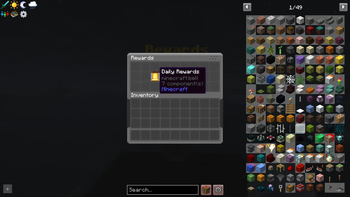
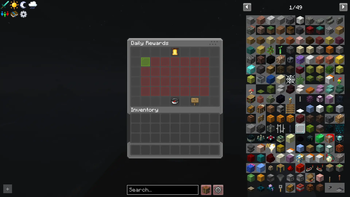
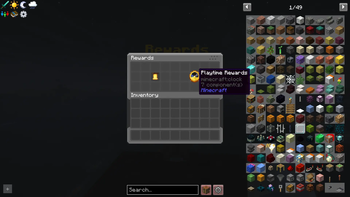
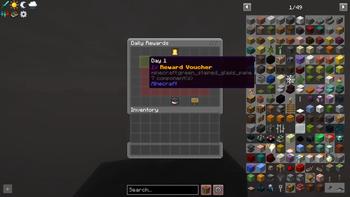
About this Mod
Universal Daily Rewards





This release marks a complete evolution and total overhaul from the original daily-rewards-fabric mod. Formerly known as Cobbleverse Daily Rewards, version 4.0.0 introduces a universal architecture designed for any Minecraft server.



Universal Daily Rewards is a 100% standalone, server-side mod that provides a highly configurable rewards system with native localization and a powerful template engine.
📖 Click here to read the full CHANGELOG
🌟 What's New in Version 4.1.0 (UI Overhaul)
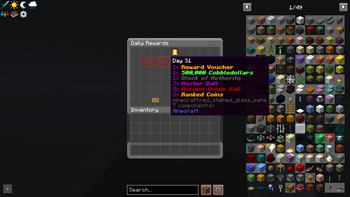
- 🎨 Complete GUI Redesign: We've completely upgraded the menu layout! Rewards are now beautifully displayed in a dynamic grid of up to 28 days per page, offering a much better visual progression for your players while fully retaining the classic multi-page support for endless streaks.
- 📏 Adaptive & Responsive Grid: The interface automatically scales to fit your server's configuration! If you set up 7 days of rewards, it beautifully centers a single row of 7 slots. Configure 14 days, and it shows two rows, scaling dynamically up to a full 28-day grid. Got more than 28 days configured? The mod will automatically generate additional pages for you!
✨ Key Features (v4.0.0+)
- 🚀 100% Server-Side: No client-side installation required. Powered by Polymer.
- 🌍 Native Localization (i18n): Automatically adapts to the player's client language using Server Translations API.
- Currently supports English, Spanish (multiple variants), and now Korean natively.
- Other languages will default to English.
- 🤝 Contributions Welcome: If you'd like to help translate the mod into your language, feel free to open a Pull Request on our GitHub!
- 📋 Template System: Quickly switch between reward sets using the
/rewards-setup loadcommand. It automatically detects any templates (including your own!) placed in theconfig/rewards/templates/folder. - 🔄 Looping Streaks: Configure your daily rewards once and let them cycle automatically.
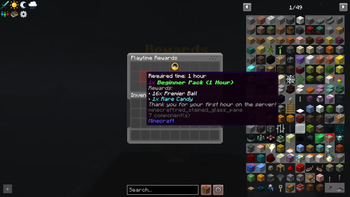
- 🕒 Dynamic Cooldowns: Real-time "Available in: Xh Ym" timers in GUI tooltips.
- 🖥️ Remote Access: Players can open the rewards menu using
/daily(configurable inglobal.json). - ⚙️ Universal i18n Templates: Default templates now use Minecraft
translatekeys, ensuring rewards names are localized in the player's language.
🛠️ Commands
Player Commands
/daily- Opens the rewards selection menu (if enabled in config)./rewards open- Alias for/daily.
Admin Commands (Permission Level 2+)
/rewards-reload-<type>-config- Hot-reload specific configurations./rewards-check <player>- Check current streak and playtime stats for a player./rewards-force-save- Forcefully save all player data to disk immediately./rewards-reset <player>- Reset all progress for a player./rewards-setstreak <player> <days>- Adjust daily login streak./rewards-setplaytime <player> <seconds>- Adjust tracked playtime./rewards-screen-entity <add|remove> <entity>- Bind the menu to physical NPCs.
Setup Commands (Permission Level 4)
/rewards-setup load <template>- Apply a pre-made template (vanilla,economy,cobbleverse)./rewards-setup allow-player-command <true|false>- Toggle remote access via/daily.
⚙️ Configuration & Flexibility
The mod uses an intuitive JSON structure that offers total freedom in how you distribute rewards. You can choose between two main methods (or mix them):
1. Command-Based Rewards (Recommended for Economy/Virtual Items)
Ideal for currency, permissions, or custom items with complex NBT. You run a command in the background and use a visual placeholder in the GUI.
- Set
"give_item": falseso the GUI item only acts as a visual icon. - Add your commands to the
"commands"array.
2. Direct Physical Rewards
The mod directly gives the player the physical item shown in the GUI.
- Set
"give_item": true. - The player will receive exactly what they see (amount, enchants, name, lore).
Configuration Example
The following example contrasts Command vs. Direct rewards (Day 1) and Text vs. Translate names (Day 2):
[
  {
    "day": 1,
    "id": "day_1",
    "commands": ["experience add %player% 500 points"],
    "items": [
      {
        "item": "minecraft:experience_bottle",
        "name": "{\"text\":\"500 XP Points (Command)\",\"color\":\"green\"}",
        "amount": 1,
        "give_item": false
      },
      {
        "item": "minecraft:diamond",
        "name": "{\"translate\":\"item.minecraft.diamond\",\"color\":\"aqua\"}",
        "amount": 3,
        "give_item": true
      }
    ]
  },
  {
    "day": 2,
    "id": "day_2",
    "items": [
      {
        "item": "minecraft:iron_sword",
        "name": "{\"text\":\"Custom Slayer Sword\",\"color\":\"red\",\"bold\":true}",
        "amount": 1,
        "give_item": true
      },
      {
        "item": "minecraft:golden_apple",
        "name": "{\"translate\":\"item.minecraft.golden_apple\",\"color\":\"gold\"}",
        "amount": 5,
        "give_item": true
      }
    ]
  }
]
💡 Want to see more full examples?
You can explore the complete code for all our pre-made templates directly on our GitHub repository.
🎨 Creating Custom Templates
You can easily create your own reward presets. The mod will automatically detect them as long as you follow these steps:
- Navigate to your server's
config/rewards/templates/folder. - Create two JSON files with the same prefix:
yourname_daily.json(for Daily Rewards)yourname_playtime.json(for Playtime Rewards)
- Use the
/rewards-setup load yournamecommand in-game. The mod will find your files and apply them instantly!
📜 Credits
This project is an overhauled fork of the original Daily-Rewards-Fabric by SmugTheKiler. Huge thanks to them for laying the foundation!
Available Versions
How to Install Universal Daily Rewards on Your Server
Order Server
Order a Minecraft Java server with at least 3 GB RAM (4 GB recommended).
Set fabric Loader
In the panel under "Egg", select the fabric loader and matching Minecraft version (1.21.1).
Install Mod
Open the mod browser in the dashboard and search for "Universal Daily Rewards". Click "Install" – done! Alternatively, upload the .jar via SFTP to the /mods folder.
Compatibility
Mod Loaders
Minecraft Versions
1.21.1, 1.21
Server-side
✓ RequiredRecommended RAM
4 GB(min. 3 GB)Frequently Asked Questions
Universal Daily Rewards server crashes on startup – what to do?
Most common cause: wrong fabric version or insufficient RAM. Check the server log (latest.log) for "OutOfMemoryError" or "Mixin" errors. With Mado Hosting: ensure at least 3 GB RAM is allocated and the loader matches the mod version (1.21.1). You can switch loaders with one click in the panel.
Is Universal Daily Rewards compatible with fabric?
Universal Daily Rewards officially supports fabric for Minecraft 1.21.1, 1.21. The Mado dashboard automatically detects incompatible loader combinations.
Server lagging with Universal Daily Rewards – how to optimize performance?
Recommended RAM: 4 GB (per 8 players). Use /spark profiler to check if Universal Daily Rewards consumes the most tick time. Common fixes: reduce server view-distance to 8-10, install "performant" or "starlight" as supplementary mods on Forge. With Mado Hosting, your server runs on NVMe SSDs with dedicated CPU cores for minimal latency.
Similar Mods




![CobbleDollars [Cobblemon Addon]](https://cdn.modrinth.com/data/s7N7AsqL/684040a264fc1d7f9b856ec5d2da39767398c7ad.png)
Rent Modded Server
Install Universal Daily Rewards with just one click on your server.