
unofficial-tails
Use it only until the official tail mode is updated!
Screenshots
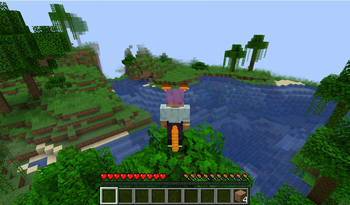
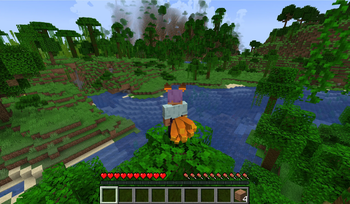
About this Mod
Tails for Forge 1.20.1
If you have ever wanted to give your Minecraft character a tail, ears, wings, or a muzzle and tune the look yourself instead of wearing a fixed cosmetic, Tails is the kind of mod that makes that experience feel personal.
This project is an unofficial port of Kihira's original Tails mod for Minecraft Forge 1.20.1. The goal of this port is not just to make the mod load on a newer version, but to preserve the original editing flow and visual feel as closely as possible on modern Forge.
Important Notice
- This project is an unofficial port
- The original Tails mod was created by Kihira
- This port is not affiliated with, endorsed by, or maintained by the original author
- If an official updated release ever becomes available, that should take priority over this port
Port Notice
This project is a temporary Forge 1.20.1 port intended to keep Tails usable on a modern version of Minecraft.
Because this is a forward port of an older mod, unstable modeling, rendering issues, or unexpected errors may still occur depending on the feature or setup.
The goal of this project is to preserve the original experience as closely as possible, not to fully redesign every system or aggressively optimize every edge case.
All rights to the original Tails mod belong to Kihira. Please do not re-upload or redistribute this port as a separate project without permission.
Official original mod page:
https://legacy.curseforge.com/minecraft/mc-mods/tails
What This Mod Adds
Tails is a character customization mod focused on appearance rather than block progression or tech systems.
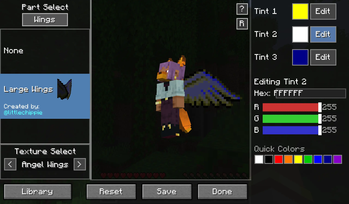
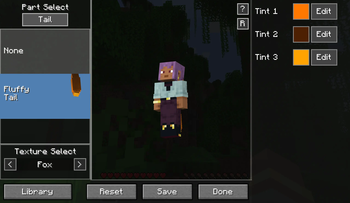
It lets players customize several cosmetic body parts directly in-game, including:
- Tails
- Ears
- Wings
- Muzzles
Each part can be selected independently, paired with its own texture, and tinted with a three-color system for more detailed customization.
Instead of acting like a simple accessory slot, the mod is built around shaping a full visual style for your player model.
Editing Experience
One of the main reasons the original mod stood out was the editing workflow, and that experience is a major focus of this port.
Inside the editor, you can:
- Open the Tails editor in-game
- Pick the part category you want to change
- Select a model from the available list
- Swap between supported textures
- Adjust tint colors with a three-color editor
- Preview the result live before saving
- Save your current appearance when you are satisfied
The live preview is a big part of the experience. You are not guessing what a change will look like and then leaving the menu to check it later. The editor is designed to let you adjust parts, colors, and combinations while immediately seeing the result.
Controls
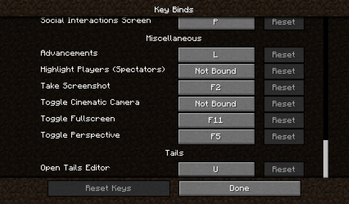
- Press U by default to open the editor
- Choose a part type from the editor panels
- Select the model you want to use
- Pick a texture if the part supports multiple textures
- Change colors in the tint section
- Press Save to apply your setup
This keeps the workflow quick and easy to experiment with, especially if you want to try multiple combinations before settling on one look.
Tail Abilities
This port also includes optional gameplay-style bonuses tied to most tails.
Examples include:
Fox or fluffy tails: movement speed bonus
Nine tails: stronger fox-style bonus with extra jump power
Dragon tail: armor and knockback resistance
Devil tail: additional attack damage
Cat tail: no fall damage
Bird tail: slower falling and reduced fall damage
Shark tail: faster swimming and underwater air refresh
Bunny tail: higher jump
These bonuses are meant to give individual tail choices a little more personality without changing the core identity of the mod as an appearance-focused customization system.
Project Goals
This port aims to keep the mod feeling like Tails rather than turning it into a generic modern cosmetic editor.
That means the focus is on:
- Preserving the classic customization style
- Keeping the part-and-texture workflow recognizable
- Maintaining live preview editing
- Matching the original visual identity where practical
- Making the experience work cleanly on Forge 1.20.1
Current State
This port is intended for players who want the classic Tails experience on a modern Forge setup.
Current areas covered by the port include:
- In-game editor access
- Part selection
- Texture selection
- Tint editing
- Live preview
- Appearance syncing
- Modern Forge compatibility
As with many unofficial ports, there may still be edge cases, polish issues, or behavior differences compared to older releases depending on the exact feature.
Multiplayer Notes
The mod is designed so player appearance can be represented in multiplayer as well, making it useful both for personal customization and for servers where visible character identity matters.
If you mainly play with friends or use themed characters, the mod works especially well as a lightweight identity and roleplay customization layer.
Relationship To The Original
This project exists because the original mod had a distinct personality that many newer cosmetic systems do not quite replicate.
The intent here is to respect that design direction as much as possible while adapting the code and rendering behavior to Forge 1.20.1.
If you enjoyed the original Tails mod and wanted something close to that experience on a newer Forge version, this port is built for exactly that purpose.
Credits
Original mod: Kihira
Forge 1.20.1 port: this project
One-Line Summary
An unofficial Forge 1.20.1 port of Kihira's Tails mod with tails, ears, wings, muzzles, tint editing, live preview, and classic-style character customization.
Available Versions
How to Install unofficial-tails on Your Server
Order Server
Order a Minecraft Java server with at least 3 GB RAM (4 GB recommended).
Set forge Loader
In the panel under "Egg", select the forge loader and matching Minecraft version (1.20.1).
Install Mod
Open the mod browser in the dashboard and search for "unofficial-tails". Click "Install" – done! Alternatively, upload the .jar via SFTP to the /mods folder.
Compatibility
Mod Loaders
Minecraft Versions
1.20.1
Server-side
✓ RequiredRecommended RAM
4 GB(min. 3 GB)Frequently Asked Questions
unofficial-tails server crashes on startup – what to do?
Most common cause: wrong forge version or insufficient RAM. Check the server log (latest.log) for "OutOfMemoryError" or "Mixin" errors. With Mado Hosting: ensure at least 3 GB RAM is allocated and the loader matches the mod version (1.20.1). You can switch loaders with one click in the panel.
Is unofficial-tails compatible with forge?
unofficial-tails officially supports forge for Minecraft 1.20.1. The Mado dashboard automatically detects incompatible loader combinations.
Server lagging with unofficial-tails – how to optimize performance?
Recommended RAM: 4 GB (per 8 players). Use /spark profiler to check if unofficial-tails consumes the most tick time. Common fixes: reduce server view-distance to 8-10, install "performant" or "starlight" as supplementary mods on Forge. With Mado Hosting, your server runs on NVMe SSDs with dedicated CPU cores for minimal latency.
Similar Mods





Rent Modded Server
Install unofficial-tails with just one click on your server.