
Update Advancement Quests
A datapack/mod that adds new advancements to complete for the new content of Minecraft Updates [Updated for 26.2]
Screenshots
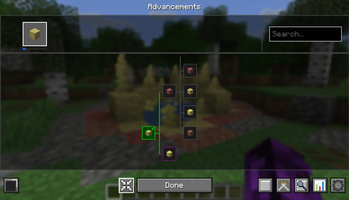
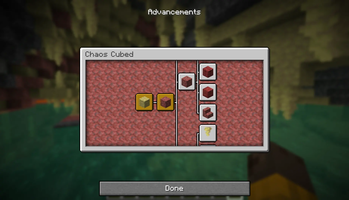
About this Mod
Adds guided quest-style advancements for new Minecraft Java Edition updates.
Minecraft adds new content but rarely commits to more advancements. This fills that empty knowledge gap and achieving thirst with a quest-like tree designed to walk you through new content in-game.
Rather than stumbling across things by accident or reaching for the wiki, each advancement acts as a guide and objective from various new biomes, blocks, crafting and even little notable changes
How It Works
A new tab appears in your Advancements screen for each supported update. Advancements are ordered to form a path based on discovery. Completely vanilla friendly, no rewards or gameplay changes.
Currently covered content
May Contain spoilers
26.2 - Chaos Cubed
Sulfur Caves - enter the sulfur caves biome
Cinnabar - collect cinnabar, then craft its stairs/slab/wall, polished set, brick set, and chiseled variant
Sulfur - collect sulfur, then craft its stairs/slab/wall, polished set, brick set, and chiseled variant
Sulfur Spike - pick up a sulfur spike from the cave floor or ceiling
Potent Sulfur - pick up potent sulfur from a water pool in the sulfur caves
Sulfur Cube - place a block inside a cube, shear it back out, kill an empty cube and watch it split, feed a slimeball to a small cube to grow it, bucket a large cube, punch an empty cube, and trigger all twelve block archetypes
Music Disc - obtain the Bounce disc from a mineshaft chest in the sulfur caves
Geyser - get launched into the air by an erupting potent sulfur geyser
Sulfur Spring - find a sulfur spring on the surface above the sulfur caves
Recommended
Use with Modern Advancements Screen for a much better and more clear experience. Full-screen layout, zoom controls, search, tracking with popups and other useful functions.
Modern Advancements Screen includes a guide feature on the Advancements with useful information to unlock it
Installation
Two versions are available, pick whichever suits your setup
Datapack (.zip) - no mod loader required
- Place the
.zipin your world'sdatapacksfolder (saves/<world name>/datapacks/) - Run
/reloadin-game, or re-load into the world - Open your Advancements screen (
L) - a new tab will appear
Mod (.jar) - requires Fabric
- Place the
.jarin yourmodsfolder - Launch the game as normal
- Advancements are applied globally across all worlds automatically
It is recommended for clients to have the mod if the server is using it as the mod contains translation files unlike the datapack of raw text
Available Versions
How to Install Update Advancement Quests on Your Server
Order Server
Order a Minecraft Java server with at least 3 GB RAM (4 GB recommended).
Set datapack Loader
In the panel under "Egg", select the datapack loader and matching Minecraft version (26.2).
Install Mod
Open the mod browser in the dashboard and search for "Update Advancement Quests". Click "Install" – done! Alternatively, upload the .jar via SFTP to the /mods folder.
Compatibility
Mod Loaders
Minecraft Versions
26.2, 26.2-rc-2
Server-side
✓ RequiredRecommended RAM
4 GB(min. 3 GB)Frequently Asked Questions
Update Advancement Quests server crashes on startup – what to do?
Most common cause: wrong datapack version or insufficient RAM. Check the server log (latest.log) for "OutOfMemoryError" or "Mixin" errors. With Mado Hosting: ensure at least 3 GB RAM is allocated and the loader matches the mod version (26.2). You can switch loaders with one click in the panel.
Is Update Advancement Quests compatible with datapack and fabric?
Update Advancement Quests officially supports datapack, fabric for Minecraft 26.2, 26.2-rc-2. The Mado dashboard automatically detects incompatible loader combinations.
Server lagging with Update Advancement Quests – how to optimize performance?
Recommended RAM: 4 GB (per 8 players). Use /spark profiler to check if Update Advancement Quests consumes the most tick time. Common fixes: reduce server view-distance to 8-10, install "performant" or "starlight" as supplementary mods on Forge. With Mado Hosting, your server runs on NVMe SSDs with dedicated CPU cores for minimal latency.
Similar Mods




Rent Modded Server
Install Update Advancement Quests with just one click on your server.