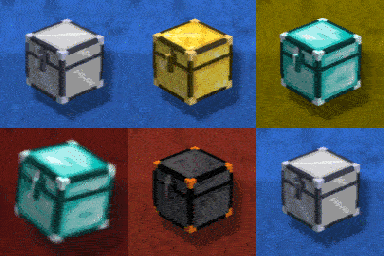
Upgraded Chests: Search & Quick-Transfer
Massive Upgraded Chests with built-in Search & Instant Move. From simple Iron Chests to big Netherite storage, this is the ultimate overhaul for fast resource transfers.
Screenshots
About this Mod

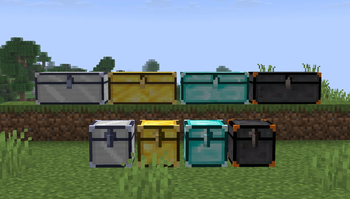
Upgraded Chests is the definitive storage overhaul for Minecraft, combining massive capacity, intelligent search tools, and instant resource transfers within a sleek, modern GUI designed for speed and simplicity.

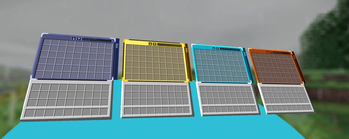
Smart Search Engine: Locate any item instantly within large containers using the built-in real-time filtering system.
Instant Resource Management: Dedicated buttons to "Deposit All" or "Withdraw All" your inventory with a single click.
Fireproof Construction: Every chest in this mod is completely immune to fire and lava, ensuring your loot is never lost to an accident.
Netherite Blast Immunity: The Netherite Tier is 100% explosion-proof (TNT & Creepers), providing the ultimate security for your most valuable items.
Modern Aesthetic: A minimalist, high-performance UI featuring full scrolling support and smooth item transitions.

.gif?raw=true)
.gif?raw=true)
.gif?raw=true)


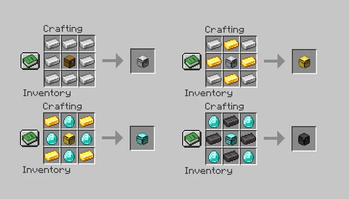
This mod utilizes a Tiered Upgrade System. Instead of crafting high-level chests from scratch, you must use the previous tier as the core base for the next upgrade.


Supported Loaders: This mod is fully compatible with Fabric, Forge, and NeoForge.
Server Support: Optimized for both Singleplayer and Multiplayer. You can run this mod on dedicated servers using any of the supported loaders for a seamless experience.

Developer: in2bubble
License: All Rights Reserved
Available Versions
How to Install Upgraded Chests: Search & Quick-Transfer on Your Server
Order Server
Order a Minecraft Java server with at least 3 GB RAM (4 GB recommended).
Set fabric Loader
In the panel under "Egg", select the fabric loader and matching Minecraft version (26.1.2).
Install Mod
Open the mod browser in the dashboard and search for "Upgraded Chests: Search & Quick-Transfer". Click "Install" – done! Alternatively, upload the .jar via SFTP to the /mods folder.
Compatibility
Mod Loaders
Minecraft Versions
26.1.2, 26.1.1, 26.1 (+1 more)
Server-side
✓ RequiredRecommended RAM
4 GB(min. 3 GB)Frequently Asked Questions
Upgraded Chests: Search & Quick-Transfer server crashes on startup – what to do?
Most common cause: wrong fabric version or insufficient RAM. Check the server log (latest.log) for "OutOfMemoryError" or "Mixin" errors. With Mado Hosting: ensure at least 3 GB RAM is allocated and the loader matches the mod version (26.1.2). You can switch loaders with one click in the panel.
Is Upgraded Chests: Search & Quick-Transfer compatible with fabric and forge and neoforge?
Upgraded Chests: Search & Quick-Transfer officially supports fabric, forge, neoforge for Minecraft 26.1.2, 26.1.1, 26.1. Note: Forge and Fabric mods are NOT cross-compatible – pick one loader and stick with it. The Mado dashboard automatically detects incompatible loader combinations.
Server lagging with Upgraded Chests: Search & Quick-Transfer – how to optimize performance?
Recommended RAM: 4 GB (per 8 players). Use /spark profiler to check if Upgraded Chests: Search & Quick-Transfer consumes the most tick time. Common fixes: reduce server view-distance to 8-10, install "performant" or "starlight" as supplementary mods on Forge. With Mado Hosting, your server runs on NVMe SSDs with dedicated CPU cores for minimal latency.
Similar Mods






Rent Modded Server
Install Upgraded Chests: Search & Quick-Transfer with just one click on your server.