
Upstack
Stack size configuration for common items.
Screenshots

About this Mod
Upstack
An open-source mod which makes the max stack size of common items configurable.
Patches bugs that occur when some items are made stackable.
Disclaimer: This mod is a passion project, so support for any particular version or feature
is not guaranteed. Feedback and feature requests (without expectation) are welcome.
Compatibility
Upstack must be installed on both the client and the server to function properly (its patches are dual-side).
Version Support
| MC | NeoForge | Fabric |
|---|---|---|
| 1.21.1 | ✅ | ✅ |
Dependencies
| NeoForge | Fabric | |
|---|---|---|
| Required | None | Fabric API Forge Config API Port |
| Recommended | None | Mod Menu (for in-game configuration) |
Mod Integration
- Vanilla Backport
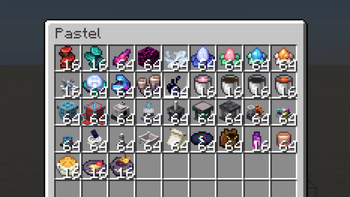
- Pastel
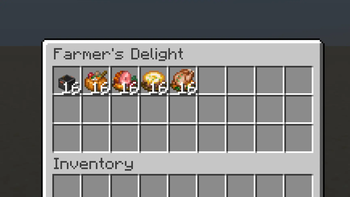
- Farmer's Delight
- Cobblemon
Configuration
Upstack can be configured in-game through the mods button (requires Mod Menu on
Fabric) or by manually editing config/upstack-common.toml.
Max Stack Size
Max stack sizes can be configured for items and item tags listed in the config.
Changes do not apply until the server is restarted.
The default configuration increases the max stack size of several commonly desired items, including water buckets
(1 → 16) and music discs (1 → 64). Set an item's max stack size to 0 to preserve its original value.
The value set for an individual item overrides the value set for any of its tags.
For instance, the stack size of item minecraft:bucket (default: 64) overrides the value of its tag #c:buckets
(default: 16).
If one item is included in two different-valued tags using a datapack, one of the values will take precedence,
but which one does so is undefined.
Use Cooldown
Use cooldowns can be configured for items listed in the config.
Changes apply immediately.
The default configuration adds modest cooldowns to snowballs (5 ticks) and throwable potions (10 ticks) to balance
their increased stack sizes. Set an item's use cooldown to 0 to remove its cooldown completely.
How does Upstack work?
On server startup, Upstack modifies the max stack size component of each configured item. Items set to values outside
[1, 99] are not modified.
In most cases, modifying an item's stack size doesn't change its expected behavior.
However, there are several known exceptions, each resulting in different issues:
- Multiple saddles can be equipped to one horse/donkey/mule (redundant).
- Multiple banner patterns can be placed in a loom at a time, even though banner patterns non-consumable (redundant).
- Placing one powder snow bucket deletes all remaining items in the stack (bug).
- Combining a stack of X items with a stack of Y enchanted books in an anvil violates item conservation (bug, exploit).
- Enchants all X items, even if there aren't enough enchanted books to do so (Y < X).
- Consumes all Y enchanted books, even if there are fewer items to enchant (X < Y).
- Costs Y times the experience of enchanting one item, even if the actual number of items enchanted differs (X /=
Y).
- Throwing splash potions, lingering potions, eggs, and snowballs has no cooldown, even though this could cause balance
issues (balance issue).
Upstack injects the following patches to address these issues:
- Set the max stack size of the horse/donkey/mule's saddle slot to 1.
- Set the max stack size of the loom's banner pattern slot to 1.
- When a powder snow bucket is placed, decrement the stack size instead of deleting the stack.
- When a stack of X items is combined with a stack of Y enchanted books:
- Enchant only 1 item at a time.
- Consume only 1 enchanted book at a time.
- Cost the experience of enchanting one item.
- Add optional, configurable cooldowns to splash potions, lingering potions, eggs, and snowballs.
Feature Roadmap
Planned
- Make max stack size bug fixes toggleable, in case of unforeseen conflicts with other mods.
- Disable mod features when not also installed on the server.
- Ensure mod configs are synced down from the server, especially cooldowns.
- Make max stack size modification data-driven, while retaining the ability to modify common items/tags through the
config.
Considering
- Add compatibility with popular mods which make max stack sizes able to exceed 99 (the Vanilla limit).
Not Planned
- Make max stack sizes able to exceed 99 (the Vanilla limit). Increasing Vanilla's max stack size limit and resolving
consequent bugs and mod conflicts is out of the scope of this mod.
Available Versions
How to Install Upstack on Your Server
Order Server
Order a Minecraft Java server with at least 3 GB RAM (4 GB recommended).
Set fabric Loader
In the panel under "Egg", select the fabric loader and matching Minecraft version (1.21.1).
Install Mod
Open the mod browser in the dashboard and search for "Upstack". Click "Install" – done! Alternatively, upload the .jar via SFTP to the /mods folder.
Compatibility
Mod Loaders
Minecraft Versions
1.21.1
Server-side
✓ RequiredRecommended RAM
4 GB(min. 3 GB)Frequently Asked Questions
Upstack server crashes on startup – what to do?
Most common cause: wrong fabric version or insufficient RAM. Check the server log (latest.log) for "OutOfMemoryError" or "Mixin" errors. With Mado Hosting: ensure at least 3 GB RAM is allocated and the loader matches the mod version (1.21.1). You can switch loaders with one click in the panel.
Is Upstack compatible with fabric and neoforge?
Upstack officially supports fabric, neoforge for Minecraft 1.21.1. The Mado dashboard automatically detects incompatible loader combinations.
Server lagging with Upstack – how to optimize performance?
Recommended RAM: 4 GB (per 8 players). Use /spark profiler to check if Upstack consumes the most tick time. Common fixes: reduce server view-distance to 8-10, install "performant" or "starlight" as supplementary mods on Forge. With Mado Hosting, your server runs on NVMe SSDs with dedicated CPU cores for minimal latency.
Similar Mods






Rent Modded Server
Install Upstack with just one click on your server.