
Useful Luck
Luck is useless in Minecraft. This mods fixes it!
About this Mod



If you ever invested in your luck stat in Minecraft in order to get better loots in chest... You got scammed!
Luck is probably the most misunderstood stat in Minecraft, but long story short: it only really affects fishing (with few neglictable exceptions). See the problem statement section for more details!
So this mod revamp how Luck affect various aspect of Minecraft, and it is HIGHLY customizable! The main difference is that using this mod, luck will affect any loot table: when opening chest or killing mobs, the luck will help roll additional high quality items in your loots!
- Balanced approach: The game primary focus is to make luck do what you thought it did in the first place
- Affect any loot table: With a highly customizable approach using datapacks, you can balance the mod any way you like, or even make it have additional effect in your modpack!
- Smart sorting algorithm: Luck can have negative effect on diversity of loot (see next section) this mod has a mechanism to prevent space hogging by smartly selecting loots when the chests overflow
- Highly compatible: the mod has been written to be non-invasive and highly compatible, incuding with mods like Lootr that changes how looting chests work
- Vanilla friendly: The internal calculation is processing the usual loot tables ensuring proper loot distribution
Azukaar's Fair Difficulty Overhaul

Problem Statement
If you try to simply open a bunch of dungeon chest (ex jungle temple) with a ridiculous luck level of 255, you will notice that actually, luck does not seem to make things better for you.
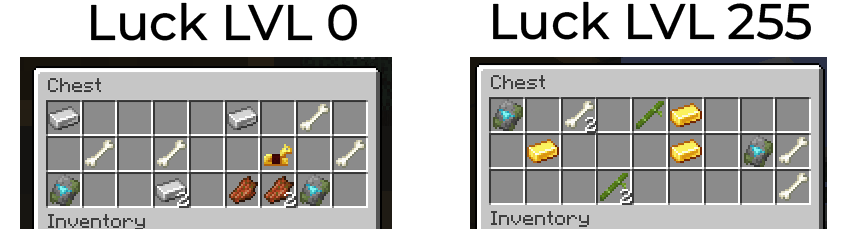
As you can see, while it's normal that luck's effect should be subtle, at level 255 (which is ridiculously high), there are no noticeable difference in the loot. The reason why can be very easily explained. While luck does technically have an effect, it is not what you think it is: the way luck work, is by simply multiplying rarity and quality of the item looted. Meaning it does not add anything! Simply change the quality... Additionally, the issue is that most item's quality is set to 0, and 0x luck is always 0... Meaning in most cases, luck would have no effect at all...
But it gets worst! Luck can even have a negative effect! Effectively, if you play a mod-pack with Apotheosis, you might have tried to max out your luck to get better stuff! But the issue is that very little mods set a quality on their loot. But when they do, a higher luck will lead to the undesirable behaviour of that specific mod hogging all the space! This is an example of opening a Bastion treasure chest at luck level 255 when Silent Gear is installed:

As you can see, since Silent Gear is the only mod setting a quality, its material are taking up all the space in the chests... yikes!
The solution
This mod revamp the way the luck stat affects looting. Instead of just relying on a quality mult, it allows you to have additional item roll per luck level. The roll are highly customizable, they can be per X level, have a % of chance to trigger, and so on... Additionally, the mod will manipulate the resulting additional loot in a way that ensure the player always gets a diversity of items, always in a balanced manner. It does so by reducing the probability of duplicate items (ex. 100 chesplates with different Apotheosis stats) in the added loots.
So to summarize, (and with the default settings) if you are luck lvl 255, then you will get up to 255 additional items rolled. Obvioulsy, in a real life game you would never reach such a high level, but for the sake of example, this is what would now happen with a level 255 luck, opening the same chest as the first screenshot:

The mod is fully open source and yes you can include it in your modpack
Available Versions
How to Install Useful Luck on Your Server
Order Server
Order a Minecraft Java server with at least 3 GB RAM (4 GB recommended).
Set forge Loader
In the panel under "Egg", select the forge loader and matching Minecraft version (1.21.11).
Install Mod
Open the mod browser in the dashboard and search for "Useful Luck". Click "Install" – done! Alternatively, upload the .jar via SFTP to the /mods folder.
Compatibility
Mod Loaders
Minecraft Versions
1.21.11, 1.21.10, 1.21.9 (+14 more)
Server-side
✓ RequiredRecommended RAM
4 GB(min. 3 GB)Frequently Asked Questions
Useful Luck server crashes on startup – what to do?
Most common cause: wrong forge version or insufficient RAM. Check the server log (latest.log) for "OutOfMemoryError" or "Mixin" errors. With Mado Hosting: ensure at least 3 GB RAM is allocated and the loader matches the mod version (1.21.11). You can switch loaders with one click in the panel.
Is Useful Luck compatible with forge and neoforge?
Useful Luck officially supports forge, neoforge for Minecraft 1.21.11, 1.21.10, 1.21.9. The Mado dashboard automatically detects incompatible loader combinations.
Server lagging with Useful Luck – how to optimize performance?
Recommended RAM: 4 GB (per 8 players). Use /spark profiler to check if Useful Luck consumes the most tick time. Common fixes: reduce server view-distance to 8-10, install "performant" or "starlight" as supplementary mods on Forge. With Mado Hosting, your server runs on NVMe SSDs with dedicated CPU cores for minimal latency.
Rent Modded Server
Install Useful Luck with just one click on your server.