
UtilsMod
Adds a lot of useful features related to the interface, gameplay and more
Screenshots

About this Mod
(EN)
This mod adds a lot of useful features, such as:
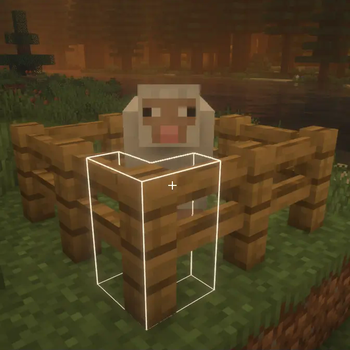
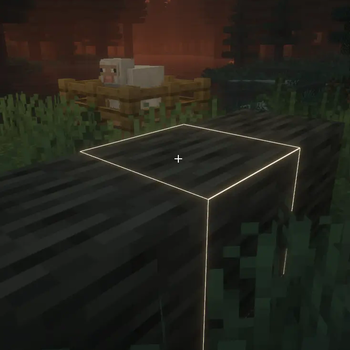
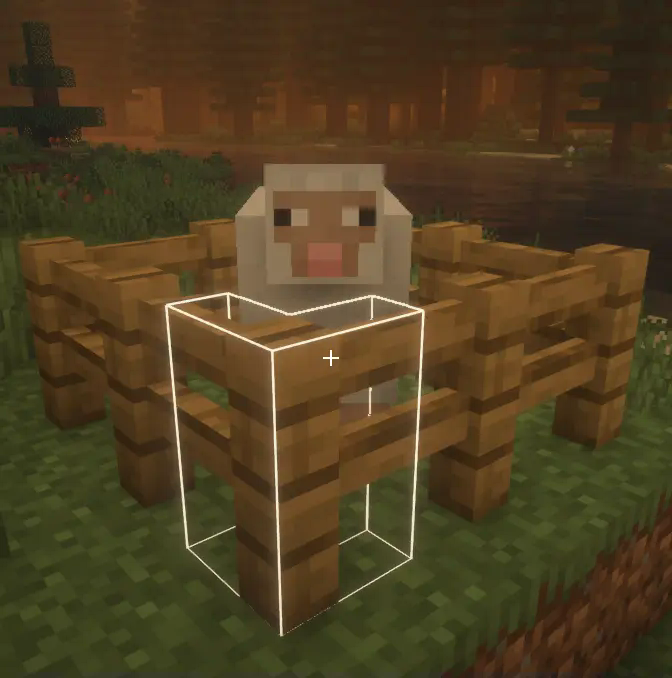
Changing the color and opacity of the block outline
White block outline
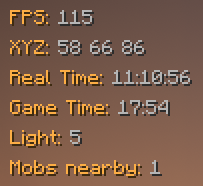
Some HUD elements that you can move anywhere on the screen
Current HUD elements list
- FPS
- Coordinates
- Real time
- Game time
- Level of lighting in the current block
- Number of mobs nearby
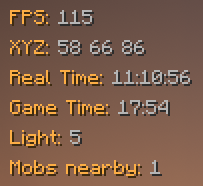
Simplified debug screen
Screenshot

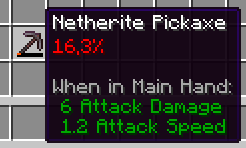
Showing durability in percentage
Screenshot
Autototem (automatically place an existing totem in your hand after you just used another one)
Autosprint (you dont have to press sprint key to sprint)
There are the following features in the mod, but they are in beta:
- Set a different crosshair instead of the standard one
- Disabling the armor rendering for all players (useful for screenshots)
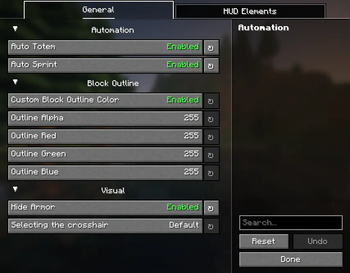
To open settings screen, press U,
to drag items to another place on the screen, press F6
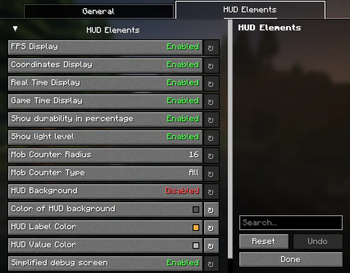
Settings list
- Enable/disable autototem
- Enable/disable autosptint
- Enable/disable custom block outline
- Color and opacity of the block outline
- Enable/disable armor render
- Default or select one of three custom crosshairs
- Enable/disable each of all HUD-elements
- Enable/disable showing durability in percentage
- Mob counter radius (1-64 blocks)
- Mod counter type (disabled; all; hostile; neutral; friendly)
- Enable/disable HUD background
- HUD background color and opacity
- HUD label color
- HUD value color
- Enable/disable Simplified debug screen
Dependency for UtilsMod mod is YACL
Other info
I'm going to add more features to this mod later, now I just ran out of ideas.
Now, UtilsMod is available for only two versions of the game (1.21.4 and 1.21.5), in the future, perhaps the mod will be released for older versions, like 1.20.1.
I have not completed the development of this mod to the end, one of the consequences of this is that now it has ARR license.
I really hope you enjoy this mod!
(RU)
Этот мод добавляет множество полезных функций, таких как:
Изменение цвета обводки блоков
Белая обводка
Множество HUD-элементов, которые вы можете перемещать в любое место экрана
Текущий список HUD-элементов
- FPS
- Координаты
- Реальное время
- Игровое время
- Уровень освещения в текущем блоке
- Количество мобов рядом
Упрощённый экран отладки
Скриншот
Отображение прочности предмета в процентах
Скриншот
Автототем (автоматически ставит имеющийся тотем заместо только что использованного)
Автоспринт (вам не обязательно нажимать кнопку спринта чтобы бежать)
В моде есть следующие функции, но они пока что в бете:
- Кастомный прицел вместо стандартного
- Выключение отображения брони у всех игроков (полезно для скриншотов)
Чтобы открыть экран настроек, нажмите U,
Чтобы перетаксивать HUD-элементы в любое место экрана, нажмите F6
Список настроек
- Включить/выключить автототем
- Включить/выключить автоспринт
- Включить/выключить кастомный цвет обводки
- Цвет и прозрачность обводки блоков
- Включить/выключить armor render
- Стандартный, или один из трех кастомных прицелов
- Включить/выключить отображение каждого из всех HUD-элементов
- Включить/выключить отображение прочности в процентах
- Радиус счетчика мобов (1-64 блоков)
- Тип считаемых мобов (выключено; все; враждебные; нейтральные; дружелюбные)
- Включить/выключить фон HUD-элементов
- Прозрачнось и цвет HUD
- Цвет меток HUD
- Цвет значений HUD
- Включить/выключить упрощённый экран отладки
Для работы UtilsMod требуется YACL
Другая информация
Я собираюсь потом добаить больше функций в мод, а сейчас у меня закончились идеи.
Сейчас UtilsMod доступен только для двух версий игры (1.21.4 and 1.21.5), в будущем, мод возможно выйдет для предыдущих версий, таких как 1.20.1.
Я ещё не закончил разработку мода, одно из последствий этого то, что пока что он лицензирован лицензией ARR.
Очень надеюсь, что вам понравится этот мод!
Available Versions
How to Install UtilsMod on Your Server
Order Server
Order a Minecraft Java server with at least 3 GB RAM (4 GB recommended).
Set fabric Loader
In the panel under "Egg", select the fabric loader and matching Minecraft version (1.21.5).
Install Mod
Open the mod browser in the dashboard and search for "UtilsMod". Click "Install" – done! Alternatively, upload the .jar via SFTP to the /mods folder.
Compatibility
Mod Loaders
Minecraft Versions
1.21.5, 1.21.4
Server-side
✗ UnsupportedRecommended RAM
4 GB(min. 3 GB)Frequently Asked Questions
UtilsMod server crashes on startup – what to do?
Most common cause: wrong fabric version or insufficient RAM. Check the server log (latest.log) for "OutOfMemoryError" or "Mixin" errors. With Mado Hosting: ensure at least 3 GB RAM is allocated and the loader matches the mod version (1.21.5). You can switch loaders with one click in the panel.
Is UtilsMod compatible with fabric?
UtilsMod officially supports fabric for Minecraft 1.21.5, 1.21.4. The Mado dashboard automatically detects incompatible loader combinations.
Server lagging with UtilsMod – how to optimize performance?
Recommended RAM: 4 GB (per 8 players). Use /spark profiler to check if UtilsMod consumes the most tick time. Common fixes: reduce server view-distance to 8-10, install "performant" or "starlight" as supplementary mods on Forge. With Mado Hosting, your server runs on NVMe SSDs with dedicated CPU cores for minimal latency.
Similar Mods



![[TaCZ] Timeless and Classics Zero](https://cdn.modrinth.com/data/SzzJttH8/fd27766d2bb8390d284696b1dbd358f87e081439_96.webp)


Rent Modded Server
Install UtilsMod with just one click on your server.