
Vanilla World
Add vanilla dimensions while keeping the original dimensions.
About this Mod
Vanilla World
Have you ever thougth of getting overwhelmed while playing with world generation datapack or mod but still want to have it? Have you wanted a sepparate vanilla dimensions that doesn't get affected by datapack or mod? This mod solved it.
Vanilla World will add vanilla dimensions while keeping the original dimensions. This mod dimensions will not affected by datapack or mod like TerraBlender (Biomes O' Plenty, Region Unexplored, Oh The Biomes We've Gone, etc), William Wythers' Overhauled Overworld, etc.
Features
- No client needed vanilla world.
- Include isolated vanilla Overworld, Nether, and The End dimension.
- Include datapack to change generation mode.
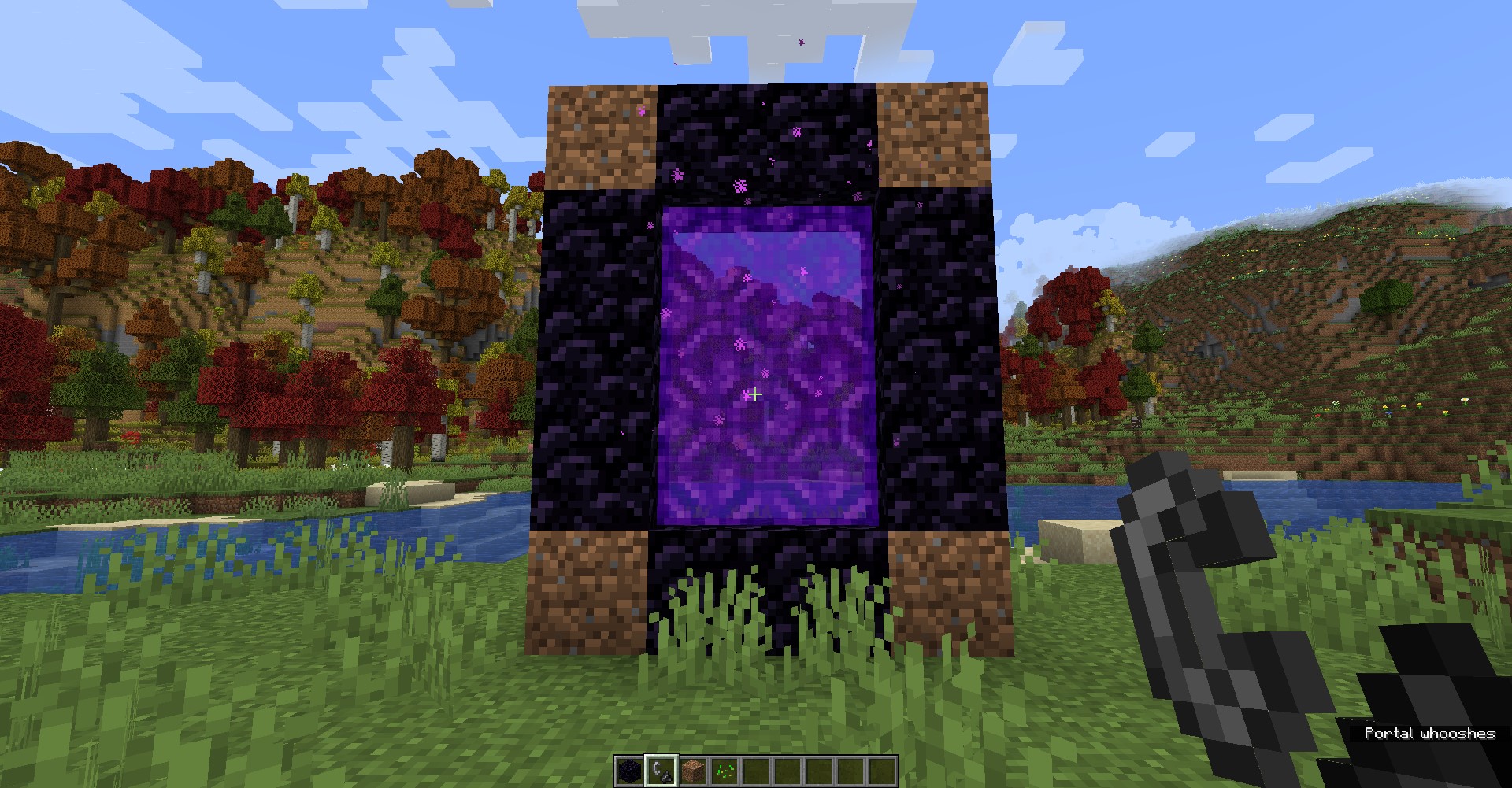
- Include datapack for alternative portal with coarse dirt corner.
- Datapack support.
Generation Mode
- Default: Unmodified Vanilla Biomes.
- Full Vanilla: Unmodified Vanilla Biomes + Vanilla Terrain Generation.
- Normal: Vanilla Biomes.
- Normal Terrain: Vanilla Biomes + Vanilla Terrain Generation.
Vanilla Terrain Generation is experimental feature to bypass terrain or world generation datapack or mod like Tectonic, Terralith, William Wythers' Expanded Ecosphere, etc.
Suggest new features for vanilla world on GitHub Discussion or Discord would be appreciated.
Usage
To access Vanilla World, make portal with obsidian frame and dirt on the frame corner like this:
Compatibility
- Default or Normal Mode:
- Tectonic
- Terralith
- William Wythers' Expanded Ecosphere
- Normal or Normal Terrain Mode:
- Geophilic
- Passengers Portal Fix
- Create Addons: Create: Portal Integration
Issues
There are no new compatibility issues or bugs being reported. Please report it on GitHub so it can be fixed. Make sure to check the dependencies first.
Support
🟨 26.1-26.1.2 / 🟩 1.21.1 / 🟥 1.21 / 🟩 1.20.1 / 🟪 1.16.5 / 🟪 1.12.2
🟩 Supported
🟥 Support Dropped
🟨 In Progress
🟪 Considered
Important Note
Feel free to use in modpacks, videos, stream, or similar media. Consider help me financially if you like this mod, I will be really grateful.


Available Versions
How to Install Vanilla World on Your Server
Order Server
Order a Minecraft Java server with at least 4 GB RAM (6 GB recommended).
Set fabric Loader
In the panel under "Egg", select the fabric loader and matching Minecraft version (1.21.1).
Install Mod
Open the mod browser in the dashboard and search for "Vanilla World". Click "Install" – done! Alternatively, upload the .jar via SFTP to the /mods folder.
Compatibility
Mod Loaders
Minecraft Versions
1.21.1, 1.21, 1.20.1
Server-side
✓ RequiredRecommended RAM
6 GB(min. 4 GB)Frequently Asked Questions
Vanilla World server crashes on startup – what to do?
Most common cause: wrong fabric version or insufficient RAM. Check the server log (latest.log) for "OutOfMemoryError" or "Mixin" errors. With Mado Hosting: ensure at least 4 GB RAM is allocated and the loader matches the mod version (1.21.1). You can switch loaders with one click in the panel.
Is Vanilla World compatible with fabric and forge and neoforge?
Vanilla World officially supports fabric, forge, neoforge for Minecraft 1.21.1, 1.21, 1.20.1. Note: Forge and Fabric mods are NOT cross-compatible – pick one loader and stick with it. The Mado dashboard automatically detects incompatible loader combinations.
Server lagging with Vanilla World – how to optimize performance?
Recommended RAM: 6 GB (per 5 players). Use /spark profiler to check if Vanilla World consumes the most tick time. Common fixes: reduce server view-distance to 8-10, install "performant" or "starlight" as supplementary mods on Forge. With Mado Hosting, your server runs on NVMe SSDs with dedicated CPU cores for minimal latency.
Similar Mods




Rent Modded Server
Install Vanilla World with just one click on your server.