
Vanity Splash Text
Discover your mods through the splash texts!
Screenshots
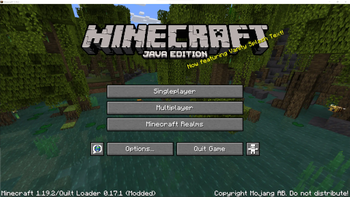
About this Mod
Have you ever discovered a modpack, seen the twenty-page list of mods, and decided to play without knowing exactly what
mods are you using? This mod is the solution to all your nightmares: it replaces the splash screen random texts with a
message that announces one of the mods that you're using. The message is randomized, and thus helps you slowly discover
the mods that you are playing with.
⚙️ Configuration
There are a couple of options you can play with in .minecraft/config/vanity_splash_text/config.toml. It is really
recommended for creators of modpacks to adjust the ignore_modid_regexs option to ensure that it has the expected
behaviour.
# All the mods with an id matching any of the regular expressions in this list will be excluded from the generated splash texts
ignore_modid_regexs = ["java", "minecraft", "quilt_.*", "quilted_fabric_.*", ".*api.*"]
# This templates are used to generate the splash texts. Some patterns are replaced:
# @@MOD@@ will be replaced with a mod's name
# @@VERSION@@ will be replaced with a mod's version
# If various replace patterns are used in a template, they will refer to the same mod
splash_templates = ["Now featuring @@MOD@@!", "With @@MOD@@ version @@VERSION@@!", "@@MOD@@???? Cool!", "Can't play without @@MOD@@!", "Who's at version @@VERSION@@? That's right, @@MOD@@!", "Did you ever play before with @@MOD@@?", "@@MOD@@ is @@MOD@@", "If you liked @@MOD@@, it's authors will love to hear about it!"]
# Set this option to false to enable seasonal splash texts (for Christmas, New year, and Halloween)
# default: false
skip_seasonal_splash_text = false
# The special PLAYER IS YOU splash text will be enabled if this value is set to 24
# default: 0
the_answer = 0
# If you want to see the original splash texts alongside the ones generated by the mod, set this option to true
# default: false
keep_old_splashes = false
📚 Modpacks
This mod has been designed with modpacks in mind, so i'll be very glad if you include it in yours. (Using this mod is also a great way to credit the mods in your modpack)
🎉 ModFest: Singularity
This mod is my submission to ModFest: Singularity!
Available Versions
How to Install Vanity Splash Text on Your Server
Order Server
Order a Minecraft Java server with at least 3 GB RAM (4 GB recommended).
Set quilt Loader
In the panel under "Egg", select the quilt loader and matching Minecraft version (1.20.1).
Install Mod
Open the mod browser in the dashboard and search for "Vanity Splash Text". Click "Install" – done! Alternatively, upload the .jar via SFTP to the /mods folder.
Compatibility
Mod Loaders
Minecraft Versions
1.20.1, 1.20, 1.19.4 (+4 more)
Server-side
✗ UnsupportedRecommended RAM
4 GB(min. 3 GB)Frequently Asked Questions
Vanity Splash Text server crashes on startup – what to do?
Most common cause: wrong quilt version or insufficient RAM. Check the server log (latest.log) for "OutOfMemoryError" or "Mixin" errors. With Mado Hosting: ensure at least 3 GB RAM is allocated and the loader matches the mod version (1.20.1). You can switch loaders with one click in the panel.
Is Vanity Splash Text compatible with quilt?
Vanity Splash Text officially supports quilt for Minecraft 1.20.1, 1.20, 1.19.4. The Mado dashboard automatically detects incompatible loader combinations.
Server lagging with Vanity Splash Text – how to optimize performance?
Recommended RAM: 4 GB (per 8 players). Use /spark profiler to check if Vanity Splash Text consumes the most tick time. Common fixes: reduce server view-distance to 8-10, install "performant" or "starlight" as supplementary mods on Forge. With Mado Hosting, your server runs on NVMe SSDs with dedicated CPU cores for minimal latency.
Similar Mods






Rent Modded Server
Install Vanity Splash Text with just one click on your server.