
VartaPack
beta! A support report and diagnostics tool for Minecraft modpack authors.
About this Mod
VartaPack
A lightweight diagnostics, integrity, and support-report tool for Minecraft modpacks.
VartaPack helps modpack authors understand whether a player's instance is clean, modified, unsupported, or broken. It validates the local environment, detects common setup problems, and generates structured reports that are easy to share when support is needed.
Purpose
VartaPack is not a performance mod.
It is a support layer for modpacks. It helps players see what is wrong and gives authors a clear overview before requesting full logs or crash reports.
Checks
VartaPack can validate:
- Minecraft version
- mod loader
- Java version
- allocated RAM
- required mods
- recommended mods
- blocked mods
- extra mods
- known conflicts
- selected file integrity
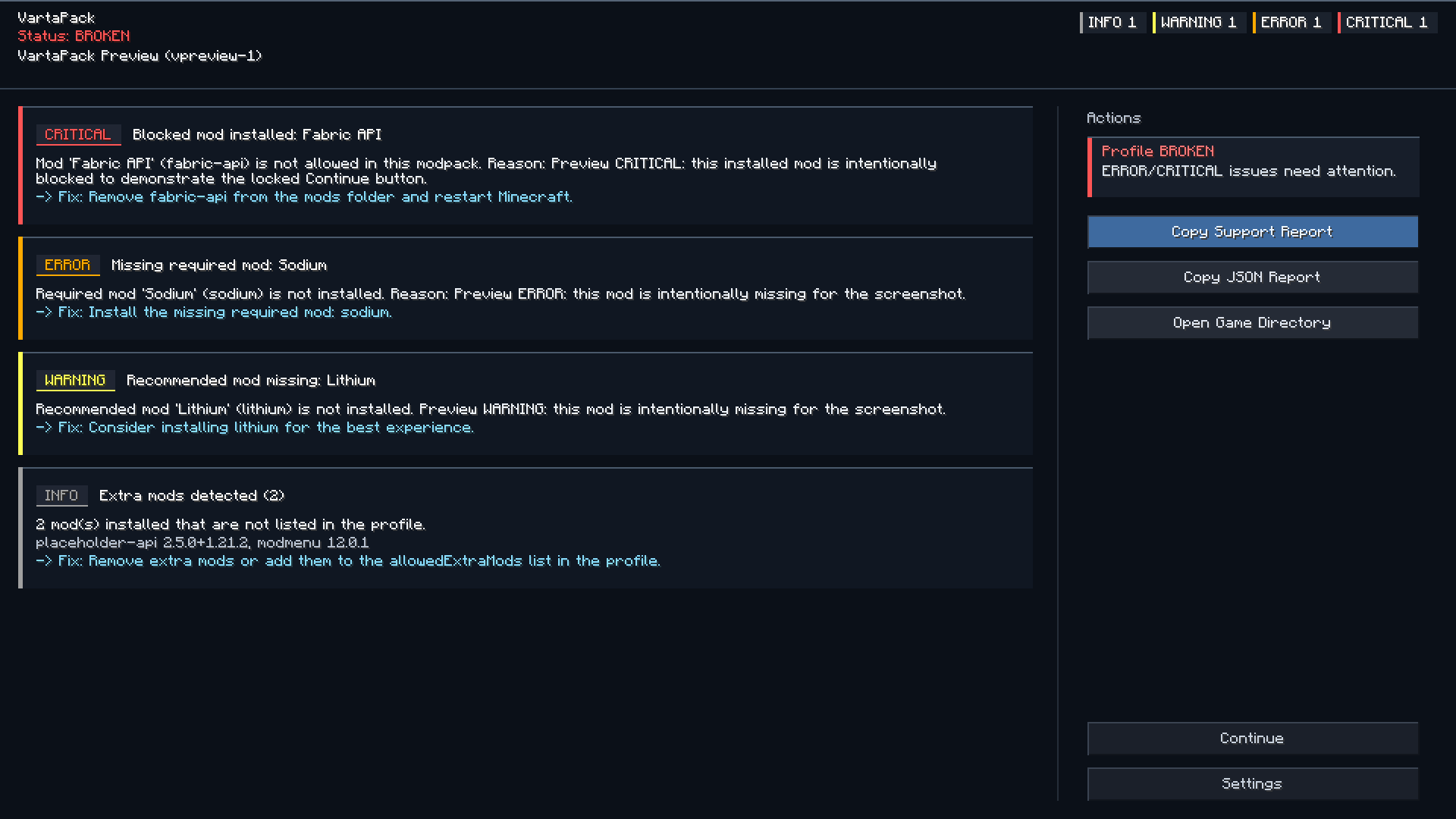
Detected issues can be shown through a startup notification and an in-game issues screen.
Pack status
VartaPack classifies the current instance as:
| Status | Meaning |
|---|---|
| Clean | The instance matches the expected profile. |
| Modified | The player changed something, but no critical issue was detected. |
| Unsupported | The instance may still run, but support should be limited. |
| Broken | A critical issue was detected. |
Support reports
Players can copy a generated support report with one click.
Reports may include:
- pack name and profile version
- Minecraft version
- loader and loader version
- Java version
- allocated RAM
- operating system
- detected issues
- missing required mods
- blocked mods
- extra mods
- installed mods
- suggested fixes
Reports are useful for GitHub issues, Discord support, CurseForge comments, and Modrinth support threads.
Crash analysis
VartaPack can scan local logs and crash reports for common patterns, such as:
- mixin failures
- missing dependencies
- incompatible mod sets
- duplicate mods
- wrong Java version
- out of memory errors
- renderer conflicts
Crash analysis is meant to help with debugging. It does not replace manual investigation.
Configuration
Modpack authors can configure VartaPack through:
config/vartapack/
Common files:
profile.json
rules.json
integrity.json
vartapack.json
These files define the expected environment, mod rules, conflict rules, integrity checks, support links, and report behavior.
Configuration examples and usage guide are available on GitHub.
Privacy
VartaPack does not collect telemetry.
Reports are generated locally. Logs, mod lists, usernames, file paths, and personal data are not uploaded automatically.
The player decides whether to copy and share a report.
Private paths and usernames are redacted where possible.
Limitations
VartaPack is a client-side diagnostics tool.
It cannot prevent every startup crash, because some crashes happen before any mod code can run. For those cases, use crash reports, doctor mode, and proper loader-level dependency or conflict rules.
Companion use
VartaPack can be used together with PackPing.
Recommended setup:
- VartaPack for diagnostics, integrity checks, and support reports
- PackPing for modpack update notifications
They can also be used separately.
Available Versions
How to Install VartaPack on Your Server
Order Server
Order a Minecraft Java server with at least 3 GB RAM (4 GB recommended).
Set fabric Loader
In the panel under "Egg", select the fabric loader and matching Minecraft version (26.2).
Install Mod
Open the mod browser in the dashboard and search for "VartaPack". Click "Install" – done! Alternatively, upload the .jar via SFTP to the /mods folder.
Compatibility
Mod Loaders
Minecraft Versions
26.2, 26.1.2, 26.1.1 (+17 more)
Server-side
✗ UnsupportedRecommended RAM
4 GB(min. 3 GB)Frequently Asked Questions
VartaPack server crashes on startup – what to do?
Most common cause: wrong fabric version or insufficient RAM. Check the server log (latest.log) for "OutOfMemoryError" or "Mixin" errors. With Mado Hosting: ensure at least 3 GB RAM is allocated and the loader matches the mod version (26.2). You can switch loaders with one click in the panel.
Is VartaPack compatible with fabric and forge and neoforge?
VartaPack officially supports fabric, forge, neoforge for Minecraft 26.2, 26.1.2, 26.1.1. Note: Forge and Fabric mods are NOT cross-compatible – pick one loader and stick with it. The Mado dashboard automatically detects incompatible loader combinations.
Server lagging with VartaPack – how to optimize performance?
Recommended RAM: 4 GB (per 8 players). Use /spark profiler to check if VartaPack consumes the most tick time. Common fixes: reduce server view-distance to 8-10, install "performant" or "starlight" as supplementary mods on Forge. With Mado Hosting, your server runs on NVMe SSDs with dedicated CPU cores for minimal latency.
Similar Mods






Rent Modded Server
Install VartaPack with just one click on your server.