
Vault Manager
Simple vault manager for Trial Chambers
Screenshots

About this Mod
Vault Manager
Simple vault manager for Trial Chambers in Minecraft
 MultiVersion 1.21-1.21.10: Single JAR for all versions
Purely client side: works in Singleplayer, in Multiplayer and doesn't have to be installed on Servers
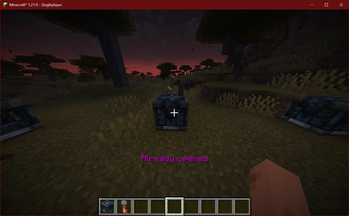
Vault Manager remembers which vaults you have already opened and tells you either:
Already opened
Or:
Not yet opened
Especially useful with Freecam when searching for previously unlooted Trial Chambers.
Features
- Open a vault with a matching key to remember it
- Remember a vault which you have already opened before installing the mod: shift+click
- Forget all remembered vaults from the current world: /vault-manager clear
- Query the nearest opened vault: /vault-manager near; works in the Overworld and in the Nether
Memory
The memory file works just like a config file, slowly being filled by the mod while you loot away.
The file is located at MINECRAFT/config/vault-manager.json, you can manually edit it
between game restarts, use some program to visualize your adventures or copy the file to another installation
if you want to continue playing on the same server.
About Me
I am a computer science student in Germany and have a part-time job at a tech company.
Apart from that, I enjoy my free time by spending it with friends, chatting online or gaming.
If you want to keep this project alive, found it helpful or just want to support and motivate me to go on,
you could consider making a small ☕ donation.
Available Versions
How to Install Vault Manager on Your Server
Order Server
Order a Minecraft Java server with at least 3 GB RAM (4 GB recommended).
Set fabric Loader
In the panel under "Egg", select the fabric loader and matching Minecraft version (1.21.10).
Install Mod
Open the mod browser in the dashboard and search for "Vault Manager". Click "Install" – done! Alternatively, upload the .jar via SFTP to the /mods folder.
Compatibility
Mod Loaders
Minecraft Versions
1.21.10, 1.21.9, 1.21.8 (+8 more)
Server-side
✗ UnsupportedRecommended RAM
4 GB(min. 3 GB)Frequently Asked Questions
Vault Manager server crashes on startup – what to do?
Most common cause: wrong fabric version or insufficient RAM. Check the server log (latest.log) for "OutOfMemoryError" or "Mixin" errors. With Mado Hosting: ensure at least 3 GB RAM is allocated and the loader matches the mod version (1.21.10). You can switch loaders with one click in the panel.
Is Vault Manager compatible with fabric?
Vault Manager officially supports fabric for Minecraft 1.21.10, 1.21.9, 1.21.8. The Mado dashboard automatically detects incompatible loader combinations.
Server lagging with Vault Manager – how to optimize performance?
Recommended RAM: 4 GB (per 8 players). Use /spark profiler to check if Vault Manager consumes the most tick time. Common fixes: reduce server view-distance to 8-10, install "performant" or "starlight" as supplementary mods on Forge. With Mado Hosting, your server runs on NVMe SSDs with dedicated CPU cores for minimal latency.
Similar Mods






Rent Modded Server
Install Vault Manager with just one click on your server.