
VeinMine
Veinmine is a simple, lightweight, multi- loader, and fast-updating Minecraft mod that allows players to efficiently mine connected blocks of the same type.
Screenshots



About this Mod
Vein Mine - Minecraft Mod
English | 简体中文
Introduction
Veinmine is a simple, lightweight, muliti-loader, and fast-updating Minecraft mod that allows players to efficiently mine connected blocks of the same type. Whether you're mining ores, chopping trees, or gathering resources, this mod makes the process faster and more convenient!
Features
- Vein Mining: Break an entire vein of ores or a group of connected blocks with a single action.
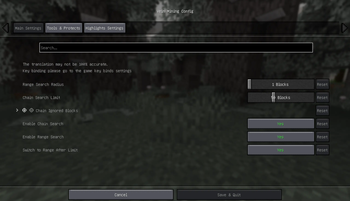
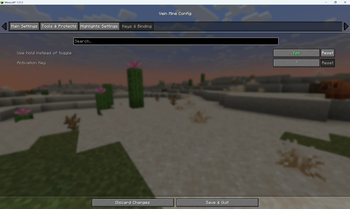
- Configurable Settings: Adjust the mining range, block types, and activation methods through an intuitive settings menu.
- Keybind Support: Toggle vein mining on/off with a customizable key.
- Blacklist: Control which blocks can't be vein-mined.
- Compatibility: Works seamlessly with other mods and custom blocks.
Recommends
For fabric, it's recommended to install ModMenu for better mod management and easier configuration.
Configuration
- Open the mods menu to customize Vein Mine's behavior. OR
- Edit the configuration file located in
.minecraft/config/veinmine.json. - Configuration Guide
- Use
/veinmine reloadcommand to reload configuration from file.
Controls
- Press `(~) (default) to toggle Vein Mine.
Support & Feedback
If you encounter any issues or have any suggestions, feel free to open an issue on our GitHub Issues page.
Or, if you're interested in contribution to our code, welcome to open a PR on GitHub!
License
This mod is licensed under the GNU General Public License Version 3. See LICENSE for details.
Available Versions
How to Install VeinMine on Your Server
Order Server
Order a Minecraft Java server with at least 3 GB RAM (4 GB recommended).
Set fabric Loader
In the panel under "Egg", select the fabric loader and matching Minecraft version (26.2-rc-2).
Install Mod
Open the mod browser in the dashboard and search for "VeinMine". Click "Install" – done! Alternatively, upload the .jar via SFTP to the /mods folder.
Compatibility
Mod Loaders
Minecraft Versions
26.2-rc-2, 26.2-pre-3, 26.1.2 (+19 more)
Server-side
✓ RequiredRecommended RAM
4 GB(min. 3 GB)Frequently Asked Questions
VeinMine server crashes on startup – what to do?
Most common cause: wrong fabric version or insufficient RAM. Check the server log (latest.log) for "OutOfMemoryError" or "Mixin" errors. With Mado Hosting: ensure at least 3 GB RAM is allocated and the loader matches the mod version (26.2-rc-2). You can switch loaders with one click in the panel.
Is VeinMine compatible with fabric and neoforge?
VeinMine officially supports fabric, neoforge for Minecraft 26.2-rc-2, 26.2-pre-3, 26.1.2. The Mado dashboard automatically detects incompatible loader combinations.
Server lagging with VeinMine – how to optimize performance?
Recommended RAM: 4 GB (per 8 players). Use /spark profiler to check if VeinMine consumes the most tick time. Common fixes: reduce server view-distance to 8-10, install "performant" or "starlight" as supplementary mods on Forge. With Mado Hosting, your server runs on NVMe SSDs with dedicated CPU cores for minimal latency.
Similar Mods




Rent Modded Server
Install VeinMine with just one click on your server.