
VelvetTab
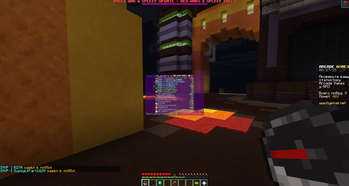
Smooth animation of opening and closing the player list
Screenshots
About this Mod
VelvetTab



Smooth, configurable animation for the TAB player list.
❓ What is this?
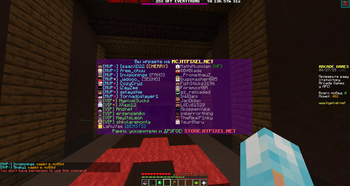
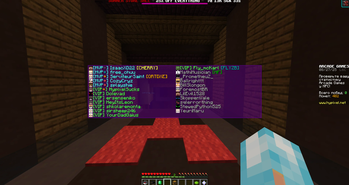
VelvetTab is a lightweight client-side mod for Fabric that adds a smooth open/close animation to the TAB player list and lets you fine-tune its look and feel.
✨ Features
Animated TAB
- enable/disable animation
- adjustable duration
- X/Y offsets (
offsetY = -1centers vertically)
Appearance
- panel background (toggle + ARGB color)
- row background (toggle + ARGB color)
- outer border (toggle + ARGB color)
- separate backgrounds for Header and Footer
Text shadows (per section)
- header text shadow
- footer text shadow
- player list text shadow (names / numeric ping)
Player heads
- toggle heads
- optional “better hat” overlay (slightly thicker 2nd skin layer)
Ping display modes
- Vanilla — standard icon bars
- Numeric — latency in ms with custom colors per threshold
(<75, <145, <200, <300, <400, ≥400) - Off — hide ping
Configuration UX
- Cloth Config settings screen
- live preview while editing
- presets: export/import (Base64) + quick Reset
Client-only
- no server installation required
🖥️ How does it work?
The mod uses mixins to adjust the animation and rendering of the player list while keeping the vanilla behavior where appropriate.
📦 Installation
- Install Fabric Loader.
- (Recommended) Install Cloth Config and Mod Menu.
- Download the latest VelvetTab from the Modrinth Versions page.
- Drop the
.jarinto yourmodsfolder. - Launch Minecraft with the Fabric profile.
VelvetTab is client-side only.
📖 Usage
Press TAB as usual — the animation and visual tweaks apply automatically. Adjust everything in the settings screen; changes are previewed live.
License
This project is licensed under the ARR License.
Available Versions
How to Install VelvetTab on Your Server
Order Server
Order a Minecraft Java server with at least 3 GB RAM (4 GB recommended).
Set fabric Loader
In the panel under "Egg", select the fabric loader and matching Minecraft version (1.21.11).
Install Mod
Open the mod browser in the dashboard and search for "VelvetTab". Click "Install" – done! Alternatively, upload the .jar via SFTP to the /mods folder.
Compatibility
Mod Loaders
Minecraft Versions
1.21.11, 1.21.8, 1.21.7 (+7 more)
Server-side
✗ UnsupportedRecommended RAM
4 GB(min. 3 GB)Frequently Asked Questions
VelvetTab server crashes on startup – what to do?
Most common cause: wrong fabric version or insufficient RAM. Check the server log (latest.log) for "OutOfMemoryError" or "Mixin" errors. With Mado Hosting: ensure at least 3 GB RAM is allocated and the loader matches the mod version (1.21.11). You can switch loaders with one click in the panel.
Is VelvetTab compatible with fabric?
VelvetTab officially supports fabric for Minecraft 1.21.11, 1.21.8, 1.21.7. The Mado dashboard automatically detects incompatible loader combinations.
Server lagging with VelvetTab – how to optimize performance?
Recommended RAM: 4 GB (per 8 players). Use /spark profiler to check if VelvetTab consumes the most tick time. Common fixes: reduce server view-distance to 8-10, install "performant" or "starlight" as supplementary mods on Forge. With Mado Hosting, your server runs on NVMe SSDs with dedicated CPU cores for minimal latency.
Rent Modded Server
Install VelvetTab with just one click on your server.