
VertexEditor
Powerful Terrain Editor, for forge!
Screenshots
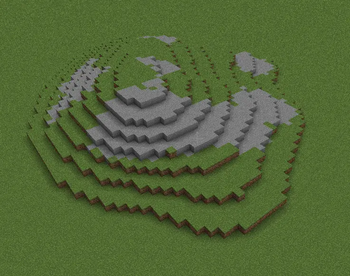


About this Mod
(to access to the menu, press RSHIFT)
VertexEditor – Advanced Terrain Editing for Minecraft (Forge)
The VertexEditor mod for Minecraft Forge 1.20.1 provides users with a strong terrain editing tool which enables them to create terrain changes through simple and direct methods. The building and mapping tools of this mod allow users to create in-game worlds through its advanced brush-based editing system which was inspired after terrain editors software.
VertexEditor enables you to create smooth natural terrain for your custom maps and landscapes and your extensive projects because it gives you complete control over terrain shaping.
Features
- Brush Tool lets users change terrain at their desired size and strength.
- Smooth terrain tool enables users to instantly create smooth surfaces by applying it to rough and unbalanced landforms.
- The Eraser lets users delete specific terrain elements while leaving the rest of the area untouched.
- The Surface Painter tool enables users to paint blocks directly onto the surface of the terrain.
- The Wall Builder tool enables users to create walls which maintain a uniform and good appearance.
- Flatten Tool enables users to create building areas which have uniform height through its ability to flatten land to a specific elevation.
Why VertexEditor?
- The system enables users to manipulate terrain quickly while maintaining productivity.
- Serves as the perfect tool for builders and map makers and server admins.
- and it allows users to carry out precise work on terrain projects.
- VertexEditor support forge, this makes it unique and (perhaps) the only choice for effectively modifying terrain for Forge.
The VertexEditor transforms Minecraft into an authentic landscape design tool which gives users complete artistic control over their creative work.
Credits:
ImGUI-java by SpaiR (integrated into the mod)
- Found a bug? feel free to join the Discord server
Available Versions
How to Install VertexEditor on Your Server
Order Server
Order a Minecraft Java server with at least 3 GB RAM (4 GB recommended).
Set forge Loader
In the panel under "Egg", select the forge loader and matching Minecraft version (1.20.6).
Install Mod
Open the mod browser in the dashboard and search for "VertexEditor". Click "Install" – done! Alternatively, upload the .jar via SFTP to the /mods folder.
Compatibility
Mod Loaders
Minecraft Versions
1.20.6, 1.20.5, 1.20.4 (+3 more)
Server-side
✓ RequiredRecommended RAM
4 GB(min. 3 GB)Frequently Asked Questions
VertexEditor server crashes on startup – what to do?
Most common cause: wrong forge version or insufficient RAM. Check the server log (latest.log) for "OutOfMemoryError" or "Mixin" errors. With Mado Hosting: ensure at least 3 GB RAM is allocated and the loader matches the mod version (1.20.6). You can switch loaders with one click in the panel.
Is VertexEditor compatible with forge?
VertexEditor officially supports forge for Minecraft 1.20.6, 1.20.5, 1.20.4. The Mado dashboard automatically detects incompatible loader combinations.
Server lagging with VertexEditor – how to optimize performance?
Recommended RAM: 4 GB (per 8 players). Use /spark profiler to check if VertexEditor consumes the most tick time. Common fixes: reduce server view-distance to 8-10, install "performant" or "starlight" as supplementary mods on Forge. With Mado Hosting, your server runs on NVMe SSDs with dedicated CPU cores for minimal latency.
Similar Mods






Rent Modded Server
Install VertexEditor with just one click on your server.