
VexBot - PvP Against Bots
Super smart Minecraft bots.Much better than PvP BOT
Screenshots



About this Mod
Vex Bot 1.7.0 - Descrption
PvP Methods ⚔️
- Sword
- Axe
- Sheild
- Crossbow & Bow
- Cobweb (Toggleable)
- Potions
- TnT Minecart PvP (Toggleable)
- Crystal PvP
- Anchor PvP
- Wind Charge Macing
- Elytra mace
- Spear Mace
Techniques 🔨
- Crit Chaining
- Combing
- Sweeping Hit
- W Tapping
Pathfinding & Ai 🎯
- Avoids Obstacles (Lava, Powderd Snow, etc)
- Allways Takes the best route
- Revenge Mode
- Follow Mode
- Priority Targeting (Preffers Low Hp/Eating targets)
- Auto Targeting (Configurable)
Difficulty System ⚖️
- Easy → Medium → Hard → Expert → Perfect
- Changes Reaction Time, Combo Chance, etc
Teams Features 👥
- Team System (Groups bots together)
- Each Team has there own indivdivdual settings
- Per-Team target lists (teams target specific people or multiple people)
Settings & GUI ⚙️
- In-game GUI — configure all bot settings without commands
- Per-team settings GUI with full toggles - Cart mode selector cycling through all 5 modes
- Settings auto-save per world — survive server restarts
Custom Potion 🧪
- Refills the kit that the potion is linked to. (By right Clicking)
Issue Tracker
https://vex-log-keeper.lovable.app
How to use
VexBot — How to Use check the tutorials at
(https://vex-log-keeper.lovable.app/tutorials)
Settings GUI
/vexbot settings — opens the main settings menu where you configure:
Difficulty — Easy / Medium / Hard / Expert / Perfect (controls reaction
speed, crits, combos)
- Auto Target — bot automatically finds and attacks nearby players
- Target Players / Bots / Mobs — what the bot will attack
- Revenge Mode — bot attacks whoever hits it
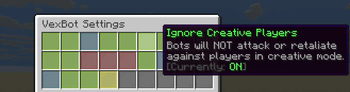
- Ignore Creative — skip creative mode players
- Use Elytra Mace — enable aerial elytra+mace drop combo
- Use Ender Pearl — bot throws ender pearl to escape when low HP
Kits (Inventory Loadouts)
- Put the gear you want in your own inventory
- /vexbot createkit
— saves your current inventory as a kit - /vexbot givekit — opens GUI to give a kit to a bot
- /vexbot deletekit — delete a saved kit
- /vexbot kiticon — set a display icon for a kit in the menu
Teams
/vexbot teamcreate
shortcuts to targets/settings)
/vexbot teammembers
/vexbot teamtargets
/vexbot teamsettings
/vexbot teamgivekit
/vexbot teamdelete
/vexbot teamjoin
/vexbot teamleave — leave your team roster
Follow Mode
/vexbot follow
/vexbot follow
Quick Start (Fighting Bot)
- /vexbot spawn — spawn a bot
- Give it gear: /vexbot givekit (or manually give items)
- /vexbot settings → enable Auto Target + Target Players
- Set Difficulty to your preference
- The bot will start fighting automatically
Available Versions
How to Install VexBot - PvP Against Bots on Your Server
Order Server
Order a Minecraft Java server with at least 3 GB RAM (4 GB recommended).
Set fabric Loader
In the panel under "Egg", select the fabric loader and matching Minecraft version (1.21.11).
Install Mod
Open the mod browser in the dashboard and search for "VexBot - PvP Against Bots". Click "Install" – done! Alternatively, upload the .jar via SFTP to the /mods folder.
Compatibility
Mod Loaders
Minecraft Versions
1.21.11
Server-side
✓ RequiredRecommended RAM
4 GB(min. 3 GB)Frequently Asked Questions
VexBot - PvP Against Bots server crashes on startup – what to do?
Most common cause: wrong fabric version or insufficient RAM. Check the server log (latest.log) for "OutOfMemoryError" or "Mixin" errors. With Mado Hosting: ensure at least 3 GB RAM is allocated and the loader matches the mod version (1.21.11). You can switch loaders with one click in the panel.
Is VexBot - PvP Against Bots compatible with fabric?
VexBot - PvP Against Bots officially supports fabric for Minecraft 1.21.11. The Mado dashboard automatically detects incompatible loader combinations.
Server lagging with VexBot - PvP Against Bots – how to optimize performance?
Recommended RAM: 4 GB (per 8 players). Use /spark profiler to check if VexBot - PvP Against Bots consumes the most tick time. Common fixes: reduce server view-distance to 8-10, install "performant" or "starlight" as supplementary mods on Forge. With Mado Hosting, your server runs on NVMe SSDs with dedicated CPU cores for minimal latency.
Similar Mods




![[TaCZ] Timeless and Classics Zero](https://cdn.modrinth.com/data/SzzJttH8/fd27766d2bb8390d284696b1dbd358f87e081439_96.webp)

Rent Modded Server
Install VexBot - PvP Against Bots with just one click on your server.
Details
- License
- Creative Commons Attribution Non Commercial 4.0 International
- Server-side
- Required