
VideoPlayer
Play video in world using VLC library
Screenshots


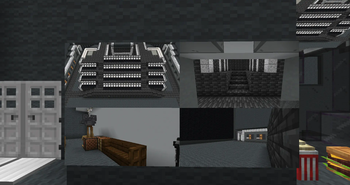
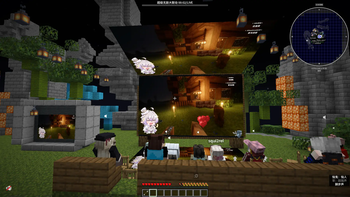
About this Mod
Control by using /vlc command
Download library here
在此处下载依赖
使用的libVLC版本已降级,如果mod版本大于等于1.5.8那么需要下载libVLC 3(上方链接已更新)
关于安卓设备:查看这个仓库获取更多信息
- vlc createArea x1 y1 z1 x2 y2 z2 观影区名字 -创建一个观影区
- vlc createScreen 观影区 屏幕名字 x1 y1 z1 x2 y2 z2 x3 y3 z3 x4 y4 z4 复制源 -在观影区里创建一个屏幕,坐标应该从左上角开始,逆时针顺序
复制源: 如果这个屏幕是主屏幕,那么传""。如果这个屏幕是复制的屏幕,那么传主屏幕名字 - vlc removeArea 观影区 -移除一个观影区
- vlc removeScreen 观影区 屏幕 -移除一个屏幕
- vlc play url -请求一个url,url可以是b站视频、直播或者直链。现在也支持填入实体uuid显示实体视角
- vlc list -列出目前观影区上的播放列表
- vlc skip -投票跳过屏幕上的视频
- vlc skipPercent -设置投票跳过需要的玩家比例
- vlc volume 音量 -设置播放器的音量,范围0到100
- vlc scale stertch/auto/set scaleX scaleY -设置播放器的缩放,stertch拉伸填充,auto自适应,set手动设置x轴y轴缩放,默认auto
对于全景视频,使用此指令可将屏幕设为全景模式
/vlc setmeta <屏幕播放区域> <屏幕> custom set 360 1
/vlc setmeta <屏幕播放区域> <屏幕> custom set radius <全景球半径>
/vlc setmeta <屏幕播放区域> <屏幕> custom set x/y/z <对应屏幕左上角点的偏移量>(这个是整型格式的浮点,详见Java Float floatToIntBits()用法及代码示例 - 纯净天空)
/vlc setmeta <屏幕播放区域> <屏幕> custom set skybox 0/1(如果是1那么会原点吸附到摄像头上)
如果安装了Vivecraft,那么可以播放3d视频(左右格式)。使用此指令可将屏幕设为3d模式
/vlc setmeta <屏幕播放区域> <屏幕> custom set 3d 1
可以同时开启全景和3d模式,那么可以播放VR180格式的视频
Available Versions
How to Install VideoPlayer on Your Server
Order Server
Order a Minecraft Java server with at least 3 GB RAM (4 GB recommended).
Set fabric Loader
In the panel under "Egg", select the fabric loader and matching Minecraft version (1.21.4).
Install Mod
Open the mod browser in the dashboard and search for "VideoPlayer". Click "Install" – done! Alternatively, upload the .jar via SFTP to the /mods folder.
Compatibility
Mod Loaders
Minecraft Versions
1.21.4, 1.20.1
Server-side
✓ RequiredRecommended RAM
4 GB(min. 3 GB)Frequently Asked Questions
VideoPlayer server crashes on startup – what to do?
Most common cause: wrong fabric version or insufficient RAM. Check the server log (latest.log) for "OutOfMemoryError" or "Mixin" errors. With Mado Hosting: ensure at least 3 GB RAM is allocated and the loader matches the mod version (1.21.4). You can switch loaders with one click in the panel.
Is VideoPlayer compatible with fabric?
VideoPlayer officially supports fabric for Minecraft 1.21.4, 1.20.1. The Mado dashboard automatically detects incompatible loader combinations.
Server lagging with VideoPlayer – how to optimize performance?
Recommended RAM: 4 GB (per 8 players). Use /spark profiler to check if VideoPlayer consumes the most tick time. Common fixes: reduce server view-distance to 8-10, install "performant" or "starlight" as supplementary mods on Forge. With Mado Hosting, your server runs on NVMe SSDs with dedicated CPU cores for minimal latency.
Similar Mods






Rent Modded Server
Install VideoPlayer with just one click on your server.