
Village Stats
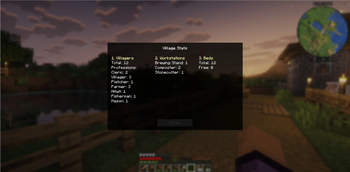
Displays detailed stats of the nearest village in Minecraft
Screenshots
About this Mod
Village Stats
A lightweight utility mod that shows real-time village statistics directly in-game.
Displays detailed information about the nearest village.
Works in real-time — updates instantly when village changes.
✨ Features
- Shows villager count
- Displays profession distribution
- Counts beds and free beds
- Tracks workstations (POI)
- Detects real village center using bell
🎮 Controls
- Press V to open the stats window
📦 Requirements
- Minecraft 26.1.2
- Fabric Loader
- Fabric API
🇷🇺 Статистика деревни
Лёгкий мод, который показывает подробную статистику ближайшей деревни прямо в игре.
✨ Возможности
- Показывает количество жителей
- Отображает распределение профессий
- Считает кровати и свободные места
- Отслеживает рабочие блоки (POI)
- Определяет центр деревни по колоколу
- Обновляется в реальном времени
🎮 Управление
- Нажмите V, чтобы открыть окно статистики
📦 Требования
- Minecraft 26.1.2
- Fabric Loader
- Fabric API
Available Versions
How to Install Village Stats on Your Server
Order Server
Order a Minecraft Java server with at least 3 GB RAM (4 GB recommended).
Set fabric Loader
In the panel under "Egg", select the fabric loader and matching Minecraft version (26.1.2).
Install Mod
Open the mod browser in the dashboard and search for "Village Stats". Click "Install" – done! Alternatively, upload the .jar via SFTP to the /mods folder.
Compatibility
Mod Loaders
Minecraft Versions
26.1.2, 1.21.2
Server-side
✓ RequiredRecommended RAM
4 GB(min. 3 GB)Frequently Asked Questions
Village Stats server crashes on startup – what to do?
Most common cause: wrong fabric version or insufficient RAM. Check the server log (latest.log) for "OutOfMemoryError" or "Mixin" errors. With Mado Hosting: ensure at least 3 GB RAM is allocated and the loader matches the mod version (26.1.2). You can switch loaders with one click in the panel.
Is Village Stats compatible with fabric?
Village Stats officially supports fabric for Minecraft 26.1.2, 1.21.2. The Mado dashboard automatically detects incompatible loader combinations.
Server lagging with Village Stats – how to optimize performance?
Recommended RAM: 4 GB (per 8 players). Use /spark profiler to check if Village Stats consumes the most tick time. Common fixes: reduce server view-distance to 8-10, install "performant" or "starlight" as supplementary mods on Forge. With Mado Hosting, your server runs on NVMe SSDs with dedicated CPU cores for minimal latency.
Similar Mods






Rent Modded Server
Install Village Stats with just one click on your server.