
Villager Link
This mod adds an easy way to see which villagers take which beds and work stations when trading with them!
Screenshots
About this Mod
🏡 Villager Link
Which villager claimed your lectern? Which one is sleeping in THAT bed? Find out instantly.
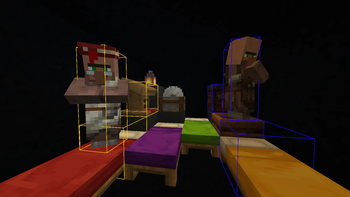
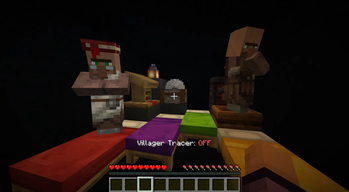
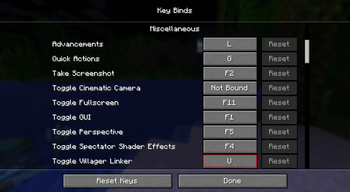
Villager Link is a simple but essential utility mod for anyone who has ever lost their mind trying to figure out why their villagers won't restock, won't breed, or just refuse to cooperate. Press U to toggle the Villager Tracer and instantly reveal the invisible links between every villager, their bed, and their job site block - all wrapped in colour-coded bounding boxes so you can see exactly who owns what.
🔍 Info To Know
- Each villager gets their own unique colour that highlights:
- Themselves — never lose track of who's who in a crowded trading hall!
- Their claimed bed - spot double-claimed or orphaned beds immediately!
- Their job site block - confirm your librarian is on their lectern, your butcher on their smoker, your cleric on their brewing stand, and so on!
😤 You Need This
No more breaking and replacing workstations hoping for the best. No more standing there wondering why your carefully built breeder isn't working. One keypress and the answer is right in front of you - whether it's a villager that's claimed a bed two chunks away, or two villagers fighting over the same workstation.
⚙️ Features
- 🟡 Colour-coded outlines per villager, bed, and job site block!
- ⌨️ Fully rebindable toggle (default: U)!
- 💬 On-screen confirmation when toggling!
- 🪶 Zero performance impact when off or on!
Press U. See the truth. Fix your villagers.
Available Versions
How to Install Villager Link on Your Server
Order Server
Order a Minecraft Java server with at least 3 GB RAM (4 GB recommended).
Set fabric Loader
In the panel under "Egg", select the fabric loader and matching Minecraft version (1.21.11).
Install Mod
Open the mod browser in the dashboard and search for "Villager Link". Click "Install" – done! Alternatively, upload the .jar via SFTP to the /mods folder.
Compatibility
Mod Loaders
Minecraft Versions
1.21.11
Server-side
✗ UnsupportedRecommended RAM
4 GB(min. 3 GB)Frequently Asked Questions
Villager Link server crashes on startup – what to do?
Most common cause: wrong fabric version or insufficient RAM. Check the server log (latest.log) for "OutOfMemoryError" or "Mixin" errors. With Mado Hosting: ensure at least 3 GB RAM is allocated and the loader matches the mod version (1.21.11). You can switch loaders with one click in the panel.
Is Villager Link compatible with fabric?
Villager Link officially supports fabric for Minecraft 1.21.11. The Mado dashboard automatically detects incompatible loader combinations.
Server lagging with Villager Link – how to optimize performance?
Recommended RAM: 4 GB (per 8 players). Use /spark profiler to check if Villager Link consumes the most tick time. Common fixes: reduce server view-distance to 8-10, install "performant" or "starlight" as supplementary mods on Forge. With Mado Hosting, your server runs on NVMe SSDs with dedicated CPU cores for minimal latency.
Similar Mods






Rent Modded Server
Install Villager Link with just one click on your server.