
Villager Linker
Manually link villagers to beds and workstations with glowing highlights.
Screenshots
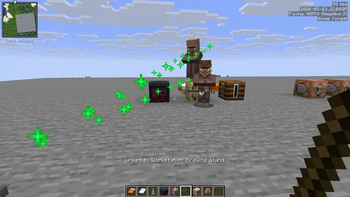
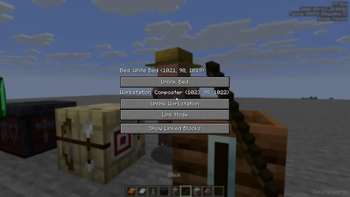
About this Mod
🥖 Villager Linker 🥖
Tired of villagers linking to the wrong beds? Sick of trying to figure out which brewing stand or lectern a cleric or librarian has actually claimed? Villager Linker is a lightweight, highly intuitive, and powerful Fabric mod that gives you full, manual control over your villagers' beds and workstations using just a simple Stick!
No more convoluted setups or breaking blocks repeatedly. Take charge of your trading halls, iron farms, and custom villages with precision and beautiful visual feedback.
🚀 Key Features
- 🔍 Detailed Villager Inspection: Sneak (Crouch) + Right-Click any villager with a stick to open a clean, custom GUI screen showing their current profession, active Bed, and active Workstation (along with exact coordinates!).
- 🔗 Manual Job & Bed Assignment: Manually link a villager to any bed or workstation of your choice. The mod instantly overrides and releases any previous occupant, locks the trade station profession, and paths the villager directly to their new station.
- ❌ Instant Unlinking: Free up occupied beds and workstations in a single click from the UI, or by sneak-right-clicking blocks with a stick when not in linking mode.
- 🎨 Spectacular Visual Highlighting & Trails: Need to find where a villager's bed or job site is? Trigger a beautiful, high-density particle beam and glowing block outline that guides you directly to the target through walls!
- 🔒 Anti-Decay Manual Lock: Manually linked workstations are automatically locked on the server to prevent villagers from randomly losing their profession or claiming another workstation.
- ⚙️ Fully Configurable: Easily customize highlight styles (
HIGHLIGHT,PATH_PARTICLE, orBOTH) and toggle whether crouching is required for linking in-game or via ModMenu.
📖 How to Use
1. Inspecting a Villager
- Hold a Stick in your hand.
- Sneak (Crouch) + Right-Click on any villager.
- This opens the Villager Linker GUI, displaying their active connections and coordinates!
2. Linking a Villager to a Bed or Workstation
- Open the villager's GUI by crouching and right-clicking them with a stick.
- Click the Link button. The screen will close, and you will enter Linking Mode.
- Walk to the bed or workstation block you want to link them to.
- Sneak + Right-Click the block with your stick.
- Beds: Dynamically links the villager to the bed (automatically targeting the head block).
- Workstations: Dynamically assigns the corresponding profession to the villager and locks it, clearing any existing owner from that block.
- You will see a beautiful particle beam trail connecting the villager to the block as confirmation!
3. Finding and Highlighting Linked Blocks
- Open the villager's GUI using the stick.
- Click Show Linked Blocks.
- For the next few seconds:
- The villager will glow (visible through blocks!).
- A high-density particle beam will connect the villager to their bed and job site.
- The targeted bed/workstation will be outlined in a glowing wireframe of magical particles!
- Note: Beds display a mystical purple Witch/Soul particle theme, while Workstations display a vibrant green/yellow Wax/Composter theme.
4. Unlinking & Clearing Blocks
- From the GUI: Open the villager screen and click Unlink Bed or Unlink Workstation to instantly clear their memory and release the POIs.
- Directly in World: If you aren't currently linking a villager, Sneak + Right-Click any bed or workstation block with a stick to instantly release it (clear its Point of Interest reservation), making it instantly available for other villagers!
🎨 Visual Themes
The mod provides three distinct visual types, which can be configured inside the settings:
HIGHLIGHT: Outlines the bed/workstation block in a stunning, high-density particle wireframe cage and highlights the villager with a glowing outline.PATH_PARTICLE: Spawns a thick, bright beam of color-coded particle streams directly between the villager and their block.BOTH(Default):** The ultimate diagnostic tool. Shows both the particle pathing beam and the block wireframe highlighting simultaneously!
⚙️ Configuration Options
Configure your experience in-game using the Settings button in the main GUI or via the ModMenu screen:
- Visuals: Cycle between
HIGHLIGHT,PATH_PARTICLE, andBOTH. - Require Crouch: Toggle whether crouching is required to perform linking interactions in the world (Default:
Trueto prevent accidental clicks while holding sticks).
🔧 Requirements & Installation
- Platform: Fabric Loader
- Dependencies:
- Fabric API
- ModMenu (Optional, for easy configuration access)
- Installation: Simply drop the
.jarfile into your Minecraftmodsfolder along with the Fabric API. Works beautifully on both singleplayer worlds and dedicated multiplayer servers!
Available Versions
How to Install Villager Linker on Your Server
Order Server
Order a Minecraft Java server with at least 3 GB RAM (4 GB recommended).
Set fabric Loader
In the panel under "Egg", select the fabric loader and matching Minecraft version (26.2).
Install Mod
Open the mod browser in the dashboard and search for "Villager Linker". Click "Install" – done! Alternatively, upload the .jar via SFTP to the /mods folder.
Compatibility
Mod Loaders
Minecraft Versions
26.2, 26.1.2
Server-side
✓ RequiredRecommended RAM
4 GB(min. 3 GB)Frequently Asked Questions
Villager Linker server crashes on startup – what to do?
Most common cause: wrong fabric version or insufficient RAM. Check the server log (latest.log) for "OutOfMemoryError" or "Mixin" errors. With Mado Hosting: ensure at least 3 GB RAM is allocated and the loader matches the mod version (26.2). You can switch loaders with one click in the panel.
Is Villager Linker compatible with fabric?
Villager Linker officially supports fabric for Minecraft 26.2, 26.1.2. The Mado dashboard automatically detects incompatible loader combinations.
Server lagging with Villager Linker – how to optimize performance?
Recommended RAM: 4 GB (per 8 players). Use /spark profiler to check if Villager Linker consumes the most tick time. Common fixes: reduce server view-distance to 8-10, install "performant" or "starlight" as supplementary mods on Forge. With Mado Hosting, your server runs on NVMe SSDs with dedicated CPU cores for minimal latency.
Rent Modded Server
Install Villager Linker with just one click on your server.
Details
- License
- Creative Commons Attribution No Derivatives 4.0 International
- Server-side
- Required