
Villager Recruits: Village Expansion
Addon for Recruits that introduces autonomous villages with their own center, faction, roles, and internal logic. Settlements organize themselves, manage recruits, and function as self‑sustaining communities without player intervention.
Screenshots
About this Mod
Recruits: Village Expansion – Addon for Recruits
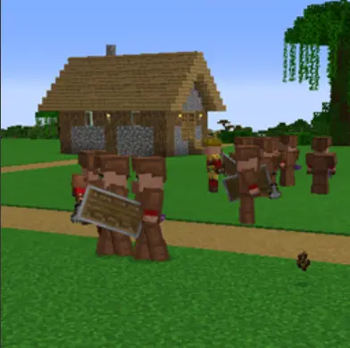
Recruits: Village Expansion is an addon for Recruits that introduces a fully autonomous village system. Each settlement has its own center, faction, and internal logic, allowing villages to function as living communities capable of organizing themselves, growing, and defending their territory without player involvement.
Villages created by this addon are not static structures: they are active entities that manage recruits, assign roles, maintain their identity, and react to world events. Each village can expand, build functional structures, establish territory, and maintain internal balance between civilians, soldiers, and resources.
The goal is to turn villages into autonomous factions, consistent and believable, interacting dynamically with the world and the player. The result is a more alive, emergent, and strategic experience that integrates seamlessly with Recruits.
NEW UPDATE – Create Your Own Buildings as an Addon(because i'm a bad builder)
Replace the Tower – Instructions
Village Recruits Addon – Technical Requirements
1. Addon Requirements
- Must be a Forge 1.20.1 mod.
- Must include Village Recruits as a dependency.
- Must register structures using the TowerAPI.
- Must provide .nbt structure files inside:
src/main/resources/data/<your_modid>/structures/
2. Required Blocks Inside Every Structure
- Recruit Block: must be placed exactly at the center.
- basic_villager_spawner: must be placed inside the structure.
These blocks are required for NPC spawning, faction creation, and structure activation. If missing, the structure will not function correctly.
3. Before Saving / Placing Villager Spawner
- Build the structure normally.
- Run:
/vr disable_spawner - Place the basic_villager_spawner and the recruit block.
- Save the structure using a Structure Block.
If you forget to disable the spawner, it will activate and disappear, and will not be saved.
4. Structure Size Limits
- Max recommended size: 11×11 (X/Z)
- Ideal size: 9×9
Larger structures may be destroyed by other generated buildings.
5. Registering Structures in Your Addon
@Mod("your_addon_id")
public class YourAddon {

    public YourAddon() {

        ResourceLocation PLAINS = ResourceLocation.fromNamespaceAndPath("minecraft", "plains");
        ResourceLocation DESERT = ResourceLocation.fromNamespaceAndPath("minecraft", "desert");
        ResourceLocation JUNGLE = ResourceLocation.fromNamespaceAndPath("minecraft", "jungle");

        // Tower in desert and plains
        TowerAPI.addForBiome(
            DESERT,
            ResourceLocation.fromNamespaceAndPath("your_addon_id", "your_tower"),
            10
        );

        TowerAPI.addForBiome(
            PLAINS,
            ResourceLocation.fromNamespaceAndPath("your_addon_id", "your_tower"),
            10
        );

        // Barracks in plains and jungle
        TowerAPI.addForBiome(
            PLAINS,
            ResourceLocation.fromNamespaceAndPath("your_addon_id", "your_barracks"),
            3
        );

        TowerAPI.addForBiome(
            JUNGLE,
            ResourceLocation.fromNamespaceAndPath("your_addon_id", "your_barracks"),
            3
        );
    }
}
6. Structure File Placement
Place your .nbt files here:
src/main/resources/data/<your_modid>/structures/
Example:
- data/recruits_testaddon/structures/barracks.nbt
- data/recruits_testaddon/structures/desert_tower.nbt
Change Automatically Generated Buildings
Override Village Buildings
package com.example.recruits_testaddon;

import com.example.villagerecruits.api.StructureOverrideAPI;
import net.minecraft.resources.ResourceLocation;
import net.minecraftforge.fml.common.Mod;

public class AddUserVillageStructures {

    public AddUserVillageStructures() {

        ResourceLocation SMALL_HOUSE = ResourceLocation.fromNamespaceAndPath(
            "recruits_testaddon", "small_house"
        );

        ResourceLocation BLACKSMITH = ResourceLocation.fromNamespaceAndPath(
            "recruits_testaddon", "blacksmith"
        );

        ResourceLocation WATCHTOWER = ResourceLocation.fromNamespaceAndPath(
            "recruits_testaddon", "watchtower"
        );

        StructureOverrideAPI.addHouse("plains", SMALL_HOUSE);
        StructureOverrideAPI.addHouse("plains", BLACKSMITH);

        StructureOverrideAPI.addWork("taiga", WATCHTOWER);

        StructureOverrideAPI.addHouse("meadow", SMALL_HOUSE);
        StructureOverrideAPI.addWork("meadow", BLACKSMITH);

        System.out.println("[Recruits Test Addon] Custom user structures added.");
    }
}
Removing vanilla buildings:
@Mod("recruits_testaddon")
public class ReplaceAllVillageStructures {

    public ReplaceAllVillageStructures() {

        ResourceLocation SMALL_HOUSE = ResourceLocation.fromNamespaceAndPath("recruits_testaddon", "small_house");
        ResourceLocation BLACKSMITH = ResourceLocation.fromNamespaceAndPath("recruits_testaddon", "blacksmith");
        ResourceLocation WATCHTOWER = ResourceLocation.fromNamespaceAndPath("recruits_testaddon", "watchtower");

        List biomes = List.of(
            "plains", "sunflower_plains", "desert", "savanna", "taiga", "snowy",
            "meadow", "forest", "birch_forest", "old_growth_birch_forest",
            "cherry_grove", "swamp", "mangrove_swamp", "badlands",
            "wooded_badlands", "eroded_badlands", "windswept_hills",
            "windswept_forest"
        );

        for (String biome : biomes) {

            StructureOverrideAPI.replaceHouses(
                biome,
                List.of(SMALL_HOUSE, BLACKSMITH, WATCHTOWER)
            );

            StructureOverrideAPI.replaceWork(
                biome,
                List.of(SMALL_HOUSE, BLACKSMITH, WATCHTOWER)
            );
        }

        System.out.println("[Recruits Test Addon] All vanilla structures replaced.");
    }
}
Note: These structures must NOT contain a normal recruit block (unlike tower replacements).
Coming Next Update
Diplomacy and war, automatic expansion, attacks, battles, and hirable promoted entities.
Compatible Mods
ewewukek's Musket Mod gives muskets to crossbowmen, increasing their spawn rate.
Upcoming Features
- Diplomacy and War
- Automatic faction expansion
- More advanced structure building
- Balancing improvements
Recommended Optimization Mods
- Let Me Despawn
- Radium Reforged
- Almanac Lib
- Embeddium
- ServerCore
- ModernFix
- Entity Culling
- FerriteCore
Available Versions
How to Install Villager Recruits: Village Expansion on Your Server
Order Server
Order a Minecraft Java server with at least 3 GB RAM (4 GB recommended).
Set forge Loader
In the panel under "Egg", select the forge loader and matching Minecraft version (1.20.1).
Install Mod
Open the mod browser in the dashboard and search for "Villager Recruits: Village Expansion". Click "Install" – done! Alternatively, upload the .jar via SFTP to the /mods folder.
Compatibility
Mod Loaders
Minecraft Versions
1.20.1
Server-side
✓ RequiredRecommended RAM
4 GB(min. 3 GB)Frequently Asked Questions
Villager Recruits: Village Expansion server crashes on startup – what to do?
Most common cause: wrong forge version or insufficient RAM. Check the server log (latest.log) for "OutOfMemoryError" or "Mixin" errors. With Mado Hosting: ensure at least 3 GB RAM is allocated and the loader matches the mod version (1.20.1). You can switch loaders with one click in the panel.
Is Villager Recruits: Village Expansion compatible with forge?
Villager Recruits: Village Expansion officially supports forge for Minecraft 1.20.1. The Mado dashboard automatically detects incompatible loader combinations.
Server lagging with Villager Recruits: Village Expansion – how to optimize performance?
Recommended RAM: 4 GB (per 8 players). Use /spark profiler to check if Villager Recruits: Village Expansion consumes the most tick time. Common fixes: reduce server view-distance to 8-10, install "performant" or "starlight" as supplementary mods on Forge. With Mado Hosting, your server runs on NVMe SSDs with dedicated CPU cores for minimal latency.
Similar Mods




Rent Modded Server
Install Villager Recruits: Village Expansion with just one click on your server.