
Bookkeeping for Villager Coin
Adds Bookkeeping items, like Receipts and Ledgers, to Villager Coin to track financial records.
Screenshots

About this Mod
VillagerUnknown's Bookkeeping for Villager Coin
This is an addon mod for VillagerUnknown's Villager Coin.
Adds Bookkeeping items, like Receipts and Ledgers, to VillagerUnknown's Villager Coin to catalog financial transactions.
This is a fun and easy way for multiplayer servers to make their shopping districts and player transactions feel more realistic.
- Receipts allow players to create records of transactions through the crafting table.
- Ledgers allow players to catalog up to 100 receipts into an organized written book through the crafting table.
Receipts
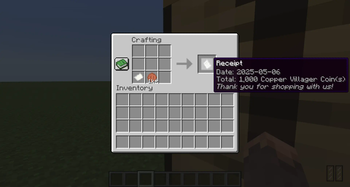
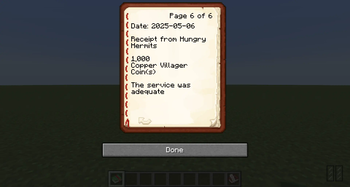
Receipts allow players to create records of transactions through the crafting table.
- Receipts are named after the player that crafted them, unless crafted by a crafter or custom named, as "Receipt from {PlayerName}".
This allows players to easily provide a receipt after receiving a payment or making a purchase. - Each Receipt includes the date created and the total of the coins in copper coins.
- Receipts from the same date stack and sum the total in copper coins.
This allows players to easily sum up their totals for the day from the same seller. - At the bottom of each receipt is a thank-you message. The default message is, "Thank you for shopping with us!"
The default message can be set in the config but players can change the thank-you message by using a custom named piece of
paper as the paper ingredient for their receipt.
Crafting Receipts
- Players can craft receipts for transactions by placing the payment amount of coins in the crafting table with paper.
- When a receipt is crafted, the date, amount, and player name will be added to the receipt.
- Receipts from the same player and date will stack and sum the totals.
Ledgers
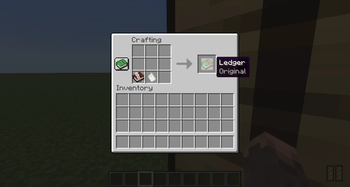
Ledgers allow players to catalog up to 100 receipts into an organized written book through the crafting table.
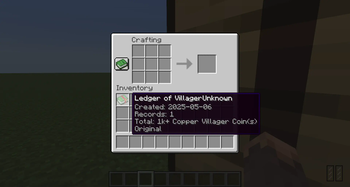
- Ledgers are named after the player that crafted them, unless crafted by a crafter, as "Ledger of {PlayerName}".
- Each Ledger includes the date created, date updated, number of records (pages), the total amount from catalogued receipts in copper coins, and the generation on copied Ledgers.
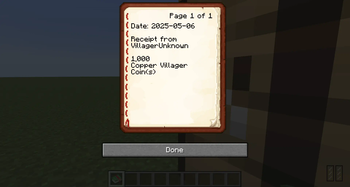
- Every page in the Ledger represents a catalogued stack of receipts consisting of the date the receipt was created, the name of the receipt, and the total amount of the receipt in copper coins.
- Ledgers can be duplicated and players can continue to add receipts to the duplicated Ledgers, if there are less than 100 pages in the Ledger.
Duplicated ledgers are custom named as "Copied {ItemName}" and a generation tooltip is appended. - Ledgers include any custom messages on Receipts. This includes custom names and, if different from the default thank-you message, the custom thank-you message.
When crafting Ledgers, they will keep the custom name from Book and Quill's. Ledgers maintain their custom name as more receipts are added.
Crafting Ledgers
- Players can craft Ledgers, to catalog their Receipts, by placing a Book and Quill in a crafting table with any number of Receipts.
- Each stack (slot in the crafting table) of receipts will be added to the Ledger as individual pages.
- Players can continue to add Receipts to their Ledger at any time by placing the Ledger in a crafting with any number of Receipts in the same way.
- Ledgers can only hold up to 100 Receipts/pages.
- Ledgers can be duplicated by placing a Ledger in a crafting table with a Book and Quill.
Additional Notes
- Dates are in the format: YYYY-MM-DD
- Ledgers aren't just for tracking spending's and earnings.
They can also be used to track when amounts are placed into, and taken out of, a "bank account" or vault.
Or, to review shops and services. - It might be wise to keep at least 2 Ledgers for a shop. One for earnings and one for spending.
- Shops that include a Decorated Pot on top of a Hopper pointed into a Chest will make it easy
for shoppers to submit copies of their Receipts to the shop for the shop owner to catalog in their shop's Ledger. - A lot of the functionality of this addon has been inspired by the habits of members from a popular SMP with a shopping district.
- In single player, players can use this addon to keep track of coins earned in their world.
- In multiplayer, this addon offers a broad range of new role playing opportunities.
With transactions between players it can be pretty straightforward creating a Receipt and filing it in a Ledger.
But, players can get really fancy with their bookkeeping by renaming the piece of paper used as the ingredient to craft the Receipt to add a footnote.
This footnote can be used as a thank-you message or other note, like a review or reminder.
Additionally, after crafting a Receipt players can rename the Receipt.
When a renamed Receipt is added to a Ledger, it will record the custom name in the Ledger.
Support
- Request features and report bugs at https://github.com/VillagerUnknown/VillagerCoin-Bookkeeping/issues
- View the changelog at https://github.com/VillagerUnknown/VillagerCoin-Bookkeeping/blob/main/CHANGELOG.md
Supported Languages
- English by VillagerUnknown
- Pirate English
- Svenska (Swedish)
- Français (French)
- Italiano (Italian)
- Deutsch (German)
- Português do Brasil (Brazil Portuguese)
- Русский (Russian)
- 한국어 (Korean)
- 简体中文 (Simplified Chinese)
- 日本語 (Japanese)
- हिन्दी (Hindi)
- (Hebrew) עברית
Disclaimer: Unless noted otherwise, translations have been provided by automated services.
Available Versions
How to Install Bookkeeping for Villager Coin on Your Server
Order Server
Order a Minecraft Java server with at least 3 GB RAM (4 GB recommended).
Set fabric Loader
In the panel under "Egg", select the fabric loader and matching Minecraft version (1.21.11).
Install Mod
Open the mod browser in the dashboard and search for "Bookkeeping for Villager Coin". Click "Install" – done! Alternatively, upload the .jar via SFTP to the /mods folder.
Compatibility
Mod Loaders
Minecraft Versions
1.21.11, 1.21.10, 1.21.9 (+8 more)
Server-side
✓ RequiredRecommended RAM
4 GB(min. 3 GB)Frequently Asked Questions
Bookkeeping for Villager Coin server crashes on startup – what to do?
Most common cause: wrong fabric version or insufficient RAM. Check the server log (latest.log) for "OutOfMemoryError" or "Mixin" errors. With Mado Hosting: ensure at least 3 GB RAM is allocated and the loader matches the mod version (1.21.11). You can switch loaders with one click in the panel.
Is Bookkeeping for Villager Coin compatible with fabric?
Bookkeeping for Villager Coin officially supports fabric for Minecraft 1.21.11, 1.21.10, 1.21.9. The Mado dashboard automatically detects incompatible loader combinations.
Server lagging with Bookkeeping for Villager Coin – how to optimize performance?
Recommended RAM: 4 GB (per 8 players). Use /spark profiler to check if Bookkeeping for Villager Coin consumes the most tick time. Common fixes: reduce server view-distance to 8-10, install "performant" or "starlight" as supplementary mods on Forge. With Mado Hosting, your server runs on NVMe SSDs with dedicated CPU cores for minimal latency.
Similar Mods




![CobbleDollars [Cobblemon Addon]](https://cdn.modrinth.com/data/s7N7AsqL/684040a264fc1d7f9b856ec5d2da39767398c7ad.png)
Rent Modded Server
Install Bookkeeping for Villager Coin with just one click on your server.