
Villages Denomination
Villages with names that are automatically generated.
Screenshots
About this Mod
Introduction:
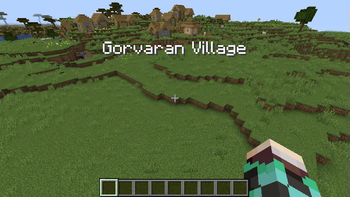
Villages Denomination is a mod that generates random names for villages when they are loaded into the world. These names can either be randomly generated or selected from a configured list.
When you enter a village, its name will be displayed to the player, showing both the main name and a complement. For example: "Kakariko Village", where "Kakariko" is the name and "Village" is the complement. This complement can be changed in the settings or even removed, displaying only the village name.
Integration:
- Traveler Titles: Display the village name in the title.
- Waystones: When you activate a waystone in a village, it will be renamed to the village name.
Examples:
Village Name

Traveler's Titles

Waystones

Commands
The mod provides some commands that can be executed if you have operator permissions:
/villages all Displays all village names.
/villages rename <village name> <new name> Renames a village.
/villages teleport <village name> Teleports to the village.
Configs:
Client-side:
- You can change the village name color changing the
villageNameColorvalue.
Server-side:
- You can change the village name complement changing the
villageNameComplementvalue. - You can set the list of village names changing the
customVillageNamesvalue. - You can set the blacklist of structures that be ignored when generating village names changing the
structuresBlacklistvalue.
Compatibility:
It must be compatible with any other mod that adds villages to the game and register the village structure with "village" in id.
Warning: This mod performs multiple file read and write operations on the server during runtime and has not been extensively tested. If you experience performance issues as a result, it is recommended that you stop using the mod and report the issue by creating an issue in the project's repository.
Sharing:
You are free to use this mod in your modpack or modify it for your own purposes. However, you may not redistribute or upload it to another site as if it were your own.
If you're interested in using this mod in your project, you may choose to credit me or not, but if you do, I would greatly appreciate it.
Available Versions
How to Install Villages Denomination on Your Server
Order Server
Order a Minecraft Java server with at least 3 GB RAM (4 GB recommended).
Set forge Loader
In the panel under "Egg", select the forge loader and matching Minecraft version (1.20.1).
Install Mod
Open the mod browser in the dashboard and search for "Villages Denomination". Click "Install" – done! Alternatively, upload the .jar via SFTP to the /mods folder.
Compatibility
Mod Loaders
Minecraft Versions
1.20.1
Server-side
✓ RequiredRecommended RAM
4 GB(min. 3 GB)Frequently Asked Questions
Villages Denomination server crashes on startup – what to do?
Most common cause: wrong forge version or insufficient RAM. Check the server log (latest.log) for "OutOfMemoryError" or "Mixin" errors. With Mado Hosting: ensure at least 3 GB RAM is allocated and the loader matches the mod version (1.20.1). You can switch loaders with one click in the panel.
Is Villages Denomination compatible with forge?
Villages Denomination officially supports forge for Minecraft 1.20.1. The Mado dashboard automatically detects incompatible loader combinations.
Server lagging with Villages Denomination – how to optimize performance?
Recommended RAM: 4 GB (per 8 players). Use /spark profiler to check if Villages Denomination consumes the most tick time. Common fixes: reduce server view-distance to 8-10, install "performant" or "starlight" as supplementary mods on Forge. With Mado Hosting, your server runs on NVMe SSDs with dedicated CPU cores for minimal latency.
Similar Mods




Rent Modded Server
Install Villages Denomination with just one click on your server.