
Visible Energy
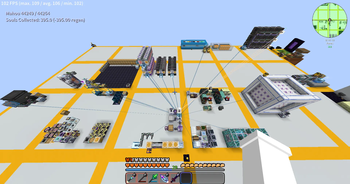
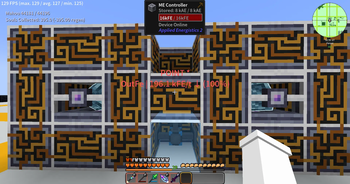
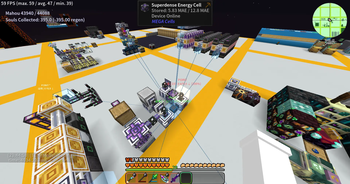
A FluxNetworks addon that highlights energy devices in-world with colored overlays, network connection lines, and transfer rate labels. Use /ve scan to find and visualize Flux Networks devices around you.
Screenshots
About this Mod
Visible Energy
A NeoForge addon mod for FluxNetworks that highlights the locations, transfer rates, and network topology of flux network devices in the game world.
Features
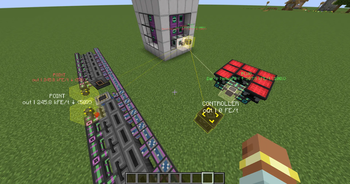
- Device Highlighting — Marks all Flux devices in the scan area with semi-transparent colored blocks and wireframes matching the flux network's color
- Connection Lines — Draws thin colored lines between input points (PLUG) and other devices within the same network, providing a clear visual representation of network topology
- Info Labels — Displays the device name, network name, energy transfer rate, and network percentage above each device
- Dynamic Refresh — Automatically updates data every 1 second, reflecting energy changes in real time
- Cross-Dimensional Monitoring — Detects and indicates devices in other dimensions within the network, displaying coordinates and chunk loading status
- Color-Coded Hints — Green indicates energy input, red indicates high-percentage output
Commands
| Command | Description |
|---|---|
/ve |
Scans surrounding Flux devices with the default radius |
/ve scan [radius] |
Scans with a specified radius (5~128) |
/ve stop |
Stops the current scan |
/ve duration <seconds> |
Sets the highlight display duration (1~3600 seconds) |
Configuration
Configure via visible_energy-common.toml:
scanRadius— Scan radius, default 32, range 5~128displayDuration— Highlight display duration in seconds, default 30, range 5~300
Dependencies
- Minecraft 1.21.1
- NeoForge 21.1.234+
- FluxNetworks 8.0.0+
Available Versions
How to Install Visible Energy on Your Server
Order Server
Order a Minecraft Java server with at least 3 GB RAM (4 GB recommended).
Set forge Loader
In the panel under "Egg", select the forge loader and matching Minecraft version (1.21.1).
Install Mod
Open the mod browser in the dashboard and search for "Visible Energy". Click "Install" – done! Alternatively, upload the .jar via SFTP to the /mods folder.
Compatibility
Mod Loaders
Minecraft Versions
1.21.1, 1.20.1
Server-side
✓ RequiredRecommended RAM
4 GB(min. 3 GB)Frequently Asked Questions
Visible Energy server crashes on startup – what to do?
Most common cause: wrong forge version or insufficient RAM. Check the server log (latest.log) for "OutOfMemoryError" or "Mixin" errors. With Mado Hosting: ensure at least 3 GB RAM is allocated and the loader matches the mod version (1.21.1). You can switch loaders with one click in the panel.
Is Visible Energy compatible with forge and neoforge?
Visible Energy officially supports forge, neoforge for Minecraft 1.21.1, 1.20.1. The Mado dashboard automatically detects incompatible loader combinations.
Server lagging with Visible Energy – how to optimize performance?
Recommended RAM: 4 GB (per 8 players). Use /spark profiler to check if Visible Energy consumes the most tick time. Common fixes: reduce server view-distance to 8-10, install "performant" or "starlight" as supplementary mods on Forge. With Mado Hosting, your server runs on NVMe SSDs with dedicated CPU cores for minimal latency.
Similar Mods






Rent Modded Server
Install Visible Energy with just one click on your server.