
Vital XP
A survival overhaul mod where health is tied to experience. Easily configurable.
Screenshots
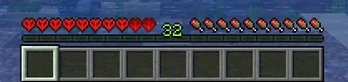


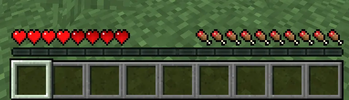
About this Mod
Description:
Vital XP adds a progression system to Minecraft by linking a player’s maximum health to their experience level.
Instead of having a fixed amount of hearts, players gain health as they level up, making XP a core survival mechanic rather than a simple enchanting resource.
How does it work?
- Players start with a minimum, configurable, amount of health.
- Health is capped at a configurable maximum.
- Every few XP levels, the player gains additional hearts.
- Losing XP reduces maximum health.
Once the maximum health cap is reached, any extra health gained is not wasted:
- Extra health becomes permanently locked hearts.
- Locked hearts are never lost, even if XP decreases.
- If the player dies, they lose their locked hearts if they have any.
Configuration:
All values can be adjusted in-game using commands or the configuration.
For versions below 1.21.1: type “/vitalxp help” to display the commands.
For versions 1.21.1 and above: the “/vitalxp” commands are no longer available. To configure the mod, go to the mods menu, select the mod, and press the “Config” button.
Available Versions
How to Install Vital XP on Your Server
Order Server
Order a Minecraft Java server with at least 3 GB RAM (4 GB recommended).
Set forge Loader
In the panel under "Egg", select the forge loader and matching Minecraft version (1.21.1).
Install Mod
Open the mod browser in the dashboard and search for "Vital XP". Click "Install" – done! Alternatively, upload the .jar via SFTP to the /mods folder.
Compatibility
Mod Loaders
Minecraft Versions
1.21.1, 1.20.1, 1.19.2 (+2 more)
Server-side
✓ RequiredRecommended RAM
4 GB(min. 3 GB)Frequently Asked Questions
Vital XP server crashes on startup – what to do?
Most common cause: wrong forge version or insufficient RAM. Check the server log (latest.log) for "OutOfMemoryError" or "Mixin" errors. With Mado Hosting: ensure at least 3 GB RAM is allocated and the loader matches the mod version (1.21.1). You can switch loaders with one click in the panel.
Is Vital XP compatible with forge and neoforge?
Vital XP officially supports forge, neoforge for Minecraft 1.21.1, 1.20.1, 1.19.2. The Mado dashboard automatically detects incompatible loader combinations.
Server lagging with Vital XP – how to optimize performance?
Recommended RAM: 4 GB (per 8 players). Use /spark profiler to check if Vital XP consumes the most tick time. Common fixes: reduce server view-distance to 8-10, install "performant" or "starlight" as supplementary mods on Forge. With Mado Hosting, your server runs on NVMe SSDs with dedicated CPU cores for minimal latency.
Similar Mods




Rent Modded Server
Install Vital XP with just one click on your server.