
Vivecraft Theater Mode
Brings back Bedrock VR theater mode to Minecraft: Java Edition, powered by Vivecraft!
Screenshots
About this Mod
Vivecraft Theater Mode
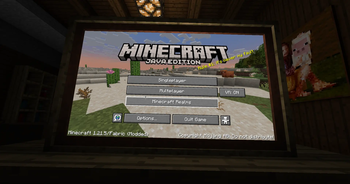
Vivecraft Theater Mode brings back the GearVR Editions-style Theater view for Vivecraft.
Instead of floating menus and a standard VR layout, it recreates a more cinematic panel
in front of you, closer to the Theater mode shown in the GearVR editions era:
This mod is made for players who want Vivecraft to feel more like a flat, front-facing
cinema screen while still keeping VR support and Vivecraft's normal menu flow.
What It Does
- Adds a Theater play mode to Vivecraft
- Renders the game on a large front-facing screen
- Keeps the view comfortable and centered for seated-style play
- Preserves normal gameplay and menu interaction
- Includes controller-friendly GUI support
Controller Mod Support
This mod is tested with Controlify, so you can navigate
Theater menus with a controller—not just mouse and keyboard.
Other controller mods may work too, but Controlify is the one I have tested against.
Requirements
- Minecraft
1.21.5 - Fabric Loader
- Fabric API
- Vivecraft
How To Use
- Install the mod alongside Vivecraft.
- Start the game and open Vivecraft's VR settings.
- Use the play mode button until it reaches Theater.
- Play normally in VR with the Theater view enabled.
The selected play mode is saved between launches.
Notes
- This mod is a compatibility/add-on mod for Vivecraft, not a standalone VR replacement.
- If you use Controlify, make sure it is configured and actively controlling input when you want controller cursor behavior in Theater screens.
Available Versions
How to Install Vivecraft Theater Mode on Your Server
Order Server
Order a Minecraft Java server with at least 3 GB RAM (4 GB recommended).
Set fabric Loader
In the panel under "Egg", select the fabric loader and matching Minecraft version (1.21.5).
Install Mod
Open the mod browser in the dashboard and search for "Vivecraft Theater Mode". Click "Install" – done! Alternatively, upload the .jar via SFTP to the /mods folder.
Compatibility
Mod Loaders
Minecraft Versions
1.21.5
Server-side
✗ UnsupportedRecommended RAM
4 GB(min. 3 GB)Frequently Asked Questions
Vivecraft Theater Mode server crashes on startup – what to do?
Most common cause: wrong fabric version or insufficient RAM. Check the server log (latest.log) for "OutOfMemoryError" or "Mixin" errors. With Mado Hosting: ensure at least 3 GB RAM is allocated and the loader matches the mod version (1.21.5). You can switch loaders with one click in the panel.
Is Vivecraft Theater Mode compatible with fabric?
Vivecraft Theater Mode officially supports fabric for Minecraft 1.21.5. The Mado dashboard automatically detects incompatible loader combinations.
Server lagging with Vivecraft Theater Mode – how to optimize performance?
Recommended RAM: 4 GB (per 8 players). Use /spark profiler to check if Vivecraft Theater Mode consumes the most tick time. Common fixes: reduce server view-distance to 8-10, install "performant" or "starlight" as supplementary mods on Forge. With Mado Hosting, your server runs on NVMe SSDs with dedicated CPU cores for minimal latency.
Rent Modded Server
Install Vivecraft Theater Mode with just one click on your server.