
vLastPlayedServer
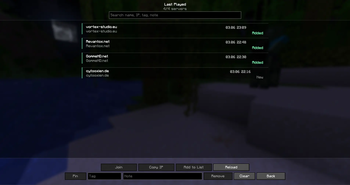
Adds a clean “Last Played Servers” list to the multiplayer screen, with search, favorites, tags, notes, and quick actions like join, copy IP, and add to the main server list.
Screenshots
About this Mod
vLastPlayedServer

VLastServerPlayed adds a clean Last Played Servers menu to Minecraft’s multiplayer screen, making it easier to keep track of servers you have recently joined.
The mod automatically remembers multiplayer servers after you connect to them and gives you a dedicated history screen where you can search, organize, and quickly access them again.
Features
- Automatically saves servers you recently joined
- Adds a Last Played button to the multiplayer screen
- Search saved servers by name, IP, tag, or note
- Pin favorite servers to keep them at the top
- Add custom tags for easier organization
- Add personal notes to saved servers
- Copy server IPs to your clipboard
- Join saved servers directly from the history screen
- Add saved servers back to the main Minecraft server list
- Shows whether a saved server is already added to your main server list
- Lightweight custom list UI without pinging every saved server on open
Why Use It?
Minecraft’s default multiplayer screen only shows servers you manually added. If you join servers through direct connect, temporary invites, or testing environments, they can be easy to lose.
VLastServerPlayed keeps a simple history of those servers so you can find them again later without searching through chats, launchers, screenshots, or old messages.
Notes
This is a client-side mod. It does not need to be installed on servers.
Available Versions
How to Install vLastPlayedServer on Your Server
Order Server
Order a Minecraft Java server with at least 3 GB RAM (4 GB recommended).
Set fabric Loader
In the panel under "Egg", select the fabric loader and matching Minecraft version (1.21.11).
Install Mod
Open the mod browser in the dashboard and search for "vLastPlayedServer". Click "Install" – done! Alternatively, upload the .jar via SFTP to the /mods folder.
Compatibility
Mod Loaders
Minecraft Versions
1.21.11
Server-side
✗ UnsupportedRecommended RAM
4 GB(min. 3 GB)Frequently Asked Questions
vLastPlayedServer server crashes on startup – what to do?
Most common cause: wrong fabric version or insufficient RAM. Check the server log (latest.log) for "OutOfMemoryError" or "Mixin" errors. With Mado Hosting: ensure at least 3 GB RAM is allocated and the loader matches the mod version (1.21.11). You can switch loaders with one click in the panel.
Is vLastPlayedServer compatible with fabric?
vLastPlayedServer officially supports fabric for Minecraft 1.21.11. The Mado dashboard automatically detects incompatible loader combinations.
Server lagging with vLastPlayedServer – how to optimize performance?
Recommended RAM: 4 GB (per 8 players). Use /spark profiler to check if vLastPlayedServer consumes the most tick time. Common fixes: reduce server view-distance to 8-10, install "performant" or "starlight" as supplementary mods on Forge. With Mado Hosting, your server runs on NVMe SSDs with dedicated CPU cores for minimal latency.
Similar Mods




Rent Modded Server
Install vLastPlayedServer with just one click on your server.