
Void dimension
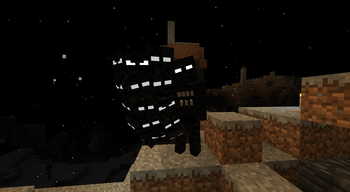
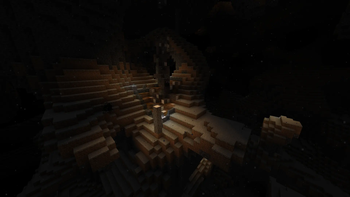
A new dimension, which is hidden under the layer of bedrock
Screenshots
About this Mod
Warning
Install Sodium to avoid fps drops, especially when using more than 16 chunks
Reason to go to the dimension
The main reason to go to the void is to get void armor, which is stronger than the netherite armor.
Entering the dimension
TIP: All recipes are located in gallery of the mod
Recommended armor to enter the dimension is netherite. The dimension is not a cakewalk, so it is recommended to have some basic pvp skills.
Be careful, you need to light up your path, otherwise you will die due to corruption of the void
- Get 2 or more voidiums, which are mined from deepslate void shard ore and the ore is found in the pale garden on height lower than 12.
- Craft a cross or a prayer rope.
- Brew void salvation potion, which allows to teleport in the void. The main ingredient of the potion is void shard and the potion is based on the awkward potion.
- Craft a bedrock bomb by putting in the middle the void shard and surround by 8 tnts. The bomb can break any block in the game.
- Find the lowest point in the overworld.
- Place the bedrock bomb on the bedrock and lit it like a tnt.
- Drink void salvation potion.
- Pray using a cross or a prayer rope by holding mouse 2.
- Jump in the void.
Exiting from the dimension to the overworld
- Brew void salvation potion.
- Craft a bedrock bomb (THIS IS A VERY IMPORTANT STEP, OTHERWISE YOU WILL BE SOFTLOCKED IN THE NETHER)
- Find the hole in the void dimension.
- Use a cross or a prayer rope and drink void salvation potion.
- Jump in the hole.
- When you teleport to the nether, place the bedrock bomb and lit it.
- Escape the nether to the overworld.
Upgrading netherite to void
- Find 2 void shards.
- Craft or find netherite smithing template.
- Craft void smithing template.
- Smelt void shard to void ingot.
- Put the netherite tool, void ingot and void smithing template in the smithing table.
Sources
Sounds
- music.1 :: blade of darkness (ATMOSFERA8)
- music.2 :: blade of darkness (ATMOSFERA19)
- music.3 :: blade of darkness (SORPRESA7)
- void_harbinger.shoot_prepare :: https://pixabay.com/sound-effects/search/dark%20magic/ (Yodguard:Dark magic (4))
- void_harbinger.shoot :: https://pixabay.com/sound-effects/search/dark%20magic/ (Yodguard:Dark magic (1))
- void_harbinger.teleport :: blade of darkness (desaparece-vamp1.wav)
- shattered_sentinel_master.death :: https://depositphotos.com/sound-effect/rumbling-impact-ancient-stony-stride-784492644.html
- staring_entity.death :: blade of darkness (muerte-Ldm.wav)
- special_attacks.lightning :: https://pixabay.com/sound-effects/search/lightning/ (Yodguard:Lightning Magic (1))
- special_attacks.counter_attack :: https://pixabay.com/sound-effects/search/power%20attack/ (Yodguard:Powerful Bear Attack with Roar (1))
- entity303.death :: nazgul screams from The lord of the rings
- eye_bright.shoot_prepare :: https://pixabay.com/sound-effects/search/pain/ (Universfield:Man Scream)
- special_attacks.magnet_prepare :: https://pixabay.com/sound-effects/search/dark%20magic/ (Yodguard:Dark magic (6))
- special_attacks.magnet_execute :: https://pixabay.com/sound-effects/search/dark%20magic/ (Yodguard:Dark magic (3))
- special_attacks.magic_prepare :: https://pixabay.com/sound-effects/search/spell/ (RescopicSound:Elemental Magic Spell Impact Outgoing)
- corrupted_warrior.* :: blade of darkness (*chk1*wav)
- void_bound_servant.* :: blade of darkness (*rgn*wav)
- armor.great.hit :: blade of darkness (golpe-maza-armfort.wav)
- armor.small.hit :: blade of darkness (GOLPE-ARMADUR-33.wav)
- consumed_soul.hit :: https://pixabay.com/sound-effects/search/ghost/
- hit1 :: (DRAGON-STUDIO:Ghost Whisper)
- hit2 :: (DRAGON-STUDIO:Ghost Whisper)
- hit3 :: (DRAGON-STUDIO:Halloween Ghost Whisper)
- hit4 :: (freesound_community:Ghost Scream)
Textures
- Corrupted mobs black skin :: https://modrinth.com/mod/intothevoid
- corrupt_block texture :: https://modrinth.com/mod/intothevoid
- alpha_steve :: https://namemc.com/skin/f2d10ae87c2444ff
Blocks
- old_corpse_pile :: https://github.com/TroupeMaster/TheDeepVoid
- old_corpse :: https://github.com/TroupeMaster/TheDeepVoid
Animations
- alpha steve walking :: [[https://gitlab.com/TecnaGamer/OldWalkingAnimation][OldWalkingAnimation]]
Available Versions
How to Install Void dimension on Your Server
Order Server
Order a Minecraft Java server with at least 3 GB RAM (4 GB recommended).
Set fabric Loader
In the panel under "Egg", select the fabric loader and matching Minecraft version (26.1.2).
Install Mod
Open the mod browser in the dashboard and search for "Void dimension". Click "Install" – done! Alternatively, upload the .jar via SFTP to the /mods folder.
Compatibility
Mod Loaders
Minecraft Versions
26.1.2, 1.21.11
Server-side
✓ RequiredRecommended RAM
4 GB(min. 3 GB)Frequently Asked Questions
Void dimension server crashes on startup – what to do?
Most common cause: wrong fabric version or insufficient RAM. Check the server log (latest.log) for "OutOfMemoryError" or "Mixin" errors. With Mado Hosting: ensure at least 3 GB RAM is allocated and the loader matches the mod version (26.1.2). You can switch loaders with one click in the panel.
Is Void dimension compatible with fabric?
Void dimension officially supports fabric for Minecraft 26.1.2, 1.21.11. The Mado dashboard automatically detects incompatible loader combinations.
Server lagging with Void dimension – how to optimize performance?
Recommended RAM: 4 GB (per 8 players). Use /spark profiler to check if Void dimension consumes the most tick time. Common fixes: reduce server view-distance to 8-10, install "performant" or "starlight" as supplementary mods on Forge. With Mado Hosting, your server runs on NVMe SSDs with dedicated CPU cores for minimal latency.
Similar Mods




Rent Modded Server
Install Void dimension with just one click on your server.