
Voodoo Poppets
[Forge & Fabric] Powerful voodoo poppets inspired by Witchery
Screenshots

About this Mod
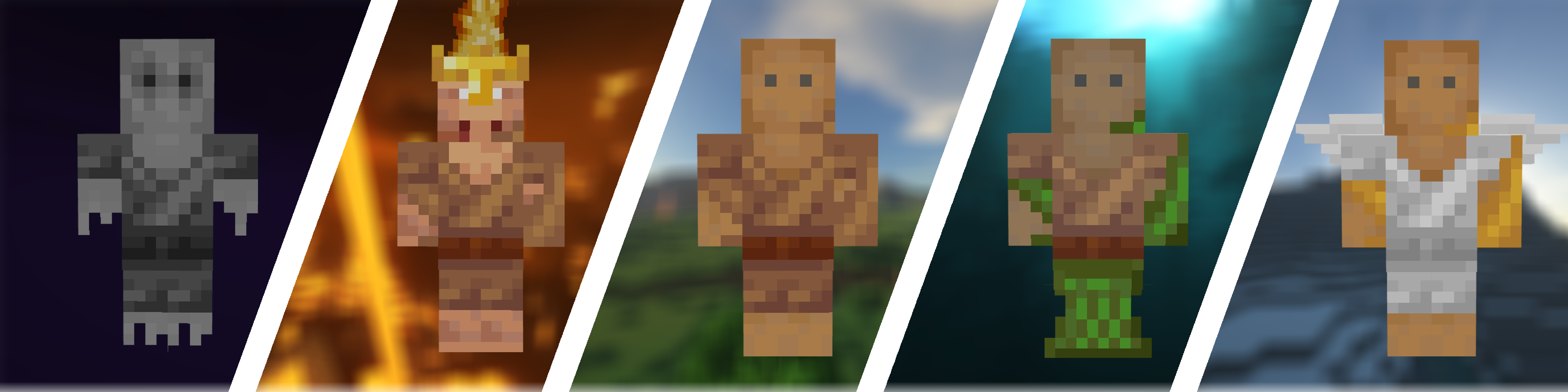

The Voodoo Poppets mod is all about what its name suggests. Inspired by the legendary Witchery mod, it adds a wide variety of voodoo poppets into the game. If you want to make your life a bit easier with the protection poppets or annoy your friends (or enemies) with the powerful voodoo poppet, this mod is perfect for you.
 Features:
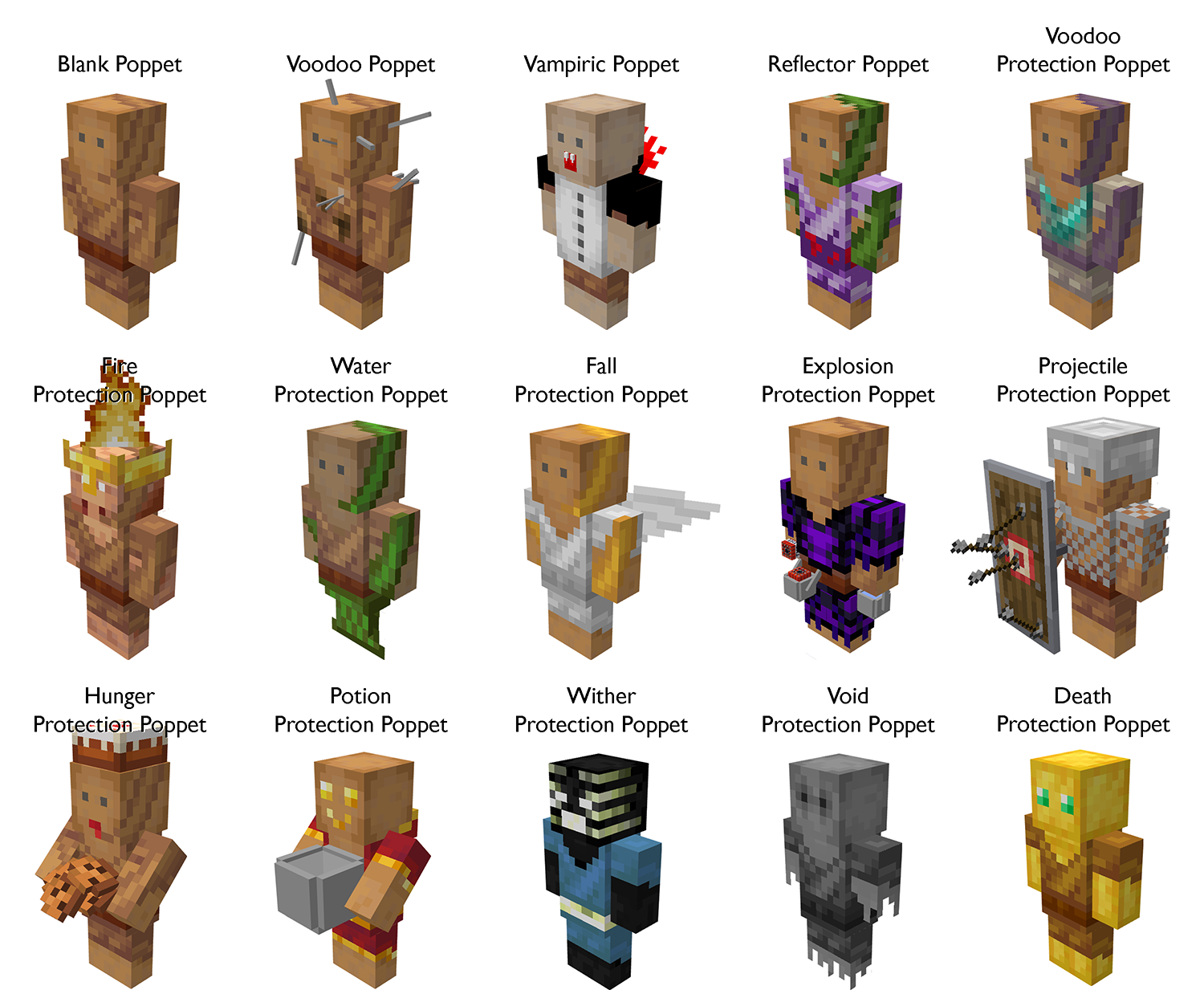
- A total of 15 poppets
- Each poppet has a unique and beautiful 3D model and texture
- Taglock Kits
- Poppet Shelves
- A guide book if you have Patchouli installed
- Extensive configuration options
Getting started:
If you have Patchouli installed, your first step should be to craft the Voodoo Manual. It simply requires a needle and some rabbit hide:
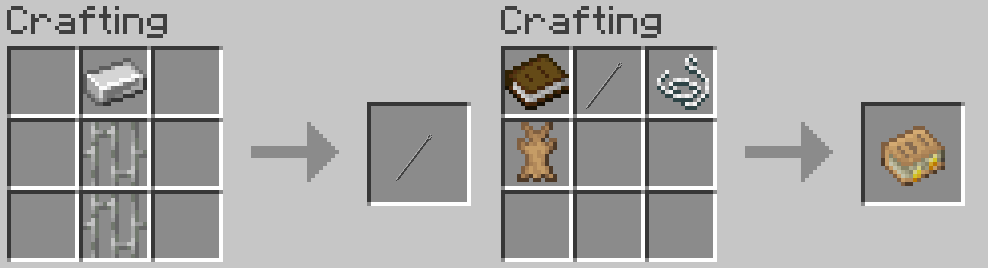
Once you have the Voodoo Manual, you learn everything about the mod from it.
If you do not have Patchouli installed, you should use the Minecraft recipe book or a mod like JEI to see the recipes. The only recipe not visible there is how to bind a poppet to a player. This can be done by combining an unbound poppet with a bound taglock kit in a crafting grid. A taglock kit can be bound by either right-clicking a player, a bed to get the taglock of another player, or shift right-clicking to get a taglock of yourself.
Pro Tip: Create a rabbit farm. You will need a lot of rabbit hide for your poppets.
Meet the poppets:
Questions and Answers:
What modloader does this mod need?
For Minecraft 1.18 and earlier, this mod only offers a Forge version.
For Minecraft 1.19 and later, this mod offers Forge and Fabric version. The Fabric versions are called "Voodoo-Fabric", while the Forge version are simply called "Voodoo".
Note that the Fabric version requires Forge Config API Port to be installed.
Can I use this mod in a modpack?
If the modpack is hosted on Modrinth or Curseforge then you can use it in your modpack without any problems.
If the modpack is hosted elsewhere, you must adhere to the LGPL-3.0 License.
Will you port this mod to Minecraft version X?
I will try to port this mod to any new versions of Minecraft, but I can't make any promises.
There are no plans to port this mod to any versions of Minecraft older than 1.16.
I can't craft the Voodoo Manual. Why?
The Voodoo Manual requires the mod Patchouli to be installed
The poppet X is too weak/strong. Can you buff/nerf it?
If you feel like a poppet is too weak or strong, your first step should be the config file of this mod. It allows you to enable or disable each poppet individually, set their durability, and for some poppets, change other stats as well.
You can also suggest a specific change to the default values on our GitHub issue tracker if you want.
I found a bug / I have a suggestion / Can you change X?
You can report bugs and submit suggestions on this mod's GitHub issue tracker.
What is the license of this mod?
The source code of the mod is released under the LGPL v3.0 license. The assets are, however, All Rights Reserved.
The build jars can be distributed under the LGPL v3.0 license, but the assets within are still All Rights Reserved.
Available Versions
How to Install Voodoo Poppets on Your Server
Order Server
Order a Minecraft Java server with at least 3 GB RAM (4 GB recommended).
Set fabric Loader
In the panel under "Egg", select the fabric loader and matching Minecraft version (1.19.2).
Install Mod
Open the mod browser in the dashboard and search for "Voodoo Poppets". Click "Install" – done! Alternatively, upload the .jar via SFTP to the /mods folder.
Compatibility
Mod Loaders
Minecraft Versions
1.19.2, 1.19.1, 1.18.1 (+3 more)
Server-side
✓ RequiredRecommended RAM
4 GB(min. 3 GB)Frequently Asked Questions
Voodoo Poppets server crashes on startup – what to do?
Most common cause: wrong fabric version or insufficient RAM. Check the server log (latest.log) for "OutOfMemoryError" or "Mixin" errors. With Mado Hosting: ensure at least 3 GB RAM is allocated and the loader matches the mod version (1.19.2). You can switch loaders with one click in the panel.
Is Voodoo Poppets compatible with fabric and forge?
Voodoo Poppets officially supports fabric, forge for Minecraft 1.19.2, 1.19.1, 1.18.1. Note: Forge and Fabric mods are NOT cross-compatible – pick one loader and stick with it. The Mado dashboard automatically detects incompatible loader combinations.
Server lagging with Voodoo Poppets – how to optimize performance?
Recommended RAM: 4 GB (per 8 players). Use /spark profiler to check if Voodoo Poppets consumes the most tick time. Common fixes: reduce server view-distance to 8-10, install "performant" or "starlight" as supplementary mods on Forge. With Mado Hosting, your server runs on NVMe SSDs with dedicated CPU cores for minimal latency.
Similar Mods




![[TaCZ] Timeless and Classics Zero](https://cdn.modrinth.com/data/SzzJttH8/fd27766d2bb8390d284696b1dbd358f87e081439_96.webp)

Rent Modded Server
Install Voodoo Poppets with just one click on your server.