
VoteKick
A mod that lets you vote kick on players.
Screenshots
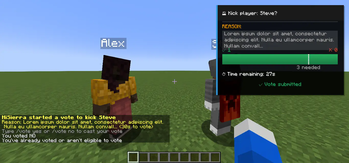
About this Mod
VoteKick
A democratic voting system that allows players to collectively remove disruptive players from the server through a clean, fair voting process.
Features
- Simple Voting Interface - Unobtrusive UI with F1/F2 keybinds or chat commands
- Anti-Abuse Protection - Prevents harassment and vote spam with cooldowns and immunity periods
- Configurable Client UI - Adjustable scaling, positioning, and visual options
- Real-time Vote Tracking - Live progress bars and vote counts
- Flexible Configuration - Extensive server-side settings for fine-tuning
Usage
Starting a Vote
/votekick <player> <reason>
/vk <player> <reason>
Voting
- Press F1 for YES (kick player)
- Press F2 for NO (keep player)
- Commands:
/vote yesor/vote no
Status
/vote status
Admin Commands
/votekick-admin cancel
/votekick-admin force
/votekick-admin reload
/votekick-admin history [page]
Requires the votekick.admin permission (or op level configured in permissions_admin_default_level).cancel ends the active vote without a kick; force ends it as passed.
Configuration
Server Configuration
Located in config/votekick.properties:
# Basic Settings
vote_duration_seconds=30
vote_pass_percentage=0.6
minimum_players=2
cooldown_seconds=120

# Protection System
new_player_protection_enabled=true
post_kick_protection_enabled=true
harassment_detection_enabled=true
vote_threshold_modifiers_enabled=true

# Customization
require_kick_reason=true
allow_self_voting=false

# Permissions (default op levels)
permissions_enabled=true
permissions_start_default_level=0
permissions_vote_default_level=0
permissions_admin_default_level=2
permissions_exempt_default_level=2

# Vote History
vote_history_enabled=true
vote_history_max_entries=200
vote_history_retention_days=90
Client Configuration
Customize your voting experience through:
- ModMenu Integration - Graphical configuration screen
- Properties File -
config/votekick-client.propertiesfor manual editing
Options include UI scaling, panel positioning, sound controls, and animation settings.
Permissions
Permission nodes:
votekick.start— allow starting votesvotekick.vote— allow casting votesvotekick.admin— allow admin commandsvotekick.exempt— exempt a player from being vote-kicked
Defaults are controlled by permissions_*_default_level in the server config (0 = all, 2 = ops).
If a permissions API is present (Fabric Permissions API or LuckPerms on Fabric/NeoForge), the nodes above are checked;
otherwise the defaults apply.
LuckPerms setup
- Fabric: install
LuckPermsandfabric-permissions-apion the server. - NeoForge: install
LuckPermson the server.
Example grants:
/lp group default permission set votekick.start true
/lp group default permission set votekick.vote true
/lp group mod permission set votekick.admin true
/lp group mod permission set votekick.exempt true
Vote History
History is stored in config/votekick_history.json and follows the retention/max entry limits.
Anti-Abuse Features
- New Player Protection - Grace period for first-time joiners
- Post-Kick Immunity - Temporary protection after being kicked
- Harassment Detection - Automatic protection for repeatedly targeted players
- Vote Cooldowns - Prevents spam voting and target harassment
- Threshold Modifiers - Requires more votes to kick frequently kicked players
Requirements
- Fabric: Fabric API (required), ModMenu (optional for GUI configuration)
- NeoForge: no extra dependencies
- Must be installed on both client and server
Default Behavior
- Server operators and players with permission level 2+ are exempt from being vote-kicked.
- All other players can participate in voting (unless protected).
Compatibility
- Minecraft 1.20.1 (Fabric only)
- Minecraft 1.20.4, 1.20.6, 1.21.1, 1.21.4 (Fabric + NeoForge)
Available Versions
How to Install VoteKick on Your Server
Order Server
Order a Minecraft Java server with at least 3 GB RAM (4 GB recommended).
Set fabric Loader
In the panel under "Egg", select the fabric loader and matching Minecraft version (1.21.11).
Install Mod
Open the mod browser in the dashboard and search for "VoteKick". Click "Install" – done! Alternatively, upload the .jar via SFTP to the /mods folder.
Compatibility
Mod Loaders
Minecraft Versions
1.21.11, 1.21.10, 1.21.9 (+9 more)
Server-side
✓ RequiredRecommended RAM
4 GB(min. 3 GB)Frequently Asked Questions
VoteKick server crashes on startup – what to do?
Most common cause: wrong fabric version or insufficient RAM. Check the server log (latest.log) for "OutOfMemoryError" or "Mixin" errors. With Mado Hosting: ensure at least 3 GB RAM is allocated and the loader matches the mod version (1.21.11). You can switch loaders with one click in the panel.
Is VoteKick compatible with fabric and neoforge?
VoteKick officially supports fabric, neoforge for Minecraft 1.21.11, 1.21.10, 1.21.9. The Mado dashboard automatically detects incompatible loader combinations.
Server lagging with VoteKick – how to optimize performance?
Recommended RAM: 4 GB (per 8 players). Use /spark profiler to check if VoteKick consumes the most tick time. Common fixes: reduce server view-distance to 8-10, install "performant" or "starlight" as supplementary mods on Forge. With Mado Hosting, your server runs on NVMe SSDs with dedicated CPU cores for minimal latency.
Similar Mods






Rent Modded Server
Install VoteKick with just one click on your server.