
VoxelDash
VoxelDash is a simple dashboard for your Minecraft and Hytale servers
Screenshots
About this Mod
 VoxelDash
A modern, beautiful web dashboard for managing your Minecraft server (formerly MCDash)





📖 Documentation · 🐛 Report Bug · ✨ Request Feature
Features
VoxelDash provides everything you need to manage your Minecraft server from a sleek, modern web interface:
| Feature | Description |
|---|---|
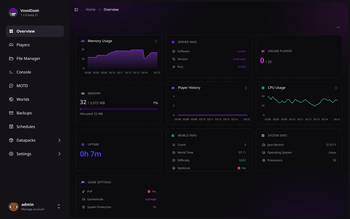
| Dashboard | Real-time status with customizable widgets for TPS, memory, CPU, players, and more |
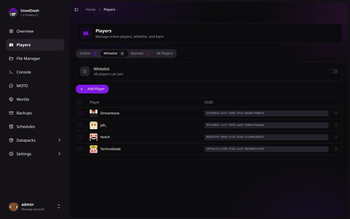
| Players | See who's online, manage the whitelist, bans, and operators, and edit inventories or profiles |
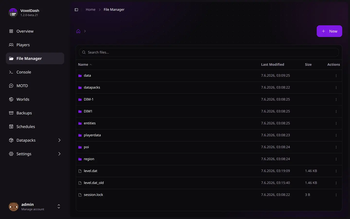
| File Manager | Browse, edit, upload, and download server files right in your browser |
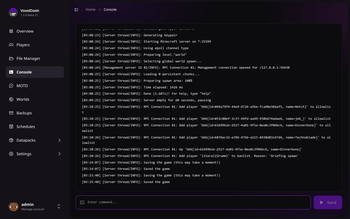
| Console | Live console output and command execution, with optional SSH access |
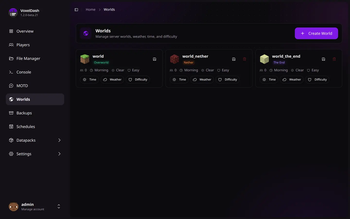
| Worlds | Manage every world's time, weather, and difficulty, or create and delete worlds |
| Plugins & Mods | Install and update plugins and mods from Modrinth, SpigotMC, and CurseForge |
| Backups | Create, restore, and download backups, manually or on a schedule |
| Schedules | Automate commands, broadcasts, backups, and restarts |
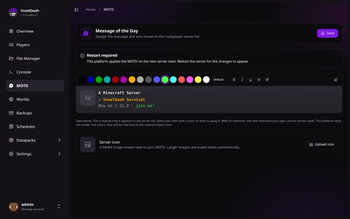
| MOTD Editor | Design the message and icon shown in the multiplayer server list |
| Profiling | Track live performance metrics and find out what's making your server lag |
| Game Rules | Tweak the game's rules from a searchable list, applied to the running server |
VoxelDash runs as a plugin or mod on Spigot, Paper, Fabric, and Forge, or as a standalone app for vanilla servers. You can also run it in front of multiple servers at once with VoxelDash One.
Quick Start
Requirements
- Java 17 or higher
- A Minecraft server (Spigot, Paper, Fabric, or Vanilla)
Installation
Download the latest release from the releases page
Install the plugin/mod on your server:
- Spigot/Paper: Place the
.jarfile in thepluginsfolder - Fabric/Forge: Place the
.jarfile in themodsfolder - Vanilla: Run the standalone
.jarfile
- Spigot/Paper: Place the
Start your server and access the dashboard at
http://localhost:7867Login with the credentials shown in the console on first start
For detailed installation instructions, check out our documentation.
Tech Stack
- Frontend: React, TypeScript, Vite, Tailwind CSS, shadcn/ui
- Backend: Java, integrated with Minecraft server APIs
- Supported Platforms: Spigot, Paper, Fabric, Forge, Vanilla
License
This project is licensed under the MIT License - see the LICENSE file for details.
Available Versions
How to Install VoxelDash on Your Server
Order Server
Order a Minecraft Java server with at least 3 GB RAM (4 GB recommended).
Set bukkit Loader
In the panel under "Egg", select the bukkit loader and matching Minecraft version (26.1.2).
Install Mod
Open the mod browser in the dashboard and search for "VoxelDash". Click "Install" – done! Alternatively, upload the .jar via SFTP to the /mods folder.
Compatibility
Mod Loaders
Minecraft Versions
26.1.2, 26.1.1, 26.1 (+43 more)
Server-side
✗ UnsupportedRecommended RAM
4 GB(min. 3 GB)Frequently Asked Questions
VoxelDash server crashes on startup – what to do?
Most common cause: wrong bukkit version or insufficient RAM. Check the server log (latest.log) for "OutOfMemoryError" or "Mixin" errors. With Mado Hosting: ensure at least 3 GB RAM is allocated and the loader matches the mod version (26.1.2). You can switch loaders with one click in the panel.
Is VoxelDash compatible with bukkit and bungeecord and fabric and folia and forge and paper and purpur and spigot and waterfall?
VoxelDash officially supports bukkit, bungeecord, fabric, folia, forge, paper, purpur, spigot, waterfall for Minecraft 26.1.2, 26.1.1, 26.1. Note: Forge and Fabric mods are NOT cross-compatible – pick one loader and stick with it. The Mado dashboard automatically detects incompatible loader combinations.
Server lagging with VoxelDash – how to optimize performance?
Recommended RAM: 4 GB (per 8 players). Use /spark profiler to check if VoxelDash consumes the most tick time. Common fixes: reduce server view-distance to 8-10, install "performant" or "starlight" as supplementary mods on Forge. With Mado Hosting, your server runs on NVMe SSDs with dedicated CPU cores for minimal latency.
Rent Modded Server
Install VoxelDash with just one click on your server.