
Ward Watch
Security-themed protection mod for Fabric 1.21.11 with password-protected storage, doors and more to come.
Screenshots
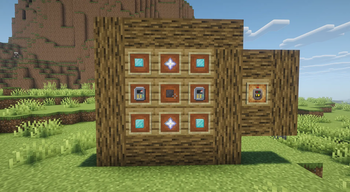


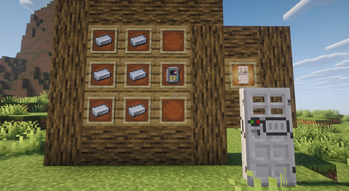
About this Mod
Ward & Watch
Ward & Watch is a security-focused Fabric mod for Minecraft 1.21.11.
This project is inspired by classic password-protection Security Craft gameplay, but it is being built as its own original mod for Fabric with its own code, assets, and progression.
Current Features
Password Protector
Craft a Password Protector and use it to secure supported storage blocks with a numeric password.
Protected Storage
You can currently protect:
- Chests
- Furnaces
- Blast Furnaces
- Smokers
Once protected:
- Players must enter the correct password to access the block
- Only the creator can break the protected block
- When the owner breaks it, the
Password Protectoris returned - Protected chests use custom textures
Protected Door
Ward & Watch also includes a separate Protected Door block. This is an own craftable door designed to work with the password system.
Protected Doors:
- Require a
Password Protectorin their recipe - Ask for a password on first setup
- Open only after entering the correct code
- Close automatically after about 3 seconds
- Cannot be opened by redstone
- Can only be broken by their owner once protected
Interface
The mod includes:
- A password setup screen
- A keypad-style unlock screen
- Masked password input
- English and Spanish localization

Status
Ward & Watch is currently in alpha.
The current focus is building a solid base for security-style gameplay on Fabric 1.21.11. More protected blocks, visual improvements, and new security mechanics are planned for future updates.
Available Versions
How to Install Ward Watch on Your Server
Order Server
Order a Minecraft Java server with at least 3 GB RAM (4 GB recommended).
Set fabric Loader
In the panel under "Egg", select the fabric loader and matching Minecraft version (1.21.11).
Install Mod
Open the mod browser in the dashboard and search for "Ward Watch". Click "Install" – done! Alternatively, upload the .jar via SFTP to the /mods folder.
Compatibility
Mod Loaders
Minecraft Versions
1.21.11
Server-side
✓ RequiredRecommended RAM
4 GB(min. 3 GB)Frequently Asked Questions
Ward Watch server crashes on startup – what to do?
Most common cause: wrong fabric version or insufficient RAM. Check the server log (latest.log) for "OutOfMemoryError" or "Mixin" errors. With Mado Hosting: ensure at least 3 GB RAM is allocated and the loader matches the mod version (1.21.11). You can switch loaders with one click in the panel.
Is Ward Watch compatible with fabric?
Ward Watch officially supports fabric for Minecraft 1.21.11. The Mado dashboard automatically detects incompatible loader combinations.
Server lagging with Ward Watch – how to optimize performance?
Recommended RAM: 4 GB (per 8 players). Use /spark profiler to check if Ward Watch consumes the most tick time. Common fixes: reduce server view-distance to 8-10, install "performant" or "starlight" as supplementary mods on Forge. With Mado Hosting, your server runs on NVMe SSDs with dedicated CPU cores for minimal latency.
Similar Mods






Rent Modded Server
Install Ward Watch with just one click on your server.