
Warptech
A Create addon made to bring balanced forms of teleportation to Create!
Screenshots
About this Mod
THIS MOD IS GOING THROUGH A MAJOR REWORK, WHICH WILL TAKE TIME. THE NEW VERSION WILL NOT WORK WITH THE OLD VERSION.
THIS MOD IS CURRENTLY JUST A PROOF OF CONCEPT- EXPECT TO NOT WORK WITH UPDATE 1.0 AND BEYOND
Create: Warptech aims on bringing balanced forms of teleportation to the Create mod.
Currently, the mod is in a beta state and so far only adds one form of teleportation; Stargates!
IT IS HEAVILY RECCOMENDED TO PLAY WITH A FE MOD OF YOUR CHOOSING AS STARGATES REQUIRE FORGE ENERGY
Very few recipies are implimented as of now, but I intend on adding them soon after a short break. This mod took a while and I hope it gets enjoyed- and I am proud to boast that this is the only mod that adds block-built, vanilla-style Stargates.
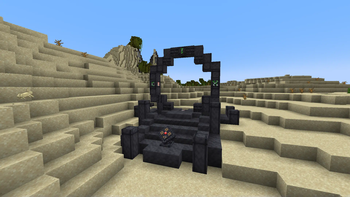
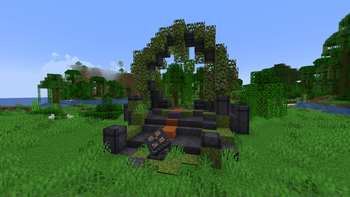
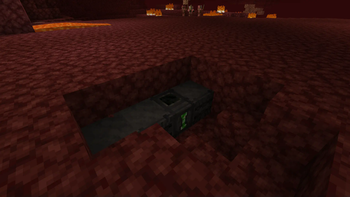
This mod, as of now, adds Stargate- inspired in function by the tech from the movie and show of the same name;
What these do is allow the player to link two points in space- intra or inter-dimensionally, and- as long as these two points are loaded- connect the two to allow for instant travel across them- but keep in mind that these are one way- and watch out for the kawoosh :]
A demonstration of manual Stargates:
https://www.youtube.com/watch?v=JenwKs38HjU
Create and Geckolib are required.
_
There are tags for which biomes can generate the default and nether style gates- I suggest looking at these for modpacks._
Available Versions
How to Install Warptech on Your Server
Order Server
Order a Minecraft Java server with at least 3 GB RAM (4 GB recommended).
Set forge Loader
In the panel under "Egg", select the forge loader and matching Minecraft version (1.20.1).
Install Mod
Open the mod browser in the dashboard and search for "Warptech". Click "Install" – done! Alternatively, upload the .jar via SFTP to the /mods folder.
Compatibility
Mod Loaders
Minecraft Versions
1.20.1
Server-side
✓ RequiredRecommended RAM
4 GB(min. 3 GB)Frequently Asked Questions
Warptech server crashes on startup – what to do?
Most common cause: wrong forge version or insufficient RAM. Check the server log (latest.log) for "OutOfMemoryError" or "Mixin" errors. With Mado Hosting: ensure at least 3 GB RAM is allocated and the loader matches the mod version (1.20.1). You can switch loaders with one click in the panel.
Is Warptech compatible with forge?
Warptech officially supports forge for Minecraft 1.20.1. The Mado dashboard automatically detects incompatible loader combinations.
Server lagging with Warptech – how to optimize performance?
Recommended RAM: 4 GB (per 8 players). Use /spark profiler to check if Warptech consumes the most tick time. Common fixes: reduce server view-distance to 8-10, install "performant" or "starlight" as supplementary mods on Forge. With Mado Hosting, your server runs on NVMe SSDs with dedicated CPU cores for minimal latency.
Similar Mods





Rent Modded Server
Install Warptech with just one click on your server.