
What Are They Listening To (WATLT)
Mod that lets you show/see what are you/players listening to!
Screenshots

About this Mod
What Are They Listening To (WATLT)
Have you ever wanted to play with your friends, and show them what are you listening to? It is possible with this mod!
You can see what other players listening to right now through Last.fm in Tab menu!

Or if someone doesn't have a Last.fm account (or they simply don't want to show their music), they can disable tracking.

As you already noticed, it even supports album covers, but not all songs on Last.fm have album covers... Though, you can add them yourself and contribute to Last.fm (I will not teach you how to do it sorry)
Usage
This mod uses Last.fm to fetch current song, so take your favorite music streaming app and pair it with any Last.fm scrobbler to start!
You will also need a Last.FM API key to communicate with API (which is obvious). Don't worry, you can get it easily here: https://www.last.fm/api/account/create (you don't need to fill callback URL btw, keep it empty)
So, now that you have an API key and server ready to start, simply start it with this mod, then fill API key in config file (.minecraft/config/watlt-common.toml) and restart server, you are now ready to use mod!
When player first join with this mod enabled, they will be prompted to enter their Last.fm username (NOT link), or deny tracking.
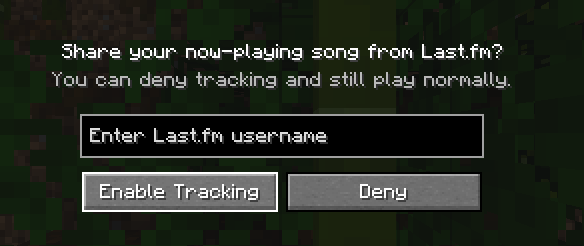
After that, they all set up and no more work needed! Easy, right?
Commands
There are several commands, but they are really simple
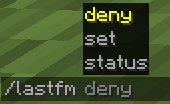
- /lastfm set
- change your Last.fm username, or set it up, if you denied tracking on login - /lastfm deny - deny tracking
- /lastfm status - debug, just debug
I guess that's all, have fun!
Spoiler
and yes name inspired by mod What Are They Up To (WATUT) https://modrinth.com/mod/what-are-they-up-to
Available Versions
How to Install What Are They Listening To (WATLT) on Your Server
Order Server
Order a Minecraft Java server with at least 3 GB RAM (4 GB recommended).
Set forge Loader
In the panel under "Egg", select the forge loader and matching Minecraft version (1.20.6).
Install Mod
Open the mod browser in the dashboard and search for "What Are They Listening To (WATLT)". Click "Install" – done! Alternatively, upload the .jar via SFTP to the /mods folder.
Compatibility
Mod Loaders
Minecraft Versions
1.20.6, 1.20.5, 1.20.4 (+3 more)
Server-side
~ OptionalRecommended RAM
4 GB(min. 3 GB)Frequently Asked Questions
What Are They Listening To (WATLT) server crashes on startup – what to do?
Most common cause: wrong forge version or insufficient RAM. Check the server log (latest.log) for "OutOfMemoryError" or "Mixin" errors. With Mado Hosting: ensure at least 3 GB RAM is allocated and the loader matches the mod version (1.20.6). You can switch loaders with one click in the panel.
Is What Are They Listening To (WATLT) compatible with forge?
What Are They Listening To (WATLT) officially supports forge for Minecraft 1.20.6, 1.20.5, 1.20.4. The Mado dashboard automatically detects incompatible loader combinations.
Server lagging with What Are They Listening To (WATLT) – how to optimize performance?
Recommended RAM: 4 GB (per 8 players). Use /spark profiler to check if What Are They Listening To (WATLT) consumes the most tick time. Common fixes: reduce server view-distance to 8-10, install "performant" or "starlight" as supplementary mods on Forge. With Mado Hosting, your server runs on NVMe SSDs with dedicated CPU cores for minimal latency.
Similar Mods






Rent Modded Server
Install What Are They Listening To (WATLT) with just one click on your server.